Ktor Transactional Email API (2026): A Service That Posts to /emails with HttpClient
Send transactional email from Ktor with Rovela’s HTTP API: a small HttpClient service, environment configuration for the Bearer key, Idempotency-Key, and documented errors. Not an OTP tutorial and not a Kotlin language tour.
Ktor already has an HTTP client; transactional email should use it
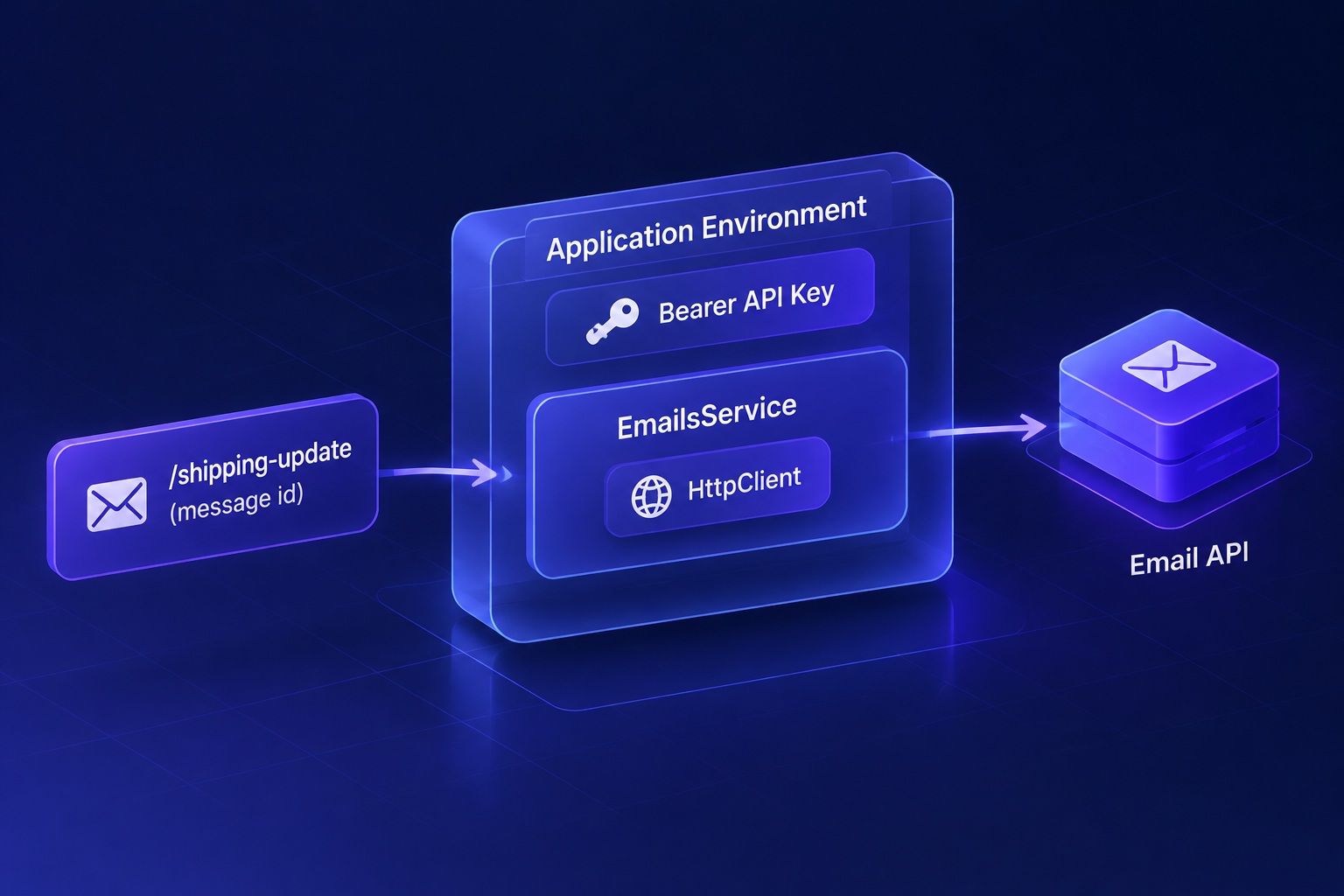
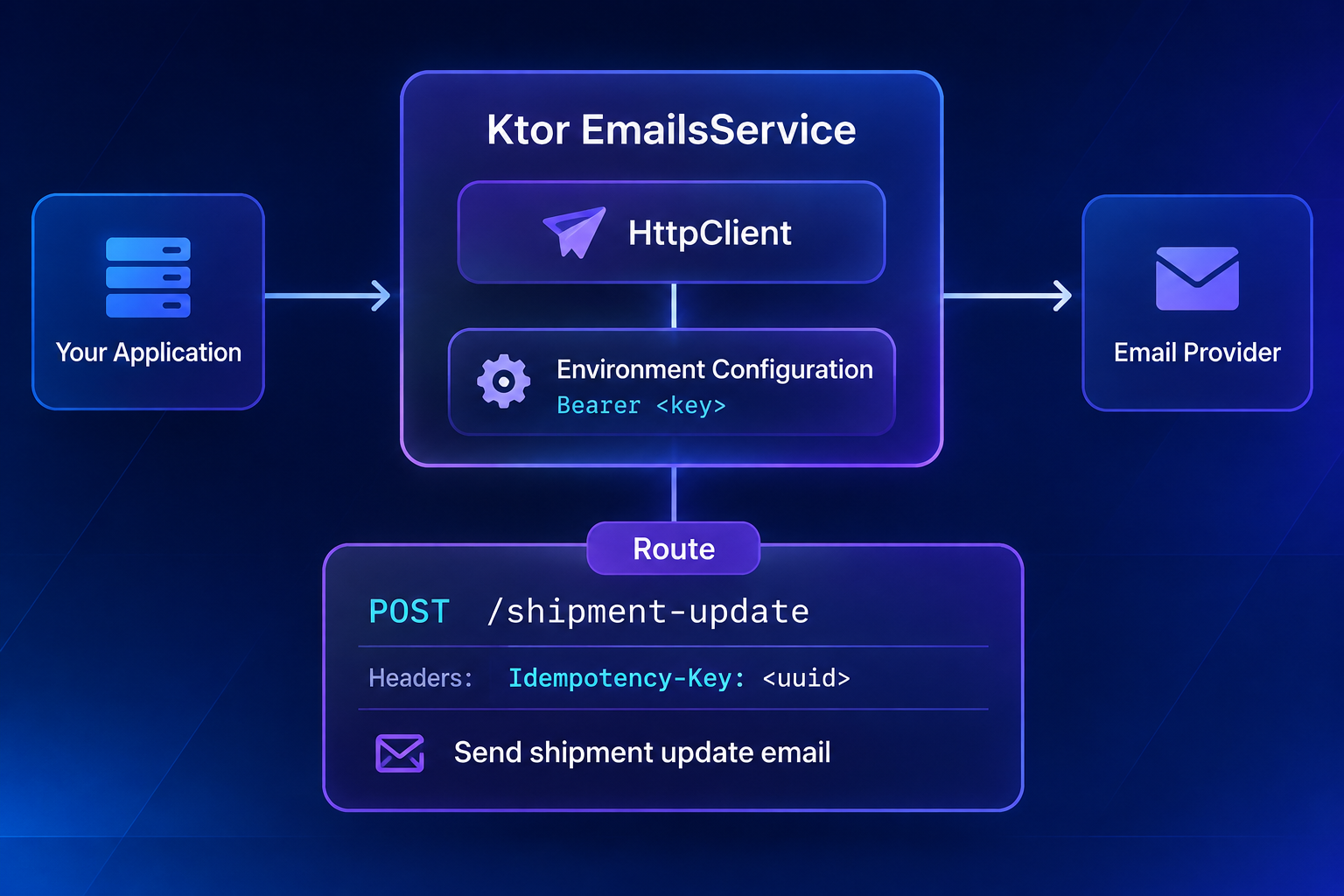
A Ktor service already calls other APIs with HttpClient, stores secrets in the application environment, and runs route handlers on the server. The natural way to send transactional email — a shipment update, an invoice that is ready, a “your export can be downloaded” note, a security alert — is the same pattern: one HTTPS POST with a Bearer key, not an SMTP session hidden behind JavaMail.
Rovela’s Email API is built for that. There is no official SDK and no Ktor plugin you have to pin to a vendor client. The base URL is https://api.rovela.dev. You authenticate with Authorization: Bearer re_… (Authentication) and queue a message with POST /emails. The response is a message id. HTTP 200 means the message was accepted and queued, not that it has already arrived (Quick Start).
This is not a redo of a Ktor OTP tutorial, and it is not a Kotlin language-tour rewrite. If you need one-time codes, start from the existing Ktor OTP guide. If you only wanted a first request in Kotlin syntax, the send email in Kotlin tour is already published. If you are on Spring Boot, use the Spring Boot transactional email API guide instead of forcing this service into a Spring container. This article is everyday Ktor app mail: a small HttpClient service, environment configuration for the key, an Idempotency-Key on anything a retry might repeat, and documented error handling around the {statusCode, name, message} envelope.
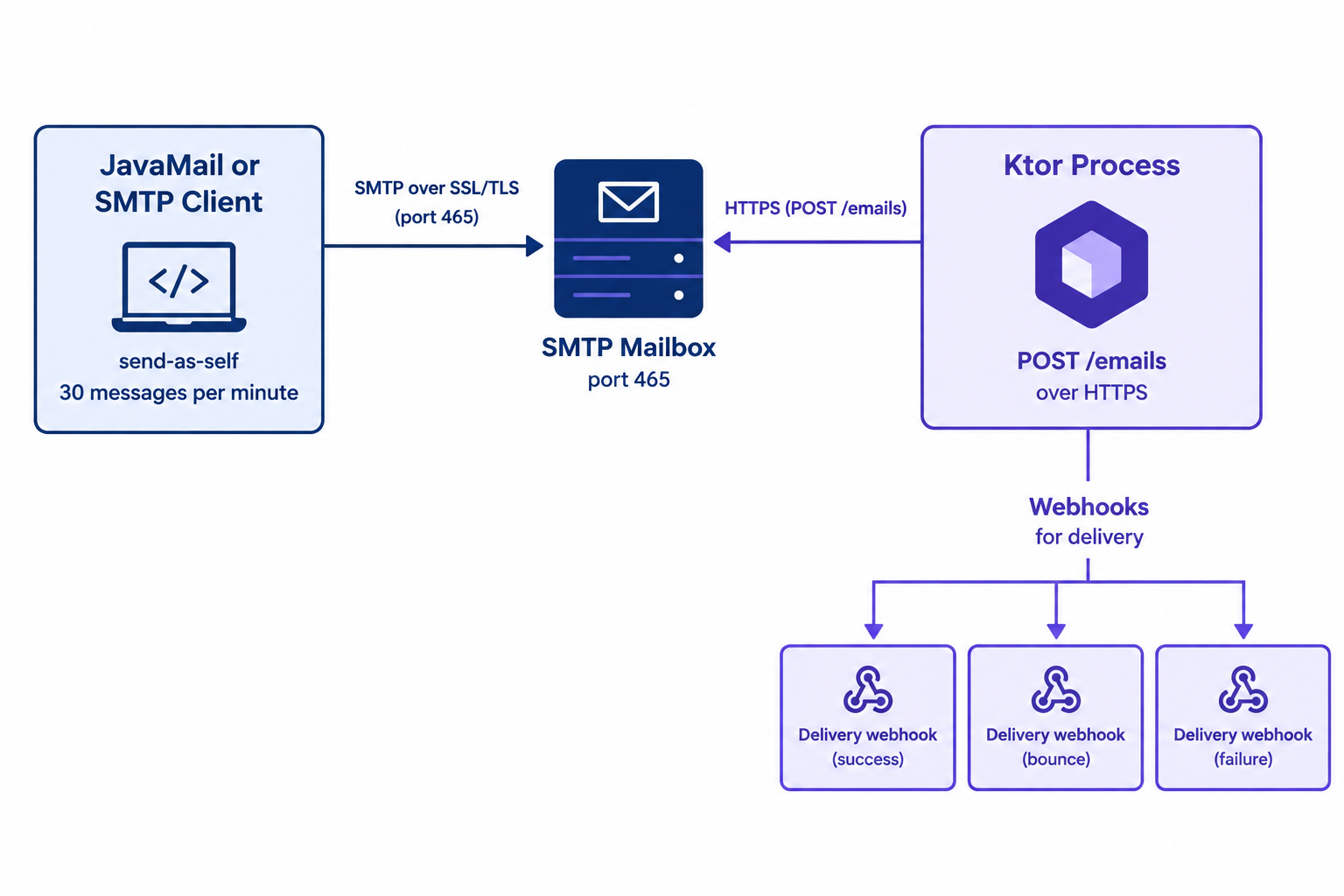
If you are still choosing between HTTP and SMTP, read Email API vs SMTP. Rovela’s SMTP is mailbox SMTP for mail apps (mx.rovela.dev:465, a device credential, send-as-self, 30 messages a minute from one client address). Programmatic volume from a Ktor process belongs on POST /emails.
What you need before the first Ktor send
The first-email guide and the Quick Start are the same five steps, whether your caller is curl or Ktor’s HttpClient:
- Create an account. You start on the free plan, which sends real mail. There is no separate sandbox or test key.
- Add and verify a sending domain (a subdomain such as
mail.example.comis a common choice). You cannot send from a domain you have not verified; an unverified or foreignfromis refused with a 400 that names the domain. See the domain setup guide and what domain email is. - Create an API key. A
sending_accesskey can send and nothing else — the right default for production. Afull_accesskey can also read messages and events, and manage domains, templates, and webhooks. The full key is shown once. - Send with
POST /emails. - Confirm delivery in the dashboard, with
GET /emails/:idorGET /emails/:id/events(those reads needfull_accessor a dashboard session), or with a webhook.
from is a string in the documented form "Acme <hello@yourdomain.com>". The address must sit on a verified sending domain. That is the same rule that makes domain email trustworthy: you prove you control the domain before you speak as it. How the display name and the address work is covered in the From name guide.
At least one of html, text, or template is required. Send both html and text where you can — many clients preview the text part (HTML email API).
An HttpClient service in your application
Keep the key on the server. Never put a Rovela key in a mobile app, a browser bundle, or a public repository. A leaked sending_access key can send mail as your domain. The Ktor application environment (System.getenv, or a HOCON value that is not committed) is the right place.
This service uses the HttpClient you already have for other outbound calls. The JSON body and headers are the same ones the Emails API documents.
// EmailsService.kt
class ApiError(
    val statusCode: Int,
    val errorName: String,
    override val message: String
) : RuntimeException(message.ifEmpty { "Rovela: HTTP $statusCode" })

class EmailsService(
    private val client: HttpClient,
    private val apiKey: String,
    private val from: String,
    private val baseUrl: String = "https://api.rovela.dev"
) {
    data class SendInput(
        val to: String,
        val subject: String,
        val html: String? = null,
        val text: String? = null,
        val replyTo: String? = null,
        val tags: Any? = null,
        val idempotencyKey: String? = null
    )

    data class SendResult(val `object`: String, val id: String)

    suspend fun send(input: SendInput): SendResult {
        val response = client.post("$baseUrl/emails") {
            header(HttpHeaders.Authorization, "Bearer $apiKey")
            input.idempotencyKey?.let { header("Idempotency-Key", it) }
            contentType(ContentType.Application.Json)
            setBody(
                buildJsonObject {
                    put("from", from)
                    put("to", input.to)
                    put("subject", input.subject)
                    input.html?.let { put("html", it) }
                    input.text?.let { put("text", it) }
                    input.replyTo?.let { put("reply_to", it) }
                    // tags: pass through as an object or array, as documented
                }
            )
            timeout { requestTimeoutMillis = 15_000 }
        }

        if (!response.status.isSuccess()) {
            val payload = response.body<JsonObject>()
            throw ApiError(
                statusCode = payload["statusCode"]?.jsonPrimitive?.int ?: response.status.value,
                errorName = payload["name"]?.jsonPrimitive?.contentOrNull ?: "ApiError",
                message = payload["message"]?.jsonPrimitive?.contentOrNull ?: ""
            )
        }
        return response.body()
    }
}
Read ROVELA_API_KEY and ROVELA_FROM at application start and construct the service once. The from value is the full documented string, including the display name if you use one. If your project already encodes tags as a JsonObject or a list, include that field on the body; Email API tags come back with the message.
Send an Idempotency-Key header (up to 256 characters) on anything a retried route, a queue consumer, or a webhook-driven job might repeat. A retry of the same request within 24 hours returns the original response instead of sending again (Idempotency-Key). For a shipment that changed status once, a key such as shipment-updated:{shipmentId}:{status} is enough.
Optional fields you will actually use: reply-to is where replies should go; cc and bcc count as recipients for billing and for the 50-recipient cap. How to exercise the service without a sandbox is in how to test a transactional email API.
A route that sends after a shipment changes
The shipment example stays on the server. The route updates the shipment, then asks EmailsService to notify the customer. The coroutine does not block waiting for the inbox.
fun Route.shipmentRoutes(emails: EmailsService, shipments: ShipmentRepository) {
    post("/shipments/{id}/status") {
        val id = call.parameters["id"] ?: return@post call.respond(HttpStatusCode.BadRequest)
        val status = call.receive<StatusBody>().status
        val shipment = shipments.updateStatus(id, status)

        val result = emails.send(
            EmailsService.SendInput(
                to = shipment.customerEmail,
                subject = "Your shipment is $status",
                html = "<p>Shipment ${shipment.trackingNumber} is now $status.</p>",
                text = "Shipment ${shipment.trackingNumber} is now $status.",
                tags = mapOf("purpose" to "shipment-updated", "shipment_id" to id),
                idempotencyKey = "shipment-updated:$id:$status"
            )
        )
        call.respond(mapOf("ok" to true, "emailId" to result.id))
    }
}
If the route can be retried, the same idempotency key keeps the customer from receiving two updates that disagree. Prefer moving the send into a background consumer if the request also has other work to finish; the service method does not change.
If you later need many personalized messages in one go, use batch (POST /emails/batch, up to 100 messages, each processed independently). template and topic_id are rejected on batch rather than ignored; send those through POST /emails.
Errors you should handle in the service
Every documented error uses the same envelope, so one ApiError covers them (Quick Start, Email API error handling):
{ "statusCode": 400, "name": "Bad Request", "message": "html or text body is required" }
The message says what was wrong. Surface it in your own logs as-is.
400— a missing required field, a base64 attachment that does not decode, afromdomain that does not belong to your organization, atemplatethat does not exist, or more than 50 recipients on one message.401— missing or invalid credential, or asending_accesskey used to read, reschedule, or cancel a message.429— rate limit exceeded. CheckRetry-Afterwhen it is present. A monthly quota error is also returned as 429; retrying will not create capacity.
HTTP 200 on send is not delivery. If you need to look a message up later, GET /emails/:id and GET /emails/:id/events require a full_access key or a dashboard session — do not put that key in the same service every route uses to send. Managing sending domains is a different API and a different key scope (Domains API, Email API authentication, sending domains API).
Delivery is asynchronous — do not poll from the route
The route should record the message id and return. Confirm delivery in the dashboard, with the Email delivery status API, or with a webhook. For production, prefer a webhook over polling GET /emails/:id from the request path.
A webhook endpoint in Ktor is a route that reads the raw body, verifies x-resend-signature, and returns 2xx quickly. Verification is byte-exact HMAC-SHA256 over "<timestamp>.<raw body>" (webhook security). A 400 you return because a payload surprised you is a permanent loss; store anything you do not yet understand rather than rejecting it. Deduplicate on the event id.
When you need a message to go out later, use scheduled_at (scheduled email). When you need many sends in one request, use batch transactional email. Reusable layouts belong in the Templates API and the templates guide.
What not to do in a Ktor codebase
Do not point JavaMail, a raw SMTP client, or a Spring JavaMailSender you happened to put on the classpath at Rovela mailbox SMTP and call that your application mailer. Mailbox SMTP is for mail apps: a mailbox can send only as itself, and a single client address is limited to 30 messages a minute. That is the wrong default for app volume, which is the point of Email API vs SMTP relay as well.
Do not put a Rovela key in an Android or iOS app that talks to this Ktor service, or in a committed application.conf. Call the API from the server. Authentication is explicit: a leaked sending_access key can send mail as your domain.
Do not treat this guide as a replacement for the OTP article, or as a Spring Boot port. Code generation and hashed storage are already covered in the Ktor OTP post. Bean wiring and RestClient belong in the Spring Boot transactional guide.
Hosted mailboxes are a different product surface. People can read and send from them in a mail app. Your Ktor process should not share a device credential with someone else’s Outlook profile.
If you send on behalf of several customers from one organization, restrict a key to a single domain so a leak cannot send as somebody else (Email API for multi-tenant SaaS). Retries of a failed HTTP call should reuse the same idempotency key (Email API retries).
Construct EmailsService when the application starts and put it in the same place you put other outbound clients, so each request does not open a new HttpClient. The engine — CIO, OkHttp, or Apache — does not change the JSON body or the headers. What you must configure is a request timeout and a verified TLS stack; the Emails API is ordinary HTTPS. If the shipment update already belongs on a queue consumer, call the same send method from the consumer rather than from the route. Tests can supply a mock client and assert the idempotency key. There is still no sandbox and no test key that behaves differently from a live one, so tests that must not send real mail should not call the live API at all.
A compact Ktor checklist
- Verify the sending domain before you set
from. An unverified domain is a 400, not a silent drop. - Keep
ROVELA_API_KEYin the application environment and inject it only into server-side services. - Prefer a
sending_accesskey in production routes; keepfull_accessfor tooling that reads events or manages webhooks. - Send both
htmlandtextwhen you can, and set anIdempotency-Keyon any path a retry can hit twice. - Record the message
idand return from the route. Watch delivery with a webhook, not a loop on the request path. - If you need a first request in curl, use the transactional email API overview, the curl sending guide, or the HTTP email API explainer — then come back to this service for the Ktor shape.