Email API Tags (2026): Label Transactional Messages and Read Them Back
Rovela’s Emails API documents tags as an optional object or array of arbitrary labels, returned with the message. How to set them on POST /emails, how they differ from Idempotency-Key and topic_id, and how to use them when you GET a message.
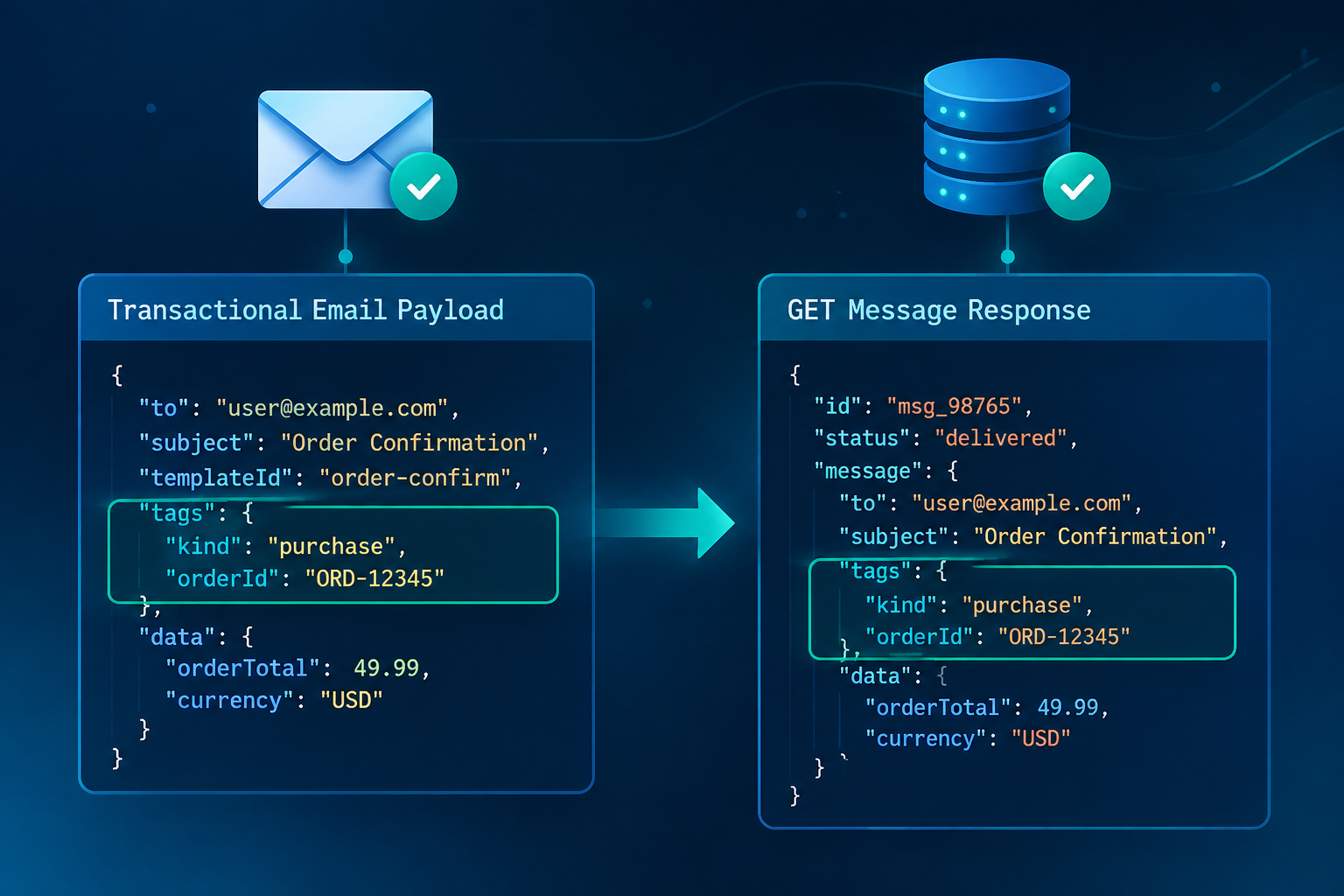
Tags are labels on a message, not a second send API
When you queue transactional email, you often need a way to recognize that message later: which order it belonged to, which template family it was, which tenant sent it. Rovela’s Emails API documents an optional tags field for exactly that. The type is object | array. The note is short and specific: “Arbitrary labels, returned with the message.”
That is the whole feature this guide covers. Tags do not replace an Idempotency-Key, they do not change billing, and they are not the same field as topic_id. They go out with POST /emails (or on an entry that uses the same schema in a batch), and you can read them back with the message.
Rovela’s Email API is still one HTTPS call. There is no official SDK. Authenticate with Authorization: Bearer re_… (Authentication). HTTP 200 means the message was accepted and queued, not that it has already arrived (Quick Start). If you are new to sending, start with the first-email guide and a verified sending domain — the same proof of control that makes domain email trustworthy.
What the documentation actually allows
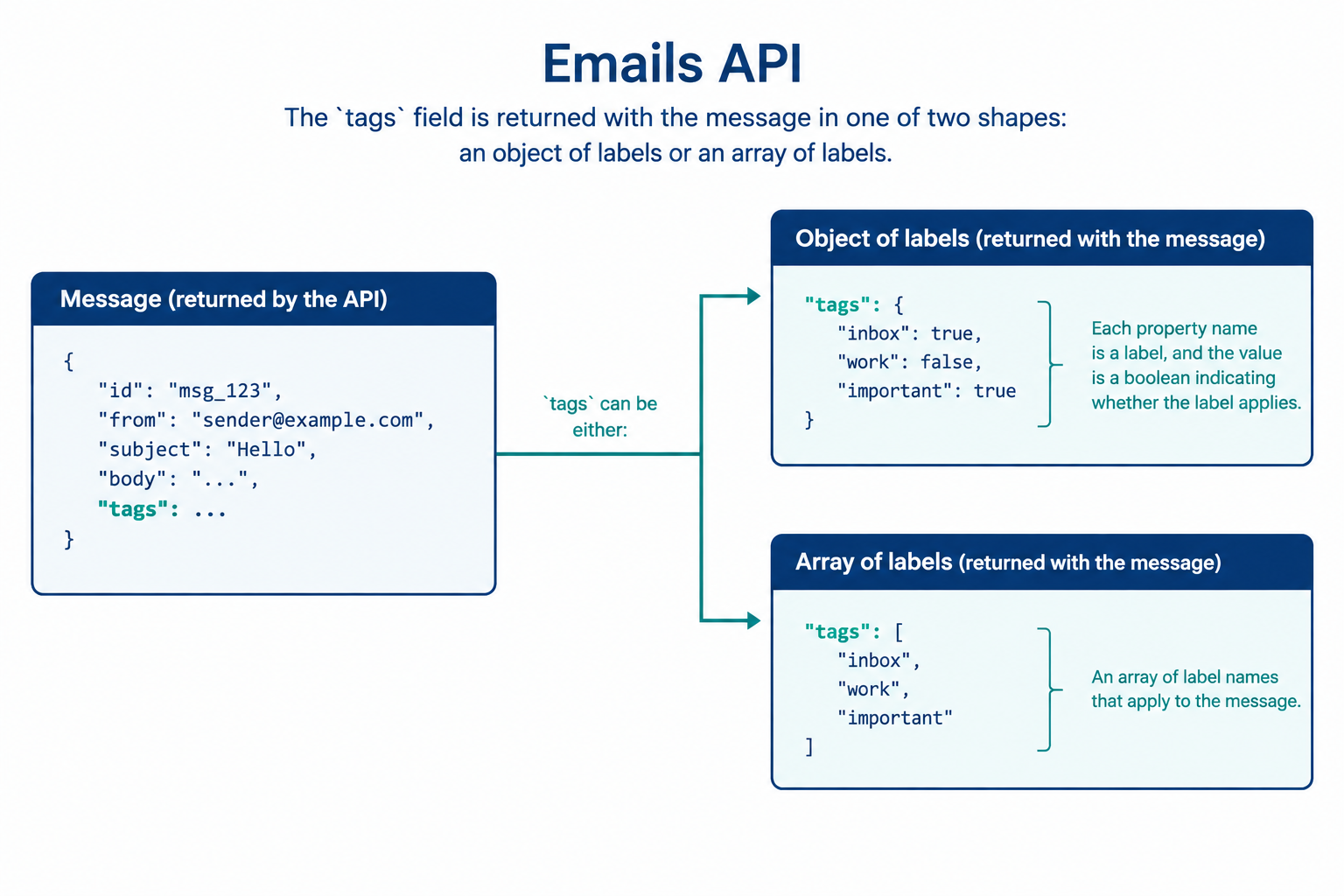
The request body on POST /emails lists tags as optional, typed as an object or an array, with the note “Arbitrary labels, returned with the message.” The Chinese API reference says the same: 任意标签,读取邮件时会原样返回. Two documented shapes are therefore valid; pick one and be consistent in your application.
An object is useful when you want named labels. This is the shape already used in the HTML email API receipt example:
curl -X POST https://api.rovela.dev/emails \
  -H "Authorization: Bearer $ROVELA_API_KEY" \
  -H "Content-Type: application/json" \
  -H "Idempotency-Key: receipt-order-1042" \
  -d '{
    "from": "Acme <receipts@mail.acme.com>",
    "to": "alice@example.com",
    "subject": "Your Acme receipt for order 1042",
    "html": "<p>Thanks for your order.</p><p>Order <b>1042</b> — total <b>$42.00</b>.</p>",
    "text": "Thanks for your order. Order 1042 — total $42.00.",
    "tags": { "kind": "receipt", "orderId": "1042" }
  }'
An array is the other documented type, useful when you only need a list of labels:
curl -X POST https://api.rovela.dev/emails \
  -H "Authorization: Bearer $ROVELA_API_KEY" \
  -H "Content-Type: application/json" \
  -H "Idempotency-Key: export-88-ready" \
  -d '{
    "from": "Acme <hello@mail.acme.com>",
    "to": "alice@example.com",
    "subject": "Your export is ready",
    "html": "<p>Your export is ready to download.</p>",
    "text": "Your export is ready to download.",
    "tags": ["export", "ready"]
  }'
from must be on a verified domain, in the documented "Acme <hello@yourdomain.com>" form (Email API From name). Send both html and text where you can. At least one of html, text, or template is required. Success looks like {"object": "email", "id": "9f1c2e40-..."}. Store that id in your own database next to the order, invoice, or export. The tags travel with the message; the id is how you look the message up.
POST /emails/batch accepts up to 100 messages, each an object with the same schema as a single send. Tags therefore belong on an individual entry when you are sending a batch of transactional messages. Two fields are rejected on the batch endpoint rather than ignored: template and topic_id. Tags are not in that refusal list. For marketing mail to a list, the batch example still points you at broadcasts rather than at inventing a tag-based mailing list (Batch transactional email API).
This guide does not invent a tags search API, a dashboard filter that is not documented here, or a requirement on particular key names. The documented description is “arbitrary labels.” Use names that are meaningful to your application.
Returned with the message — how to actually use that
“Returned with the message” is the reason to set tags at all. After a send, you can read the message with GET /emails/:id. That call needs a full_access key or a dashboard session; a sending_access key can only send, and using it to read is a 401 (Authentication, Email delivery status API).
A practical pattern:
- Your application already knows the
kindand theorderId(or the export id, or the tenant id) at send time. Put those values intagsand also store the returned emailidon your own row. - When you are debugging a single message,
GET /emails/:id(andGET /emails/:id/eventsfor the timeline) gives you the current state plus the labels you attached. - For anything systematic — bounces, complaints, deliveries at production volume — subscribe to a webhook and verify the HMAC-SHA256 signature (webhook security).
The documented delivery webhook example includes email_id, from, and to in data. It does not show tags. The events page also says to treat the exact field set of data as additive: new fields can appear, and a handler that rejects unexpected fields will lose the event. Parse what you need and ignore the rest. Until a documented payload lists tags, correlate with the email_id you stored, and read tags back from the message when you need the labels. Do not write a webhook handler that assumes tags are always present in data.
Do not invent a /logs endpoint. Delivery history lives in the dashboard and, with a full_access key, on the GET endpoints above.
Tags are not Idempotency-Key, and they are not topic_id
These three mechanisms sit close together in a send request and solve different problems. Mixing them up is how people either double-send or expect filtering the API does not document.
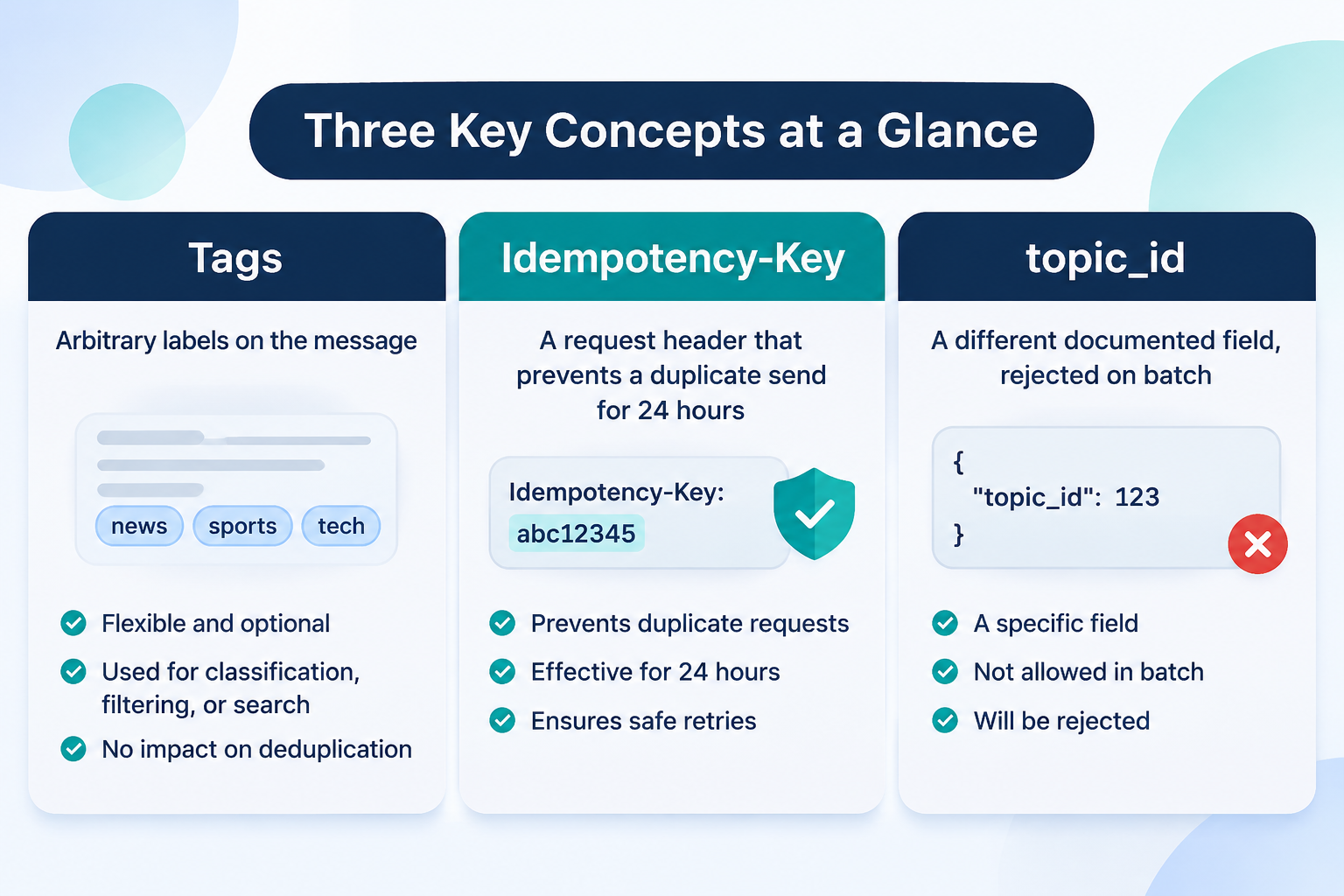
An Idempotency-Key is a request header, up to 256 characters. A retry of the same request within 24 hours returns the original response instead of sending again. That is what you want for a queue, a payment webhook, or a user double-click. Tags are body fields on the message. They do not make a retry safe. If your worker times out and posts again, you still need the header, even if the tags object is identical.
topic_id is a different optional string on POST /emails. The documentation describes it as “Only send to contacts subscribed to this topic,” and it says POST /emails/batch rejects topic_id (and template) rather than ignoring them, because a batch that silently dropped topic_id would mail people who had unsubscribed from that topic. The batch example also notes that broadcasts handle unsubscribe links, topics, and per-contact suppression, and that batch is for transactional mail that happens to go out in bulk. This article will not invent a contacts or topics API — those pages are not part of the public docs set used here — and it will not treat tags as a substitute for topic_id. If you are sending a newsletter to a list, start from the marketing emails product page and the batch guidance, not from message labels.
A few other nearby fields are equally easy to confuse with labels and are documented elsewhere:
fromis the verified address (and optional display name), not a tag (Email API From name).reply_toroutes replies and is not a label (Email API Reply-To).ccandbccare recipients. They count toward the 50-recipient transport cap and toward monthly quota, because quota is charged per recipient, not per message (Email API CC and BCC). Tags do not add recipients and do not appear in that cap.
Errors, retries, and what tags will not do
Every error uses the same shape (Quick Start, Email API error handling):
{
  "statusCode": 400,
  "name": "Bad Request",
  "message": "html or text body is required"
}
Documented cases you will actually hit:
- 400 — a missing required field, an unverified or foreign
fromdomain, a template that does not exist, a base64 attachment that does not decode, or more than 50 recipients acrossto,cc, andbcc. - 401 — missing or invalid key, or a
sending_accesskey used to read, reschedule, or cancel a message. - 429 — rate limit or monthly allowance exceeded. Official examples mention
Retry-After. Each entry in a batch counts individually (Pricing).
Surface the message field in your logs as-is. If a send fails and you retry, reuse the same Idempotency-Key and the same tags. Changing the labels on a retry does not create a new safe-send contract; the header does.
What this field will not do, because the Emails API does not document it:
- It will not prevent a duplicate send. Use
Idempotency-Key. - It will not subscribe or unsubscribe a contact, and it will not replace
topic_idor a broadcast. - It will not be treated here as a webhook filter or a searchable index. Read the message if you need the labels; key off
email_idin webhooks. - It will not let you send from an unverified domain, skip HTML-or-text-or-template, or bypass mailbox vs API choices. Programmatic volume still belongs on
POST /emails, not on mailbox SMTP (mx.rovela.dev:465, send-as-self, 30 messages a minute). See Email API vs SMTP if you are choosing a transport.
Free-plan keys send real mail. There is no sandbox. During development, use a verified staging subdomain and recipients you control (how to test a transactional email API).
If you schedule with scheduled_at, reading, rescheduling, and cancelling need full_access or a dashboard session. Tags can still ride on a scheduled send because they are part of the ordinary message body; the scheduled email guide covers the timing and cancel path. Stored templates are mutually exclusive with html and text; if you send { id, variables }, you can still include tags as a sibling field on the same request, following the same schema table.
A compact tags checklist
- Decide on one documented shape — object or array — and use it consistently in your app.
- Put labels that you already know at send time (
kind, an order id, a tenant id) intotags. - Store the returned message
idon your own record. That is how youGETthe message later and how you match a webhookemail_id. - Always set an
Idempotency-Keywhen a queue or retry might fire twice. Tags do not do that job. - Do not use
tagsas a stand-in fortopic_idor for broadcasts. - Read tags back with the message using a
full_accesskey. Do not assume they appear on a webhookdataobject unless you have seen them there. - Keep
fromon a verified domain, sendhtmlandtexttogether, and leave mailbox SMTP to mail apps.
Used this way, tags are a small, documented hook: arbitrary labels you attach once and retrieve with the message. Combined with the id you store yourself, they make a transactional email API easier to debug without inventing a second set of endpoints.