Email API Reply-To (2026): Route Replies Without Changing Your Verified From
Use Rovela’s documented reply_to field to send from a verified from address and direct human replies to support or a ticket mailbox — and how that differs from inbound webhooks and mailbox SMTP.
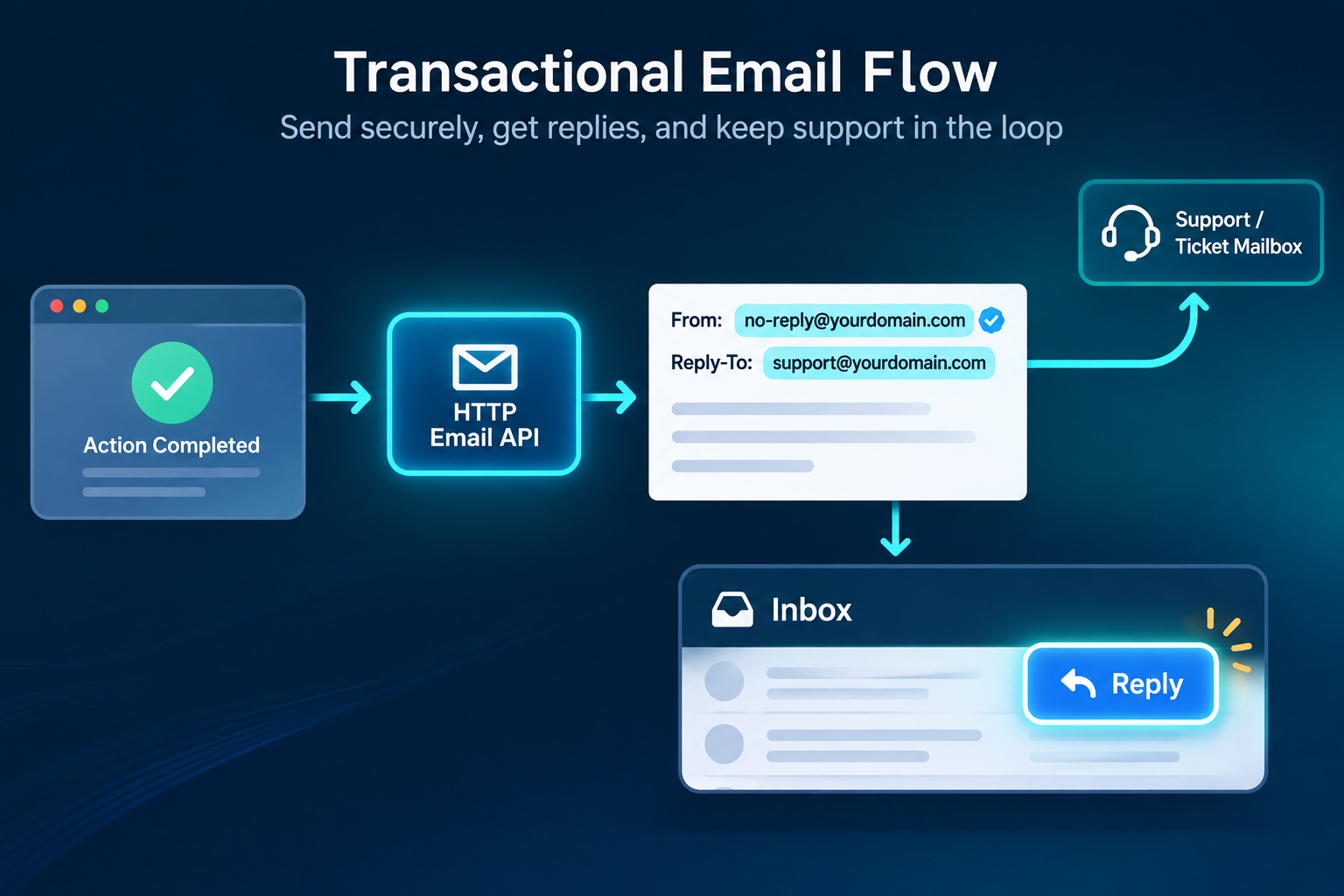
What reply_to is for on a transactional email API
A transactional message almost always needs two different addresses, and they are not interchangeable. The from address is who the message is allowed to appear to come from — on Rovela, it must be on a verified sending domain. The reply_to address is where a human reply should go when someone hits Reply in their mail client.
This is one of the most common product-search questions around an Email API: how do I send from no-reply@mail.example.com (or hello@mail.example.com) and still let a customer reach support, a ticket queue, or a founder inbox? The documented answer is the optional reply_to field on POST /emails. It accepts a string or an array of strings, and it means exactly what the field table says: where replies should go.
This is not an inbound-parsing tutorial. If you need to receive those replies as webhooks, that is a separate, documented feature — start with the inbound email API and inbound plus outbound. This guide is about setting the header correctly when you send, why from and reply_to should often differ, and how that interacts with domain email and mailboxes.
If you are still deciding between HTTP and a mail-app server, read Email API vs SMTP and the Quick Start.
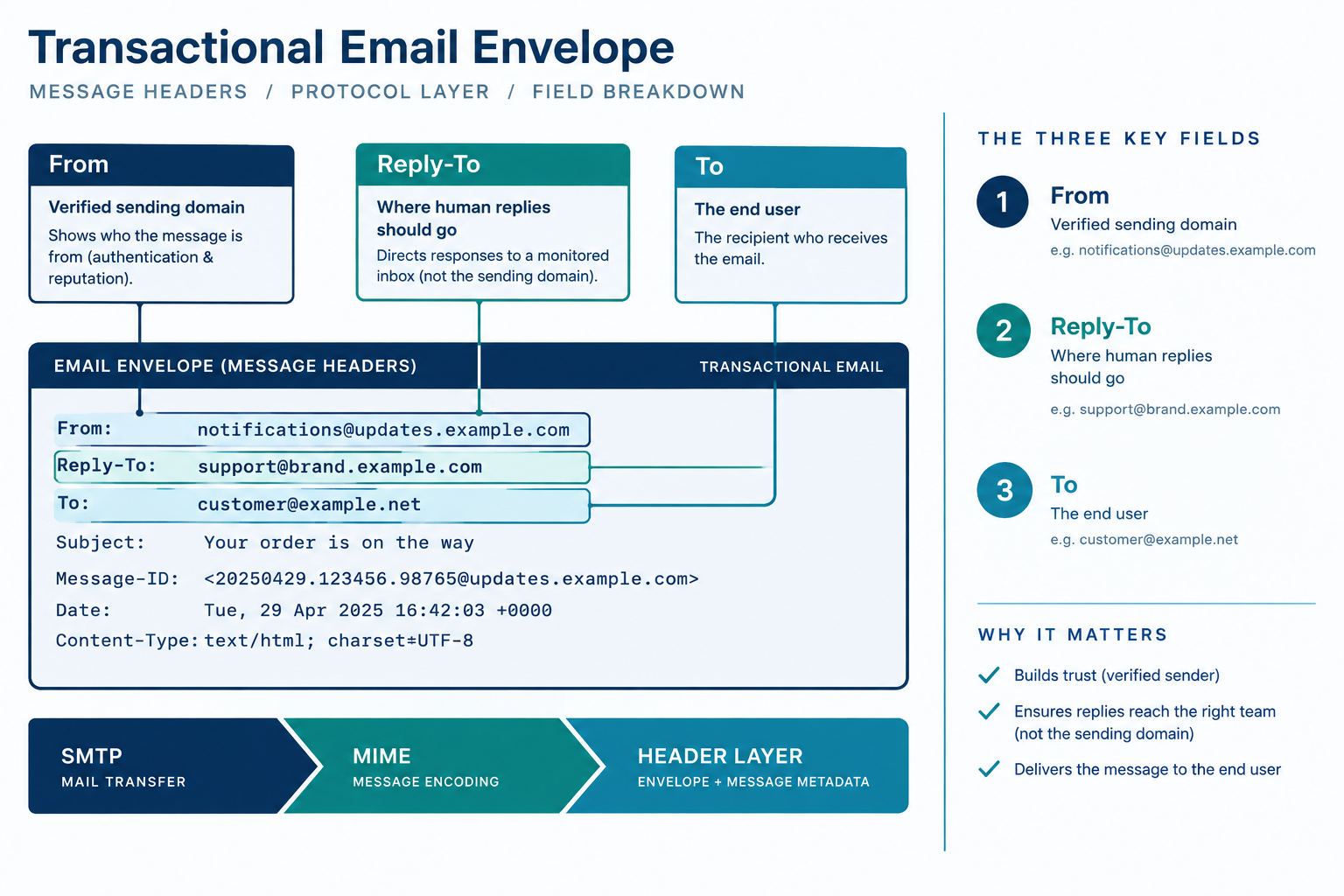
From is an authorization question; Reply-To is a product question
Send Email requires from as a string such as "Acme <hello@example.com>", and the domain part must belong to a domain you have verified. An unverified or foreign domain is refused with a 400 that names the domain (Quick Start, Send your first email). That rule exists so you cannot impersonate a domain you do not control. It is email authentication in the SPF/DKIM/DMARC sense, which is why a sending subdomain such as mail.example.com is a common setup in the first-email guide.
reply_to is optional and is not a substitute for that verification. You still send as a verified from. You then tell the receiving mail client, “if a person replies, route the reply here instead.” That address can be:
- A support mailbox on the same domain, such as
support@example.comorhelp@example.com. - A ticket address you already use, such as
tickets@example.com. - A personal or founder address, for an early-stage product that really does want replies in one inbox.
Rovela does not require reply_to to be the same as from. That is the point of the field. What you should not do is invent a behavior the docs do not state: setting reply_to does not, by itself, turn on inbound webhooks, create a mailbox, or change DKIM signing. Signing still follows the verified sending domain on from.
A practical pattern for app mail is:
from:Acme <no-reply@mail.example.com>orAcme <hello@mail.example.com>on the verified sending domain.reply_to:Acme Support <support@example.com>— the inbox a human will actually read.to: the user who triggered the message.
Receipts, password-reset confirmations, and some security alerts may reasonably use no Reply-To and a clearly named no-reply From, because a reply would not be handled. Order issues, onboarding “any questions?” notes, and support follow-ups should almost always set reply_to. The scheduled example even uses body copy that says “Just reply to this email,” which only works if Reply actually reaches someone.
A complete send with reply_to
There is no official SDK (Installation). A curl request is enough:
curl -X POST https://api.rovela.dev/emails \
  -H "Authorization: Bearer $ROVELA_SENDING_KEY" \
  -H "Content-Type: application/json" \
  -H "Idempotency-Key: order-10043-shipped" \
  -d '{
    "from": "Acme <no-reply@mail.acme.com>",
    "to": "alice@example.com",
    "reply_to": "Acme Support <support@acme.com>",
    "subject": "Your Acme order has shipped",
    "html": "<p>Hi Alice, order 10043 is on its way.</p><p>Questions? Just reply to this email.</p>",
    "text": "Hi Alice, order 10043 is on its way. Questions? Just reply to this email."
  }'
The same body with fetch on a server:
await fetch("https://api.rovela.dev/emails", {
  method: "POST",
  headers: {
    Authorization: "Bearer " + process.env.ROVELA_SENDING_KEY,
    "Content-Type": "application/json",
    "Idempotency-Key": "order-10043-shipped",
  },
  body: JSON.stringify({
    from: "Acme <no-reply@mail.acme.com>",
    to: "alice@example.com",
    reply_to: "Acme Support <support@acme.com>",
    subject: "Your Acme order has shipped",
    html: "<p>Hi Alice, order 10043 is on its way.</p><p>Questions? Just reply to this email.</p>",
    text: "Hi Alice, order 10043 is on its way. Questions? Just reply to this email.",
  }),
});
reply_to may also be an array if you want replies to reach more than one address. Do not confuse that with cc. cc delivers a copy of the outbound message to those addresses and counts toward the 50-recipient cap and toward quota (Email API CC and BCC). reply_to does not add a recipient on the way out; it only changes where a later reply is addressed. If you need a teammate to see the original send, use cc. If you need a teammate to see the customer’s reply, put them on reply_to or on the mailbox that receives it.
Always send both html and text when you can — many clients preview the text part (HTML email API). Put an Idempotency-Key on anything a queue or webhook might retry (Idempotency keys).
Where the reply actually lands
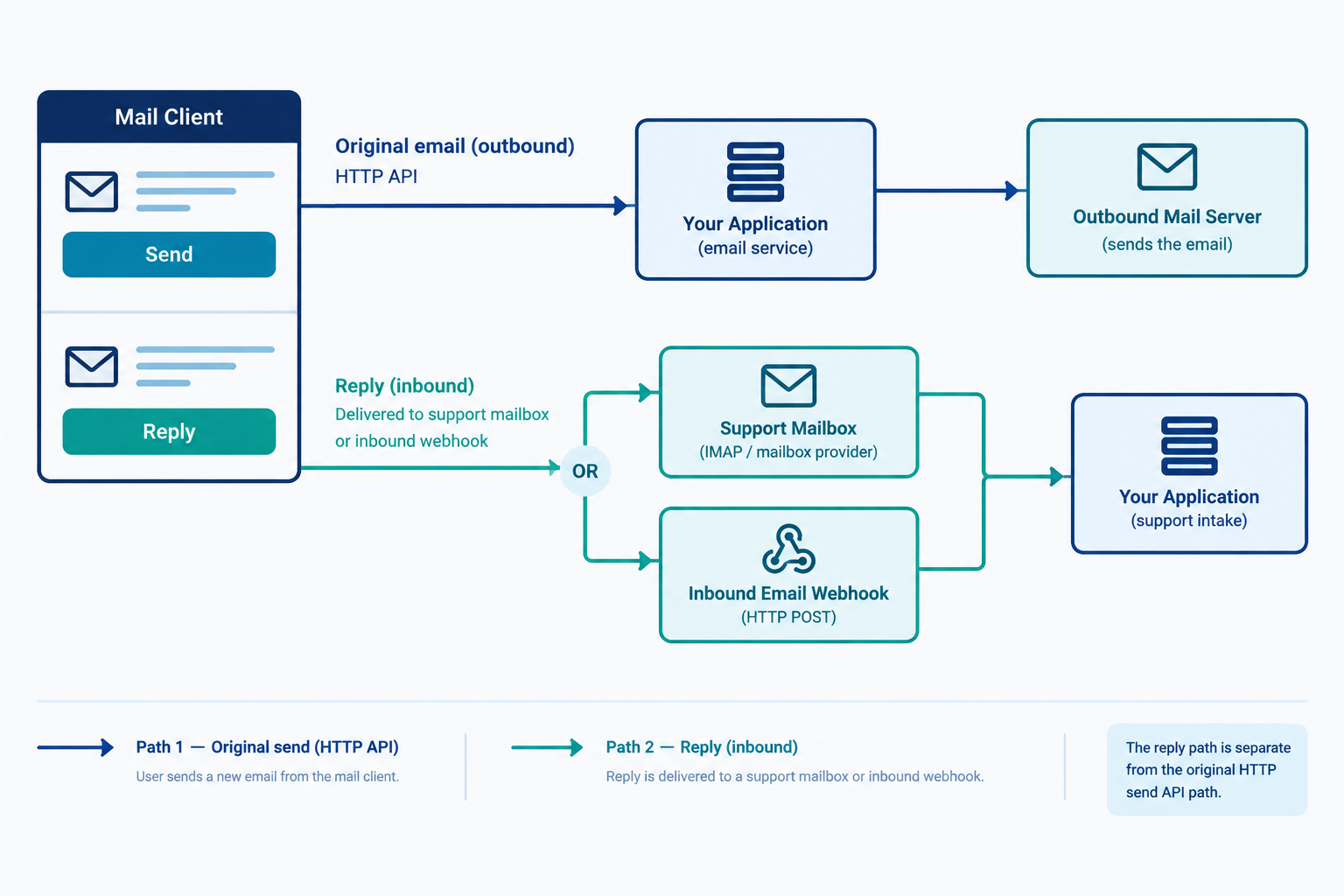
Setting reply_to only writes the address into the message. Delivery of the reply depends on what that address is.
If support@acme.com is a Rovela business mailbox on your domain, the reply can be read in webmail at rovela.email, or in Outlook, Apple Mail, or another client over IMAP. Every plan includes mailboxes; SMTP and IMAP use mx.rovela.dev and a per-device credential. That mailbox SMTP path is for mail apps, and a mailbox can send only as itself. It is not how your application should send volume — that remains POST /emails. See SMTP and Email API vs SMTP relay.
If you have turned on inbound for a verified domain, you can also subscribe to email.received and process replies in your app, including ticket creation. That is documented in inbound examples and the inbound posts linked above. You still set reply_to to an address on that domain; inbound does not replace the field.
If reply_to points at a Google Workspace, Microsoft 365, or other inbox you already run, the reply simply arrives there. Rovela does not need to host that inbox. Just make sure the address exists, is monitored, and is one you are willing to publish to customers.
Design choices that keep replies useful
Use a sending subdomain for from when you want transactional reputation isolated from the root domain, as Send your first email recommends (mail.example.com is the usual example). Keep reply_to on a stable, memorable address people will trust, often on the root domain. That split is normal: no-reply@mail.example.com in From, support@example.com in Reply-To.
Do not set reply_to to an unmonitored black hole if the body asks the reader to “just reply.” Either handle replies, or say in the body that the mailbox is not monitored and give a URL for support. The header and the copy have to agree.
For account-security mail — password resets, new-device alerts, one-time codes — many teams deliberately omit reply_to or point it at a security inbox, and they never ask the user to reply with a code. Codes belong in a fresh message you generate on the server, not in a free-form reply. See the official verification code and password reset examples; this article will not redo those flows.
If several products or brands share one Rovela organization, restrict API keys to a single domain so a leaked key cannot send as another brand (Authentication, Email API for multi-tenant SaaS). reply_to should stay inside the same brand the user just received mail from. A message from Brand A that replies to Brand B’s inbox is how phishing reports start, even when the send itself is legitimate.
headers is a documented optional object for custom headers, and tags can travel with the message for your own labeling (Send Email API). If a documented header already exists as a first-class field — reply_to, cc, bcc, from — use the field. Do not invent a requirement to also set Reply-To inside headers; the first-class field is what this guide uses.
Errors and status to expect
A bad or unverified from is a 400, not a “it sent but replies fail later” problem. A missing html/text/template is also a 400. A 200 still means accepted and queued, not delivered; confirm with the dashboard, GET /emails/:id (a full_access key), or a webhook (Email delivery status API, Email API error handling). sending_access can send; it cannot read or cancel.
Replies themselves are ordinary inbound mail to the reply_to address. If they do not arrive, debug that address as mail receiving — DNS, mailbox existence, inbound routing — not as a failed send. Email DNS configuration and the domain setup guide are the right references when MX for the reply address is wrong.
A compact production checklist
- Verify the sending domain (or a sending subdomain) before any production
from. - Set
reply_towhenever the product wants a human conversation; omit it only when you truly will not handle a reply. - Make the body and the header agree: “just reply” requires a live mailbox or inbound handler.
- Do not use
ccwhen you meantreply_to, and do not use mailbox SMTP when you meant the HTTP API. - Store the message
id, send anIdempotency-Key, and watch delivery on webhooks or the events API. - Point
reply_toat an address you own and monitor, on a domain the customer can recognize.
Rovela’s transactional email product is built for exactly this kind of app mail: one authenticated send from your domain, with a clear place for the conversation to continue. Once reply_to is set deliberately, the rest of the stack — mailboxes, inbound webhooks, or an inbox you already run — can receive the human side without changing how the application sends.
How this differs from sending through mailbox SMTP
It is tempting to “solve” Reply-To by sending the transactional message itself from support@acme.com over SMTP. That works for a person in a mail app: the mailbox sends only as itself, so From and the mailbox identity stay aligned. It is the wrong default for an application. Mailbox SMTP is limited to 30 messages a minute from one client address, 50 recipients per message, and it does not give you the HTTP API’s open and click tracking, logs, or webhooks. Programmatic volume belongs on POST /emails, with from on a verified sending domain and reply_to aimed at the mailbox humans actually read.
If a support agent later replies from webmail or Outlook, they are using that mailbox’s SMTP/IMAP credential, send-as-self, which is exactly what the mail-app path is for. The application and the agent can share a domain without sharing a transport. That split — HTTP API for the app, mailbox for the human — is the same idea as transactional email with mailboxes, viewed from the Reply-To field.
A small end-to-end picture for a shipping notification:
- Your order service calls
POST /emailswithfromonmail.acme.com,reply_toofsupport@acme.com, and anIdempotency-Keyderived from the shipment id. - The API returns
{"object":"email","id":"..."}. A200means queued. You record the id on the order. - A webhook (or a
full_accessread of/emails/:id/events) tells you it was delivered — or bounced, in which case you do not expect a reply. - If Alice hits Reply, her mail client addresses
support@acme.com. An agent answers from the mailbox, or your inbound webhook opens a ticket.
None of those steps require a vendor SDK, a high-volume SMTP relay, or a special Reply-To API. They require a verified domain, a sending key, and a deliberate reply_to value. That is the whole feature, and it is enough for most transactional products.