Email API CC and BCC (2026): The 50-Recipient Cap and Per-Recipient Billing on Rovela
How Rovela’s cc and bcc fields work on transactional mail: they count toward the 50-recipient transport cap and toward monthly quota, and when to send a separate message or a batch instead of a BCC list.
CC and BCC on a transactional email API
Most product-search results for “email API CC BCC” are really two questions glued together. First: can I copy a teammate or hide a recipient on a single transactional message? Second: can I use BCC to blast a list without exposing addresses? The answers diverge. On Rovela’s Send Email API, cc and bcc are first-class fields — a string or an array of strings — and they are appropriate when one message truly has extra recipients. They are the wrong tool for a campaign or a per-user notification list.
This guide stays on the first question, with the documented billing and cap rules attached so you do not discover them on a 400 or a 429. If you are trying to hide addresses on a large send, read Bulk email single display instead, and use batch transactional email or broadcasts as those posts and the official examples recommend.
For transport choice, see Email API vs SMTP and the Email API product page. For why from must be a domain you control, see What is domain email? and the Quick Start.
The rules that actually constrain CC and BCC
Three facts from the Emails API and Pricing change how you design the send:
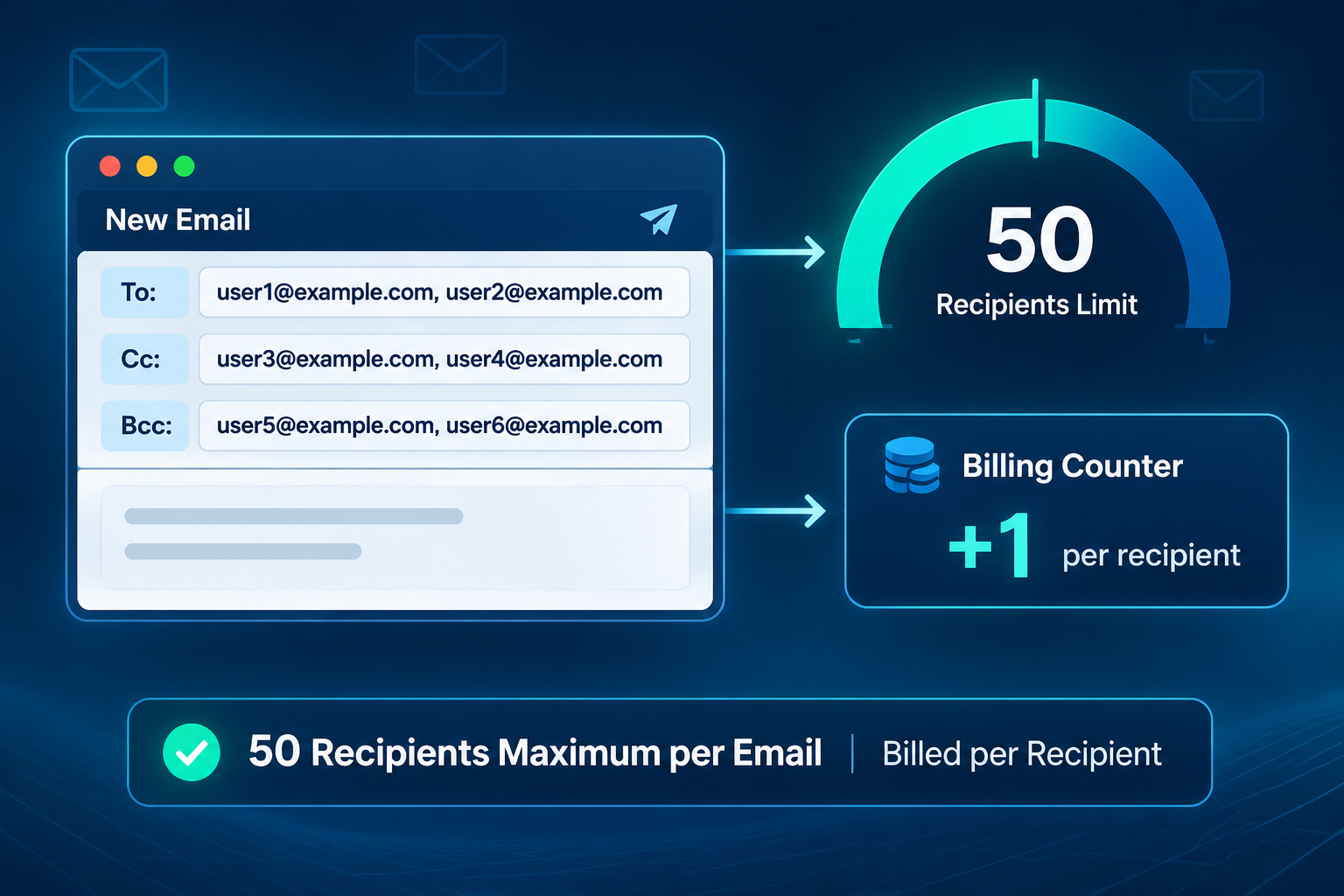
- A message may address at most 50 recipients across
to,cc, andbcccombined. That is a transport limit, not a plan limit. It is checked before the request is accepted, so a message the mail server would have refused is not charged. - Quota is charged per recipient, not per message. A message to three people costs three of your monthly allowance.
ccandbcccount exactly the same asto. A batch of 100 messages to two recipients each costs 200. Broadcasts and mail sent from webmail count the same way; mail you receive does not. tois required.ccandbccare optional. They do not replaceto, and they do not replacereply_to.reply_tochanges where a later reply is addressed and does not add an outbound recipient (Email API reply-to).
Those rules are why “just BCC the whole company” fails twice: you will hit the 50 cap, and you will burn quota for every hidden address. They are also why a receipt that CCs finance@acme.com is cheap and honest: it is two deliveries, two quota units, and one shared body, which is usually what you want.
The 50 cap is easy to trip when to is already an array. If you pass twenty customers in to and thirty-one partners in cc, the request is a 400. Split the work, or send individual messages through POST /emails/batch (up to 100 messages per call, each with its own recipients, still capped at 50 per message).
When a transactional CC or BCC is the right shape
Use cc when the extra recipient should see that they were copied, and should see the same body the user saw:
- A paid invoice or receipt that finance needs on file, while the customer remains the primary
to. See Receipt email API for the receipt angle; this article only adds the copy. - A workspace invitation that also CCs the inviting admin, so they have a record in their inbox.
- A contractual notice that must land in both the signer’s inbox and a compliance mailbox, with both parties aware of each other.
Use bcc when the extra recipient should receive the same body without being revealed to the other addresses on that message:
- A support supervisor watching a small number of high-touch outbound notices.
- A staging hook that quietly copies a developer inbox while you are still testing copy — remembering that this is still a real delivery and still costs quota, because there is no sandbox (Test a transactional email API).
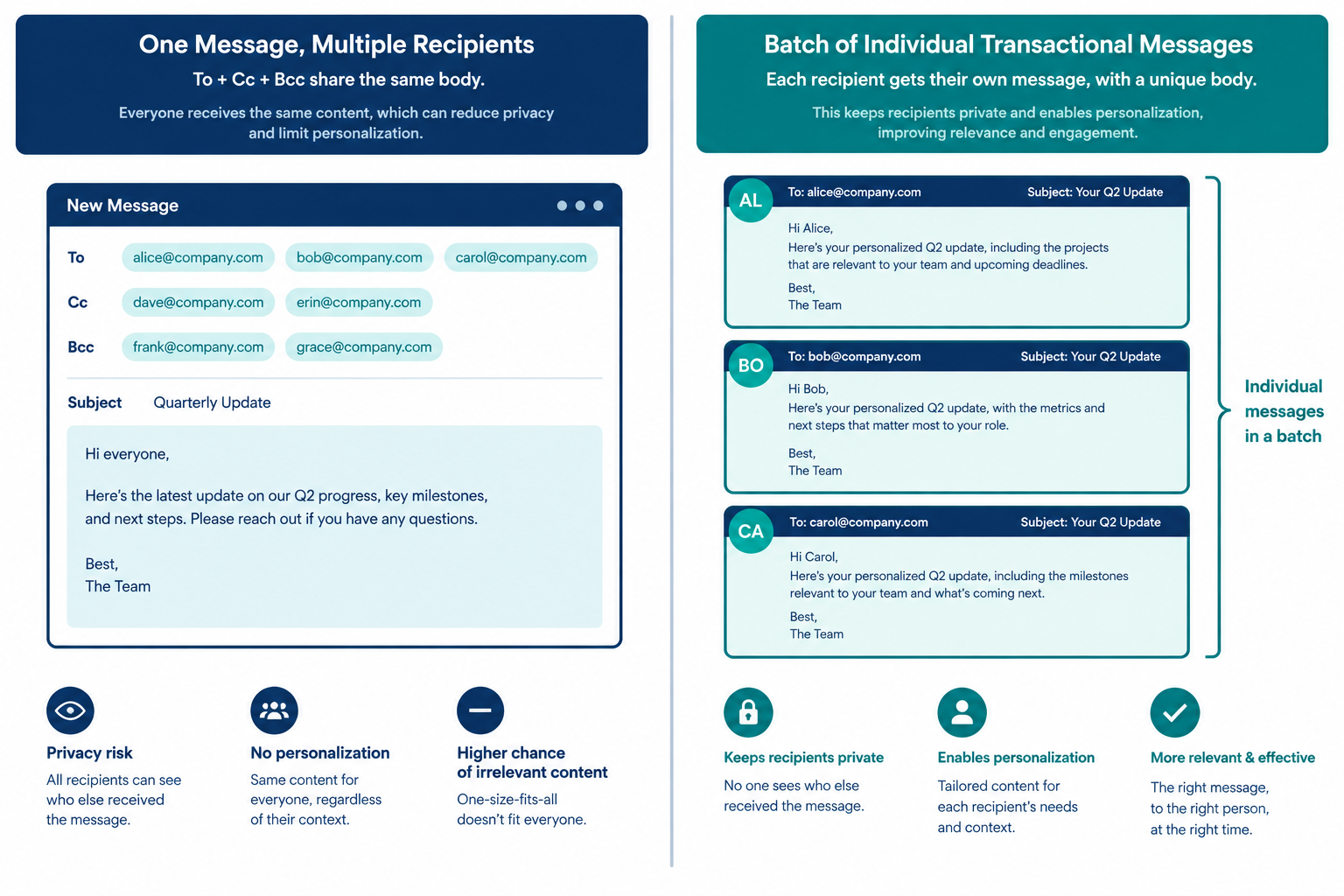
Do not use bcc to simulate personalization. Everyone on that message still gets one subject and one body. If Alice and Bob should see different totals, different reset links, or no each other’s addresses, send two messages (or a batch of two). The official batch example says the same thing in a different direction: for marketing to a list, use broadcasts, which handle unsubscribe links, topics, and per-contact suppression; batch is for transactional mail that happens to go out together.
A complete example
No official SDK is required (Installation). A receipt that copies finance:
curl -X POST https://api.rovela.dev/emails \
  -H "Authorization: Bearer $ROVELA_SENDING_KEY" \
  -H "Content-Type: application/json" \
  -H "Idempotency-Key: receipt-inv-1842" \
  -d '{
    "from": "Acme Billing <billing@mail.acme.com>",
    "to": "alice@example.com",
    "cc": "Acme Finance <finance@acme.com>",
    "reply_to": "Acme Billing <billing@acme.com>",
    "subject": "Your receipt for invoice 1842",
    "html": "<p>Hi Alice, invoice 1842 is paid. This email is a receipt, not a marketing message.</p>",
    "text": "Hi Alice, invoice 1842 is paid. This email is a receipt, not a marketing message."
  }'
The same send with fetch, and with two finance addresses on cc:
await fetch("https://api.rovela.dev/emails", {
  method: "POST",
  headers: {
    Authorization: "Bearer " + process.env.ROVELA_SENDING_KEY,
    "Content-Type": "application/json",
    "Idempotency-Key": "receipt-inv-1842",
  },
  body: JSON.stringify({
    from: "Acme Billing <billing@mail.acme.com>",
    to: "alice@example.com",
    cc: ["finance@acme.com", "audits@acme.com"],
    bcc: "receipts-archive@acme.com",
    reply_to: "Acme Billing <billing@acme.com>",
    subject: "Your receipt for invoice 1842",
    html: "<p>Hi Alice, invoice 1842 is paid.</p>",
    text: "Hi Alice, invoice 1842 is paid.",
  }),
});
Count the recipients before you send: one to, two cc, one bcc is four deliveries and four quota units, still well under 50. If audits@acme.com only needs the event, not a second copy of the same MIME message, a webhook on email.delivered is cheaper and does not put an internal address on the message at all.
Always send html and text together when you can (HTML email API). Always set an Idempotency-Key on a receipt, derived from the invoice id, so a retried job cannot bill the customer’s inbox twice (Idempotency keys). from must be on a verified domain.
Batch, loops, and the 50-cap math
POST /emails/batch takes up to 100 message objects, each with the same schema as a single send. Recipients are per message. A batch of 100 invoices, each with to the customer and cc finance, is 100 messages and 200 recipients of quota. One of those messages cannot add 49 extra CCs just because the batch still has room; the 50 cap is per message.
Entries are processed independently: one bad address list does not discard the others, and a 429 can arrive partway through because each message counts individually toward the rate limit (Emails API, Email API rate limits). Retry that chunk after Retry-After, with a stable idempotency key per chunk, as the batch example does. template and topic_id are rejected on batch; if a send needs either, use POST /emails.
If you are about to put dozens of customers in one bcc to “save API calls,” stop and invert the design: one message per customer, optionally batched, optionally with one internal cc on each. You stay under the cap, you can personalize, and you do not leak the list if a client displays BCC incorrectly — the failure mode the bulk-display article exists to prevent.
Mailbox SMTP also allows up to 50 recipients per message, but it is send-as-self from a device credential at 30 messages a minute, and it is not the programmatic path. Application CC/BCC belongs on POST /emails.
Errors, status, and privacy details worth logging
- A combined recipient list over 50 is a 400, with nothing charged.
- An unverified
fromis a 400 that names the domain. - A 200 still means queued, not delivered. Any of the recipients can later bounce independently; watch webhooks or
GET /emails/:id/eventswith afull_accesskey (Email delivery status API, Email API error handling). - Sending to a suppressed address is accepted and then marked
suppressedrather than delivered (sending manual, suppression list). If finance is fine but the customer is suppressed, do not read the 200 as “the receipt arrived.” - Monthly allowance is calendar-month based. Over-quota sends are 429 with usage in the message, and unused emails do not carry over (Pricing). CC and BCC can exhaust a Free-plan 100-email month faster than you expect, because every copy counts.
Log the recipient counts you intended (to, cc, bcc) next to the message id. When a bounce webhook arrives, you need to know which address it refers to, not just that “the receipt send” failed.
A short decision checklist
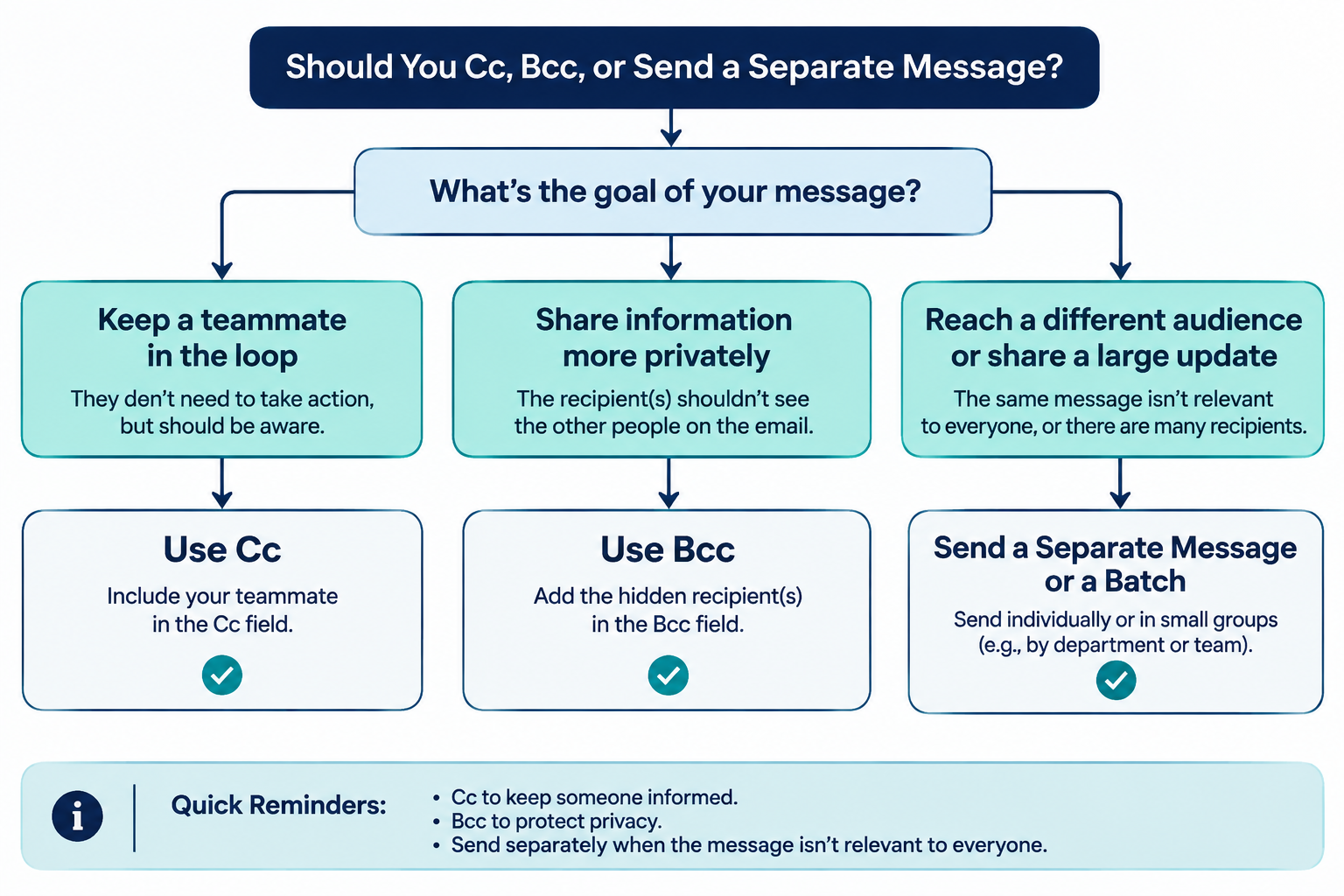
- Is this one conversation with extra visible or hidden copies? Use
ccorbcconPOST /emails. - Is this many people, each needing their own body or privacy? Use batch or individual sends, not one BCC list.
- Is this marketing? Use broadcasts, with unsubscribe and suppression, not transactional BCC.
- Count
to + cc + bccbefore you send. Stay at or under 50, and budget quota per recipient. - Do not confuse
ccwithreply_to. One is an outbound copy; the other is where a reply should go. - Confirm delivery per recipient via webhooks or the events API, not via the original 200.
Used this way, CC and BCC stay what they are on the documented Emails API: precise tools for a single transactional message, with a hard cap and honest billing, rather than a disguised mailing list.
A useful internal convention is to keep customer-facing addresses in to, humans who should appear on the thread in cc, and systems or archives in bcc — or, better for systems, not on the message at all. Once a copy is in someone’s inbox, you cannot unsend it, and the 50-cap plus per-recipient quota are there to make that cost visible at request time. If you need a teammate to answer the customer rather than to witness the outbound receipt, set reply_to to the support mailbox and skip the CC; the customer’s reply then goes to a monitored inbox, which is a different and usually better workflow than copying finance on every shipment notice. The Quick Start will get a first single-recipient send working; add cc and bcc only after you can state, in one sentence, why each extra address is on that particular message.