Email API Error Handling (2026): 400, 401, 429, and Accepted vs Delivered
How to handle Rovela’s documented email API errors: the {statusCode, name, message} envelope, 400 validation and domain failures, 401 versus 403, 429 with Retry-After or monthly quota, and why HTTP 200 means queued, not delivered.
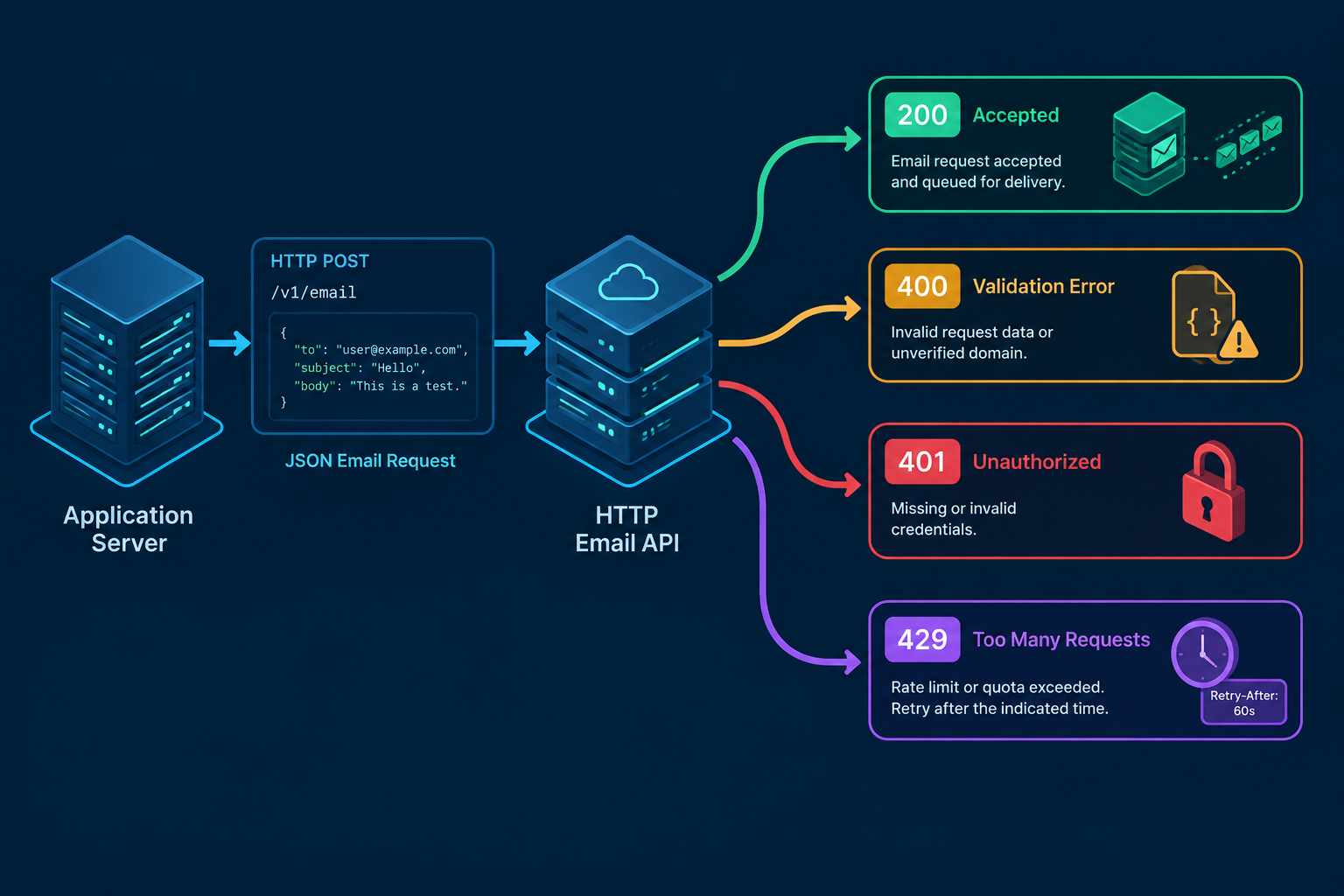
Why email API error handling is its own problem
When you send email programmatically through an Email API, two different classes of failure get mixed together in logs: the HTTP request itself, and what happens to the message after it has been accepted. Only the first class belongs in your API error handler. The second class — delivered, delayed, bounced, complained, or suppressed — shows up later on the message resource or a webhook.
This guide is the integration view of those HTTP errors for Rovela’s hosted Send Email API. It is not a rewrite of Email API retries (how to retry safely), Email API rate limits (how allowance and throttling work), or Email API authentication (how keys and scopes work). Those posts are the right next click once you know which status you are looking at.
If you are still choosing a transport, start with Email API vs SMTP and the Quick Start. For why the from address has to live on a domain you control, see What is domain email?.
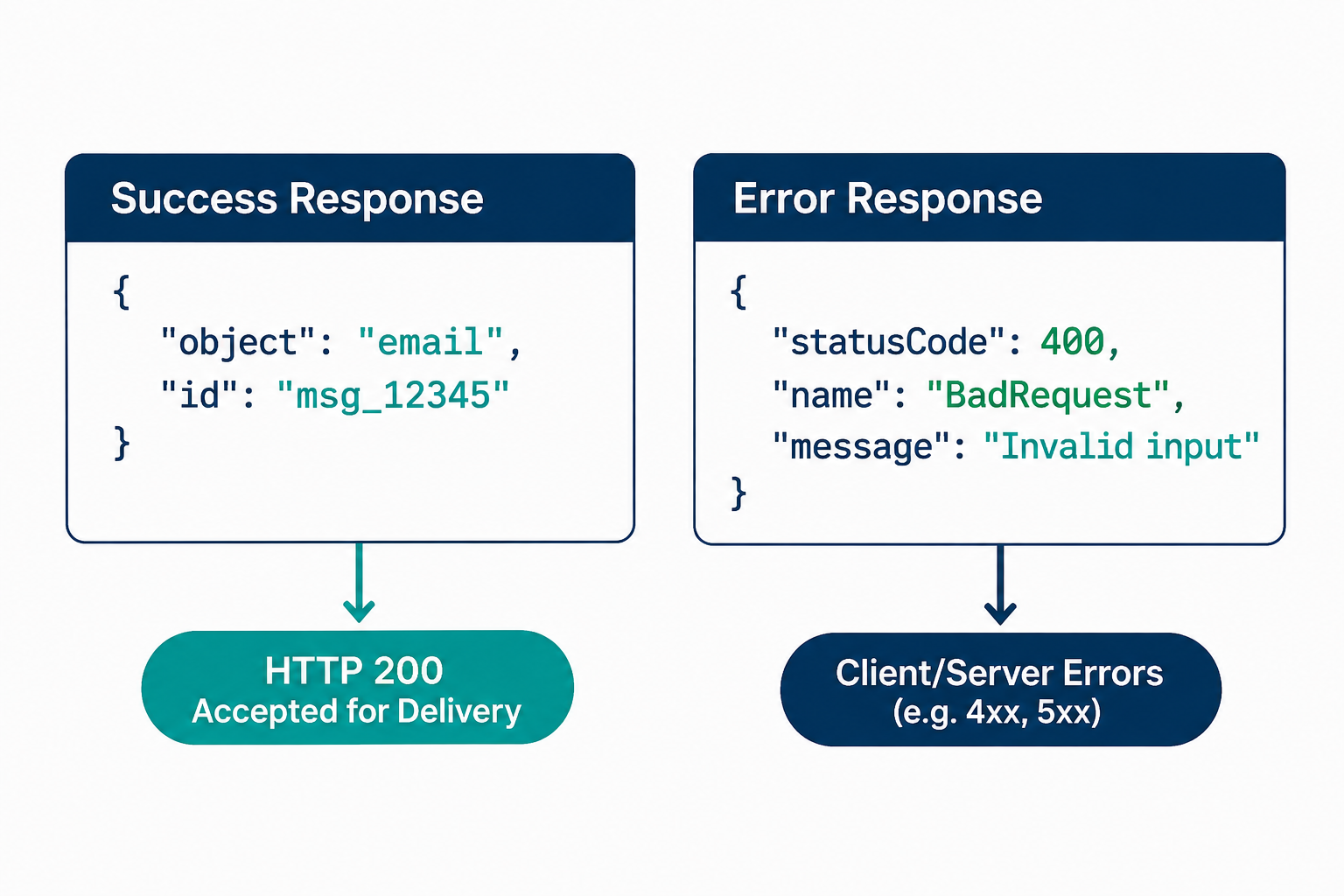
The error envelope is the same everywhere
Quick Start documents a single JSON shape for failures:
{
  "statusCode": 400,
  "name": "Bad Request",
  "message": "html or text body is required"
}
That matters more than it looks. You can write one parser for send, batch, cancel, and the read endpoints: read statusCode to decide whether to retry, fix the request, or rotate a key; log message as-is, because the docs say it describes what was wrong rather than restating the status name. Do not switch on a typo in name when statusCode is already the stable discriminator.
A successful send looks different on purpose:
{"object": "email", "id": "9f1c2e40-..."}
The id is the handle you store for later GET /emails/:id, GET /emails/:id/events, cancel, or webhook correlation. There is no delivery guarantee inside that 200 response.
200 means accepted, not delivered
This is the mistake that shows up in incident reviews. Rovela’s Email API and Quick Start are explicit: a 200 means the message was accepted and queued for delivery. Delivery is asynchronous. The message then moves through states you observe in one of three documented places:
- The Emails view in the dashboard, which shows the same timeline without an extra API call.
GET /emails/:idfor the current state, andGET /emails/:id/eventsfor the timeline — both require afull_accesskey or a dashboard session (Send Email API).- A production webhook, which is what you should use instead of polling.
A later bounce is not an HTTP error on the original POST /emails. If you only throw when res.ok is false, you will mark a hard bounce as “sent successfully.” Pair this guide with Email delivery status API, Transactional email webhooks, and Email bounce handling.
One related case is documented in the sending manual: sending to an address already on the suppression list is accepted and returns an id, but the message is never delivered and the status becomes suppressed. That is also not a 400.
400 — the request will not be accepted
The Emails API lists the 400s you will actually implement against:
- A missing required field.
fromandtoare required.subjectis required unless a template supplies one. At least one ofhtml,text, ortemplateis required, andtemplateis mutually exclusive withhtmlandtext. - A
fromdomain that is not in your organization, or is not yet verified. Quick Start and Send your first email both say an unverified domain is refused with a 400 that names the domain, rather than being accepted and silently dropped. Fix DNS and verification first; see Verified domain email API and How to set up domain email. - A
templatethat does not exist. - A base64 attachment that does not decode.
- More than 50 recipients on one message, counted across
to,cc, andbcccombined. That cap is a transport limit, not a plan limit, and it is checked before the request is accepted — so nothing is charged for a message the mail server would have refused.
The batch and scheduled example adds two more 400s that belong in the same handler: POST /emails/:id/cancel and PATCH /emails/:id return 400 once the message is already on its way. Mail that has left cannot be called back. Rescheduling only works while the status is still scheduled.
POST /emails/batch has a documented refusal that is easy to misread as a generic 400: template and topic_id are rejected rather than ignored, because silently dropping them would send a body-less message or mail people who had unsubscribed from a topic. Send those through POST /emails instead (Batch transactional email API).
How you should handle a 400 in application code: do not retry the same body. Surface message to the developer or to your own logs, fix the payload or the domain, and only then send again. If the 400 is “too many recipients,” split the list or switch to batch; see Email API CC and BCC. If it is a cancel-too-late, treat the message as already committed and watch status or webhooks.
401 and 403 — credentials, not payload
Authentication keeps two failures in the same error shape and asks you to distinguish them:
401— no credential, or one that is not valid. The key was revoked, mistyped, missing theBearerprefix, or is the wrong kind for this endpoint.403— the credential is valid but the role does not permit the action. A dashboardmembercalling something reserved for anowneroradmingets 403 rather than 401.
On the Emails API itself, a sending_access key used to read, reschedule, or cancel a message comes back 401 (Send Email API, batch and scheduled example). That is easy to trip in a worker that sends with the production sending key and then immediately tries GET /emails/:id. Create a separate full_access key for tooling and keep the sending key on the send path only.
Send your first email documents a related case on management endpoints: a valid sending_access key calling something like GET /domains gets 403, and the message names the permission it needs. Do not collapse 401 and 403 into “auth failed, regenerate the key.” A 403 on a management route often means the key is fine and the scope is wrong. A 401 on send often means the key is missing, revoked, or not being sent as Authorization: Bearer re_….
Never put a key in a browser, a mobile app, or a public repository — Authentication is blunt about this. A leaked sending_access key is someone sending mail as your domain. Call the API from your server, store the key in an environment variable, and revoke from the dashboard or DELETE /api-keys/:id if you need to cut it off immediately. Rotating is create-then-revoke, so you can deploy the new key before the old one stops working.
429 — slow down, or you are out of monthly allowance
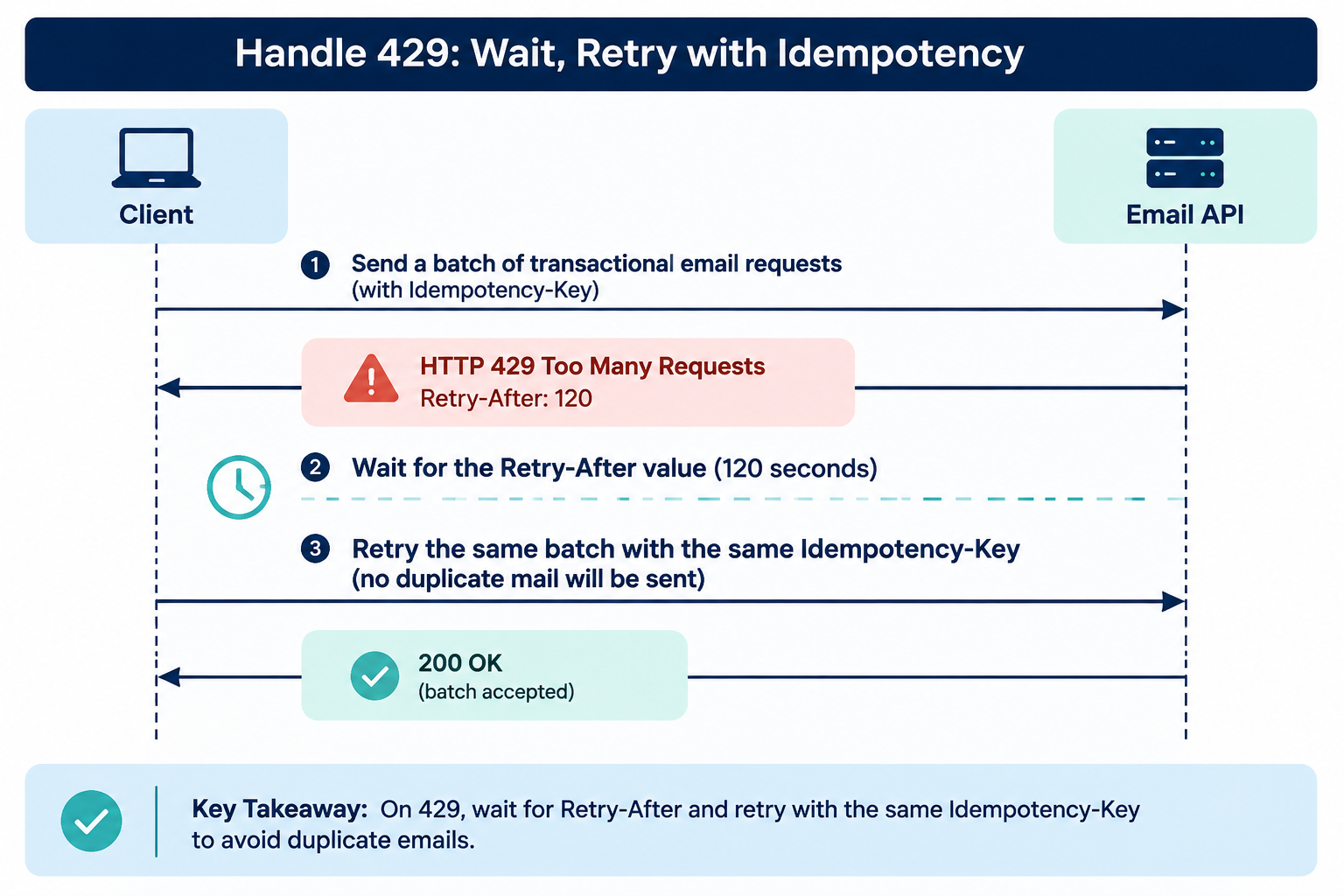
The Emails API documents 429 as rate limit exceeded, and it adds a detail that bites batch users: each message in a batch counts individually, so a large batch can trip the limit partway through. Entries are processed independently, which means the response may already list ids for earlier entries in that request. Your client should not assume “the whole batch failed” or “the whole batch succeeded” without reading the body.
The official batch example retries a 429 by waiting Retry-After seconds (falling back to one second if the header is missing) and sending the same chunk again, with a stable Idempotency-Key per chunk so a crash-and-rerun does not double-send the chunks that already succeeded. That pattern is the documented one; this article will not invent a requests-per-second number, because the public docs do not publish one.
A second 429 is on Pricing: if you go over the monthly allowance, sending stops for the rest of the calendar month, the API answers 429 with how much you have used, and nothing is billed automatically. Upgrade if you need to keep sending. Unused emails do not carry over. On the Free plan that allowance is 100 emails a month, counted per recipient, with no card required. Tests count; so do cc and bcc. See Email API rate limits and Email API for startups.
Handle 429 by backing off, honoring Retry-After when present, and using an Idempotency-Key (up to 256 characters; a retry of the same key within 24 hours returns the original response instead of sending again). If the message says you have used the monthly allowance, backing off will not help until the next calendar month or an upgrade — branch on message for that case rather than retrying forever.
A send helper that classifies errors
The following Node example is a thin wrapper around fetch. It does not add an SDK — Rovela has no client library to install — and it follows the documented statuses only.
async function sendEmail(payload, { idempotencyKey, sendingKey, maxRetries = 4 } = {}) {
  let attempt = 0;
  while (true) {
    const res = await fetch("https://api.rovela.dev/emails", {
      method: "POST",
      headers: {
        Authorization: "Bearer " + sendingKey,
        "Content-Type": "application/json",
        ...(idempotencyKey ? { "Idempotency-Key": idempotencyKey } : {}),
      },
      body: JSON.stringify(payload),
    });

    const body = await res.json().catch(() => ({}));

    if (res.ok) {
      // Accepted and queued. Delivery is observed later.
      return { ok: true, id: body.id, status: res.status };
    }

    const msg = body.message || res.statusText;

    if (res.status === 429 && attempt < maxRetries) {
      const waitSec = Number(res.headers.get("retry-after") ?? 1);
      await new Promise((r) => setTimeout(r, 1000 * waitSec));
      attempt += 1;
      continue;
    }

    if (res.status === 400) {
      return { ok: false, retryable: false, status: 400, message: msg };
    }

    if (res.status === 401 || res.status === 403) {
      return { ok: false, retryable: false, status: res.status, message: msg };
    }

    return { ok: false, retryable: res.status >= 500, status: res.status, message: msg };
  }
}
Use a sending_access key in sendingKey. If you need to inspect the message afterwards, call GET /emails/:id/events with a full_access key in a different helper — mixing the two keys in one function is how teams accidentally log 401s next to successful sends.
A curl check for the same classification, useful in a staging script:
curl -sS -D - -o /tmp/send.json -X POST https://api.rovela.dev/emails \
  -H "Authorization: Bearer $ROVELA_SENDING_KEY" \
  -H "Content-Type: application/json" \
  -H "Idempotency-Key: test-signup-alice-2026-11-11" \
  -d '{
    "from": "Acme <hello@mail.yourdomain.com>",
    "to": "you@yourdomain.com",
    "subject": "Hello from Rovela",
    "html": "<p>It worked.</p>",
    "text": "It worked."
  }'
Look at the HTTP status on the response headers first, then at /tmp/send.json. If you see the error envelope, fix message before you retry. If you see an id, open the message under Emails in the dashboard or call the events endpoint with a full_access key.
What not to treat as an API error
- SMTP failures from a mail app. Rovela SMTP is mailbox SMTP (
mx.rovela.dev:465, device credential, send-as-self, 30 messages a minute from one client address). It is not the programmatic path, and its limits are not the HTTP error catalog. For application volume, usePOST /emails. See Email API vs SMTP relay. - Delivery and engagement events.
email.bounced,email.complained,email.delayed, opens, and clicks are webhook or events-API data. See Webhook events. - Invented status codes. This guide does not document a 409 conflict for idempotent retries, because the documented behavior is to return the original response. It also does not invent a
/logsendpoint; request and delivery history live in the dashboard Logs and Emails surfaces and in the message events API, as described in Email API logs.
A practical checklist for production
- Parse every non-2xx body as
{ statusCode, name, message }and logmessage. - Treat
200as “queued.” Persist the id. Watch webhooks for the outcome. - Never retry a 400 with the same invalid payload; never retry a monthly-allowance 429 as if it were a short rate limit.
- Honor
Retry-Afteron 429, and send anIdempotency-Keyon any path a queue can replay. - Keep
sending_accesson the send path andfull_accesson status tooling, and do not be surprised by 401 vs 403 across those endpoints. - Alert on a sudden spike of 400s naming a domain — that is often DNS or a typo in
from, not a provider outage. - After deploys, send one real message to an inbox you control and confirm
email.deliveredbefore you declare the release done. There is no separate sandbox; see Test a transactional email API.
The shortest path to a working setup remains the Quick Start and Send your first email. Once that send works, this error catalog is what keeps it working when something is wrong with the request, the key, or the allowance — and what stops you from confusing that with a bounce after a perfectly valid 200.