Test a Transactional Email API (2026): Safe Rehearsals on Rovela When There Is No Sandbox
Rovela has no sandbox or test key — Free-plan keys send real mail. How to test safely with a verified staging domain, recipients you control, Idempotency-Key, and delivery checks via the dashboard or GET /emails/:id/events.
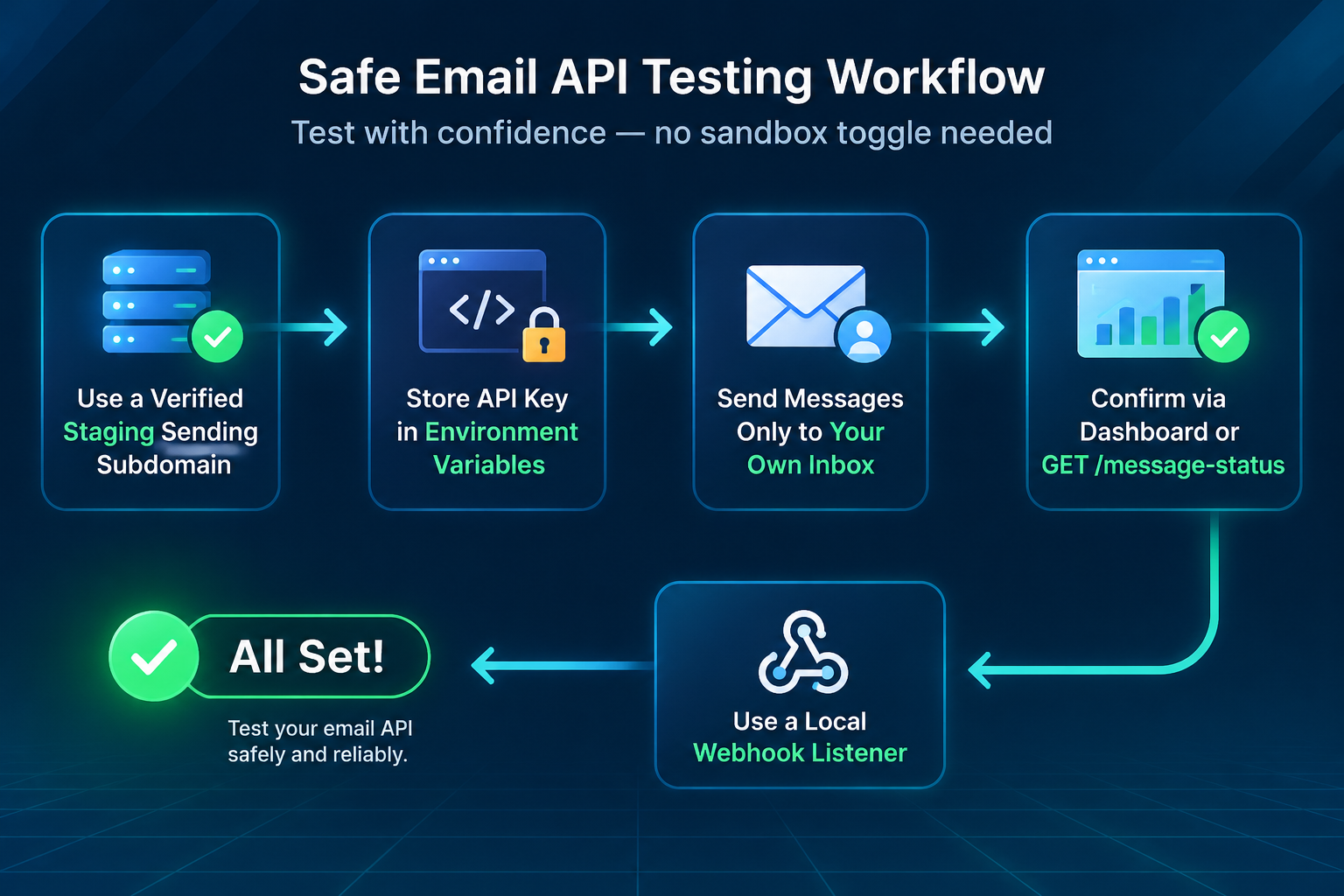
Testing a transactional email API when there is no sandbox
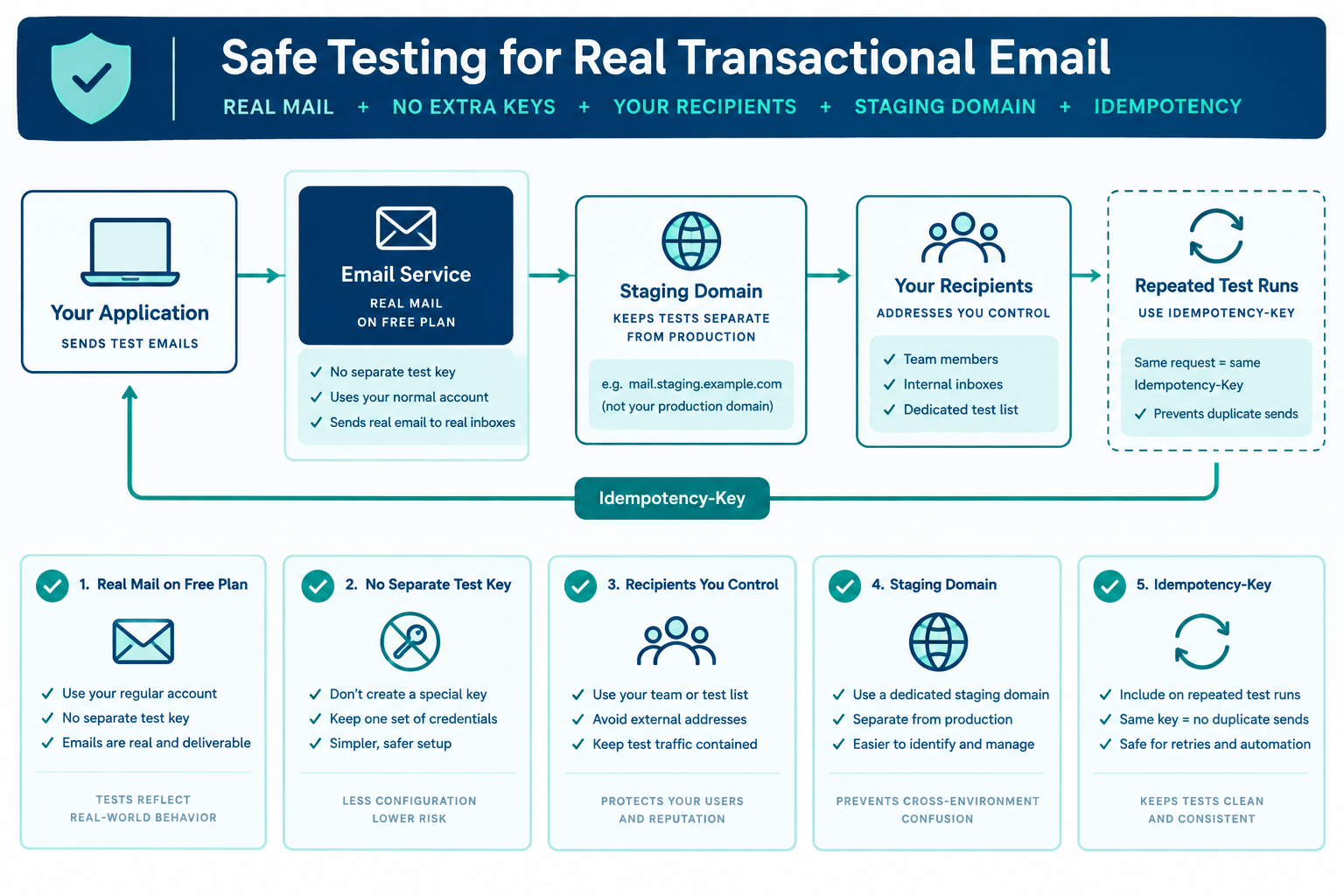
Most email APIs are searched with some version of “how do I test this without mailing real users?” Rovela’s answer is unusually direct. Quick Start and Send your first email both say the Free plan sends real mail: there is no separate sandbox mode, and no test key that behaves differently from a live one.
That is a constraint, not a missing checkbox. It means every test is also a rehearsal of DNS, DKIM, and delivery. It also means you need a discipline the product will not enforce for you: verify a domain you control, send only to inboxes you control, and treat every test as something that counts against quota and can land in a real mailbox.
This guide is that discipline, mapped onto the documented Email API. It is not a claim that a sandbox exists, and it is not a rewrite of Send your first email in 5 minutes, Send email with curl, or Email API logs. Those will get a first message out. This article is about repeating that send safely while you build the rest of the app.
If you still need a transport primer, start with Email API vs SMTP and What is domain email?.
What “real mail” changes about a test plan
Because keys do not come in a test flavor, the same sending_access key that works in development will deliver to whatever to address you pass it. A fixture that still contains a customer email from a production dump will send a production-looking message from your verified domain. Build the test plan around that fact.
Use a dedicated sending domain or subdomain for non-production work when you can. Send your first email already recommends a subdomain such as mail.example.com if you are not ready to commit the root domain; mail.staging.example.com (or a separate staging domain) is the same idea taken one step further. You still have to publish the DNS records the dashboard shows and click Verify. Unverified from addresses are refused with a 400 that names the domain, which is what you want — a test should fail closed, not quietly use a cousin domain.
Keep two keys, even in staging: a sending_access key in the app’s environment, and a full_access key only in tooling that reads GET /emails/:id or /events or manages domains (Authentication). Never put either key in a browser, a mobile app, or a CI log. Revocation is immediate; rotation is create-then-revoke.
Quota is real too. The Free plan includes 100 emails a month, counted per recipient, with no card required (Pricing). cc and bcc count. Unused emails do not carry over. A chatty integration test that sends on every commit will exhaust the month and then 429. Budget a small number of real sends, and stub the HTTP call in unit tests.
A first test send you can actually trust
The official curl from Quick Start is the right skeleton. Pin the recipient to an inbox you own, and add an Idempotency-Key so rerunning the script does not multiply messages:
curl -X POST https://api.rovela.dev/emails \
  -H "Authorization: Bearer $ROVELA_SENDING_KEY" \
  -H "Content-Type: application/json" \
  -H "Idempotency-Key: staging-smoke-2026-11-11" \
  -d '{
    "from": "Acme Staging <hello@mail.staging.example.com>",
    "to": "you@your-inbox.com",
    "subject": "Staging smoke test",
    "html": "<p>This is a real message from the staging domain.</p>",
    "text": "This is a real message from the staging domain."
  }'
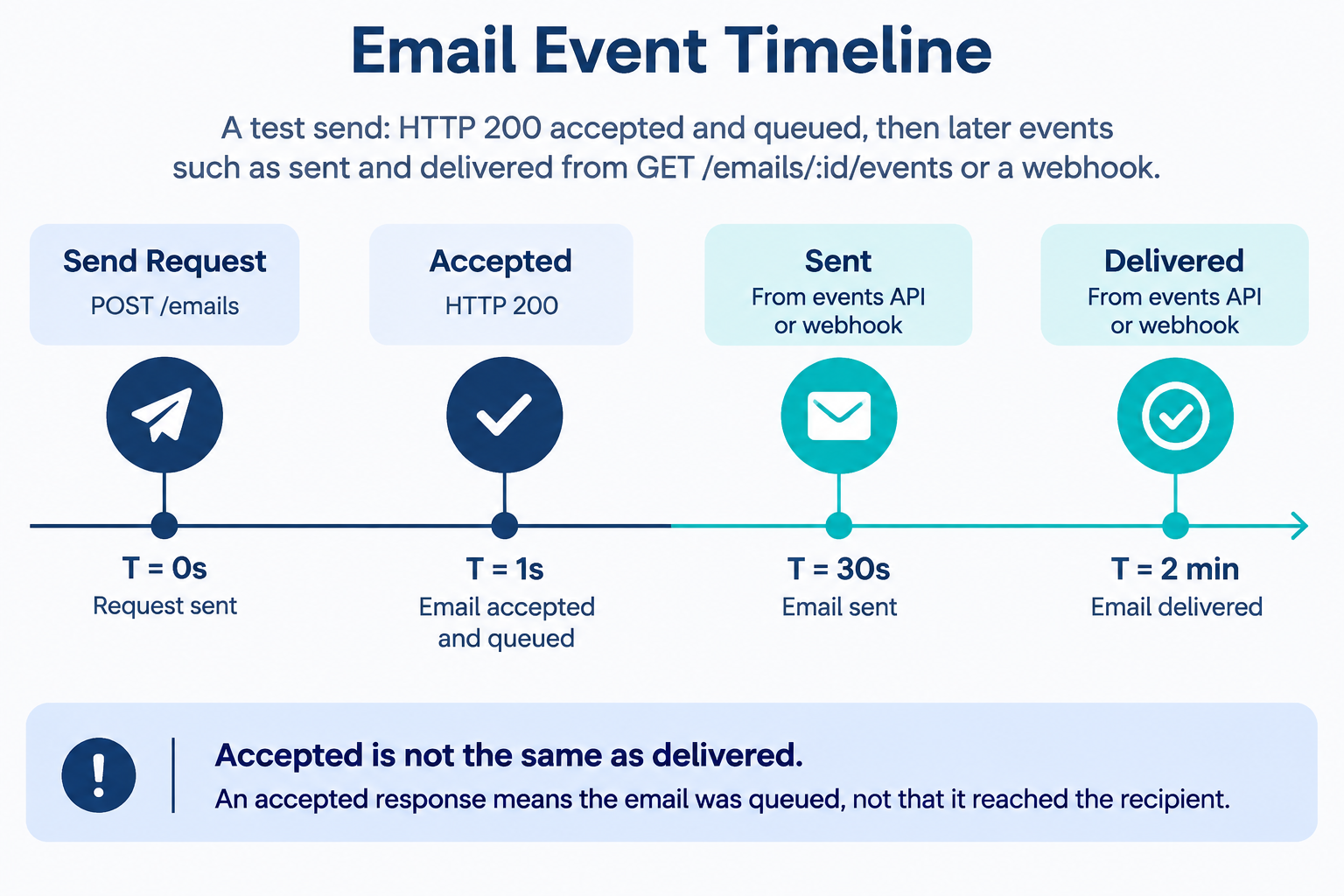
A 200 returns {"object":"email","id":"..."} and means accepted and queued, not delivered. That distinction is the rest of the test.
Confirm in the dashboard under Emails (sending manual), or with a full_access key:
curl https://api.rovela.dev/emails/$EMAIL_ID/events \
  -H "Authorization: Bearer $ROVELA_FULL_ACCESS_KEY"
You are looking for email.sent followed by email.delivered. If you see email.bounced, check the address you used before you redesign the template. If you see suppressed, the address is on the suppression list; the API accepted the send and then did not deliver it. A sending_access key used to read events comes back 401 on the Emails API — that is documented, not a broken test (Send Email API).
There is no official SDK (Installation). The same request in a staging script is a fetch call. Unit tests should not hit api.rovela.dev at all; they should assert that your wrapper built the right JSON and header. Save live sends for a smoke test you run deliberately.
Make repeated runs safe with idempotency
Developers rerun the same script. Queues redo the same job. Without an Idempotency-Key, each rerun is a new message. With one (up to 256 characters), a retry within 24 hours returns the original response and does not dispatch a second mail (Emails API, Idempotency keys).
For a smoke test, a daily-stable key such as staging-smoke-2026-11-11 is enough: you can run the script ten times that morning and still have one message. For a feature test tied to a fake order, derive the key from the fixture id. When you want a fresh message, change the key. Do not disable idempotency in staging “to make testing easier”; that is how a flaky script mails you twelve receipts.
429s are part of the test surface. Honor Retry-After as the official batch example does, and distinguish a short rate-limit 429 from a monthly-allowance 429, which will not clear until the next calendar month or an upgrade (Pricing, Email API error handling, Email API rate limits).
Test the parts that only show up after accept
A complete staging check is more than res.ok. Walk through:
- Invalid
from. Point at an unverified domain and expect 400, with the domain named inmessage. - Missing body. Omit
html,text, andtemplateand expect 400 in the standard{ statusCode, name, message }shape. - Recipient cap. More than 50 addresses across
to/cc/bccis a 400 and is not charged (Email API CC and BCC). - Scope mistakes. Read or cancel with the sending key and expect 401; call a management endpoint such as
GET /domainswith that key and expect 403 (Send your first email). - Delivery path. Send one good message to yourself and wait for
email.deliveredin events or a webhook. Verify the signature in your handler (Webhook security, Verify webhook signatures). - Bounce path. Only if you have a genuine reserved invalid address you are willing to send real mail to, and only rarely; do not loop this in CI. The bounces example is the reference for handling the event, not for generating a storm of them.
- Scheduled mail. If you use
scheduled_at, set a future ISO 8601 timestamp with an offset, and practice cancel orPATCHwith afull_accesskey before the send time (batch and scheduled example). Once the message is on its way, both return 400.
Point a staging webhook at a URL you control. Production-like events will arrive for your test messages because the mail is real. Keep that endpoint’s signing secret out of the application sending key, and do not reuse a production webhook URL for noisy staging traffic.
What not to do
- Do not look for a
test_key, a sandbox dashboard switch, or a documented “disable delivery” flag. They are not part of the product. - Do not send to customers, scraped lists, or teammates who did not agree to receive staging mail. Reply-To and CC still create real deliveries.
- Do not use mailbox SMTP as a stand-in for API tests. SMTP is send-as-self from a device credential, 30 messages a minute, and it will not exercise webhooks or the message id you will use in production.
- Do not invent a
/logsquery in tests. Use the dashboard Emails and Logs views andGET /emails/:id/events(Email API logs, Email delivery status API). - Do not hammer the API from CI on every pull request. Stub unit tests; run one smoke send on a schedule or at release time.
A staging checklist you can paste into a runbook
- Staging sending domain verified;
fromuses only that domain. ROVELA_SENDING_KEYandROVELA_FULL_ACCESS_KEYlive in the environment, not in git.- Default
tois an inbox your team owns; fixtures cannot override it to a production customer. - Smoke script sends
htmlandtext, anIdempotency-Key, and optionally a staging-onlyreply_to. - You confirm
email.delivered(dashboard or events API) before you call the integration done. - A webhook endpoint in staging verifies signatures and is ignored by production consumers.
- Monthly quota is watched so a noisy day cannot silence the next deploy.
Rovela’s hosted transactional API is meant to be easy to integrate, including for apps built with AI assistants that would otherwise mock a provider that never signs DKIM. The trade-off for “no sandbox” is honesty: when the smoke test is green, a real message reached a real inbox from your domain. That is a better pre-production signal than a simulated accept, as long as you keep the recipients, the domain, and the keys on the staging side of the fence.
Local development without surprising anyone
On a laptop, load keys from a local secret manager or an ignored env file, and default the recipient in code — not only in a script — so a typo in a request body cannot escape. If you render templates locally, still send both html and text in the smoke test; many clients show the text part in a notification preview, and that is a delivery issue you will not see from a screenshot of the HTML. When you add attachments, use a tiny fixture and remember that a request which cannot be accepted returns 400 (for example a base64 body that does not decode). For anything you would not want copied into a real mailbox, skip the attachment and print a staging link instead.
If several people share one staging organization, prefer a domain-restricted key so a leaked staging secret cannot send as the production brand (Authentication, Email API for multi-tenant SaaS). The Free plan allows one sending domain, which is enough for a first project; on Pro you can keep production and staging domains in the same organization only if access control and key scope make that split real. When in doubt, use a separate organization for staging. The Quick Start still applies: verify, send, then confirm delivery — every time you change DNS, keys, or the send wrapper.