Django Transactional Email API (2026): Send App Mail from Django with POST /emails
How to send transactional email from Django with Rovela’s HTTP Email API: a urllib helper, Django settings for the Bearer key, Idempotency-Key, and why django.core.mail over mailbox SMTP is the wrong default for app volume. Not an OTP tutorial.
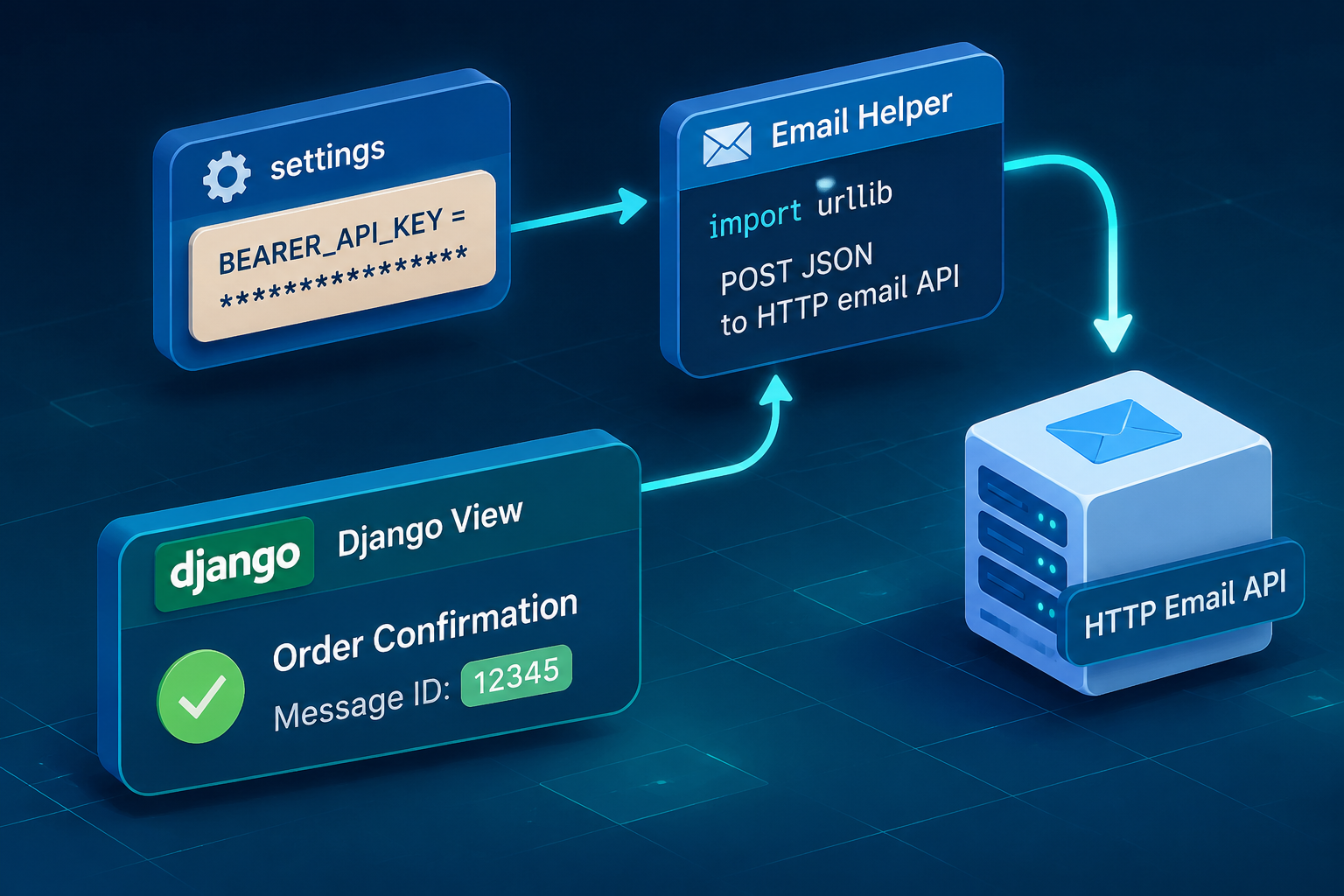
Django already speaks HTTP; transactional email should too
A Django application already posts JSON, talks to payment providers, and queues work in ordinary Python. The natural way to send transactional email — an order confirmation, a “your invoice is ready” note, a shipping update, a security alert — is the same pattern: one HTTPS POST with a Bearer key, not an SMTP session hidden behind django.core.mail.
Rovela’s Email API is built for that. There is no official SDK and no package you have to pin. The base URL is https://api.rovela.dev. You authenticate with Authorization: Bearer re_… (Authentication) and queue a message with POST /emails. The response is a message id. HTTP 200 means the message was accepted and queued, not that it has already arrived (Quick Start).
This is not a redo of a Django OTP tutorial. If you need one-time codes, start from the existing Django OTP guide and the official verification code example. This article is everyday Django app mail: a small helper in your project, settings for the key, an Idempotency-Key on anything a retry might repeat, and documented error handling around the {statusCode, name, message} envelope.
If you are still choosing between HTTP and SMTP, read Email API vs SMTP. Rovela’s SMTP is mailbox SMTP for mail apps (mx.rovela.dev:465, a device credential, send-as-self, 30 messages a minute from one client address). Programmatic volume from a Django process belongs on POST /emails.
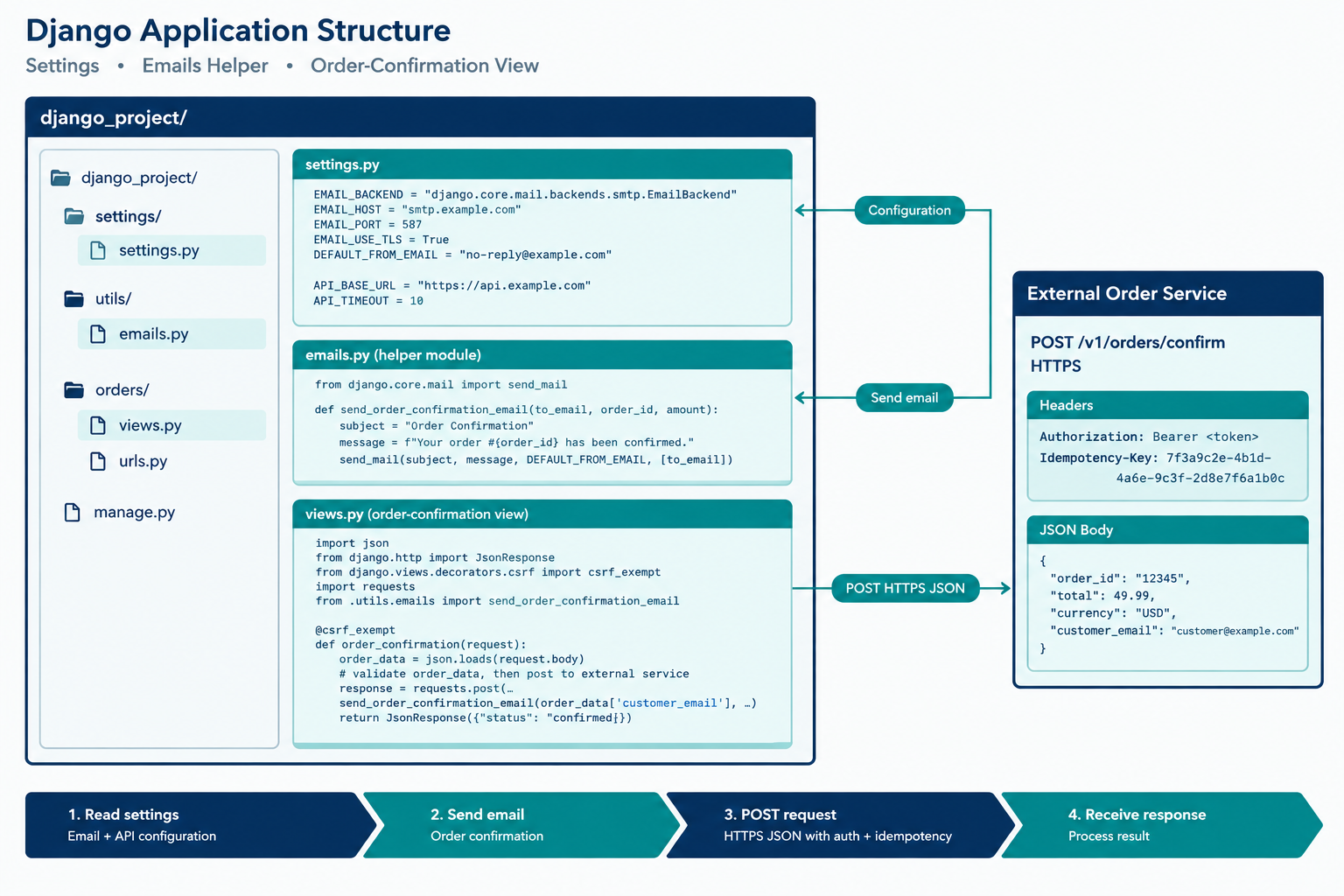
What you need before the first Django send
The first-email guide and the Quick Start are the same five steps, whether your caller is curl or Django:
- Create an account. You start on the free plan, which sends real mail. There is no separate sandbox or test key.
- Add and verify a sending domain (a subdomain such as
mail.example.comis a common choice). You cannot send from a domain you have not verified; an unverified or foreignfromis refused with a 400 that names the domain. See the domain setup guide and what domain email is. - Create an API key. A
sending_accesskey can send and nothing else — the right default for production. Afull_accesskey can also read messages and events, and manage domains, templates, and webhooks. The full key is shown once. - Send with
POST /emails. - Confirm delivery in the dashboard, with
GET /emails/:idorGET /emails/:id/events(those reads needfull_accessor a dashboard session), or with a webhook.
from is a string in the documented form "Acme <hello@yourdomain.com>". The address must sit on a verified sending domain. That is the same rule that makes domain email trustworthy: you prove you control the domain before you speak as it. How the display name and the address work is covered in the From name guide.
At least one of html, text, or template is required. Send both html and text where you can — many clients preview the text part (HTML email API).
A settings-backed helper with urllib
Keep the key on the server. Never put a Rovela key in a browser bundle, a mobile app, or a public repository. A leaked sending_access key can send mail as your domain. Django settings (or environment variables read by settings) are the right place.
This helper uses the Python standard library so the project does not need a second HTTP client just to send mail. If you already depend on requests or httpx elsewhere in the same codebase, the JSON body and headers are identical.
# settings.py (excerpt)
import os

ROVELA_API_KEY = os.environ["ROVELA_API_KEY"]  # sending_access
ROVELA_FROM = os.environ.get("ROVELA_FROM", "Acme <hello@mail.acme.com>")
ROVELA_BASE_URL = os.environ.get("ROVELA_BASE_URL", "https://api.rovela.dev")
# emails.py
import json
import urllib.error
import urllib.request
from django.conf import settings

class EmailsError(Exception):
    def __init__(self, status_code, payload):
        self.status_code = status_code
        self.payload = payload  # {statusCode, name, message}
        super().__init__(payload.get("message") or str(status_code))

def send_email(*, to, subject, html, text, idempotency_key=None, reply_to=None, tags=None):
    payload = {
        "from": settings.ROVELA_FROM,
        "to": to,
        "subject": subject,
        "html": html,
        "text": text,
    }
    if reply_to:
        payload["reply_to"] = reply_to
    if tags is not None:
        payload["tags"] = tags
    headers = {
        "Authorization": f"Bearer {settings.ROVELA_API_KEY}",
        "Content-Type": "application/json",
    }
    if idempotency_key:
        headers["Idempotency-Key"] = idempotency_key
    req = urllib.request.Request(
        settings.ROVELA_BASE_URL.rstrip("/") + "/emails",
        data=json.dumps(payload).encode(),
        headers=headers,
        method="POST",
    )
    try:
        with urllib.request.urlopen(req, timeout=30) as resp:
            return json.loads(resp.read().decode())  # {"object": "email", "id": "..."}
    except urllib.error.HTTPError as e:
        raw = e.read().decode()
        try:
            err = json.loads(raw)
        except ValueError:
            err = {"statusCode": e.code, "name": "Error", "message": raw}
        raise EmailsError(e.code, err) from e
The curl equivalent of the same send, matching the Emails API and the Quick Start, is:
curl -X POST https://api.rovela.dev/emails \
  -H "Authorization: Bearer $ROVELA_API_KEY" \
  -H "Content-Type: application/json" \
  -H "Idempotency-Key: order-1042-confirmation" \
  -d '{
    "from": "Acme <hello@mail.acme.com>",
    "to": "alice@example.com",
    "subject": "Your Acme order 1042 is confirmed",
    "html": "<p>Thanks. Order <b>1042</b> is confirmed.</p>",
    "text": "Thanks. Order 1042 is confirmed.",
    "tags": {"kind": "order_confirmation", "orderId": "1042"}
  }'
Success looks like {"object": "email", "id": "9f1c2e40-..."}. Store that id next to the order in your database. You will want it when you debug a single message.
A view that sends after a user action
Transactional mail is triggered by something the user did. A minimal order-confirmation view, with an idempotency key derived from the order id so a retried HTTP request does not send two confirmations:
# orders/views.py
from django.http import JsonResponse
from django.views.decorators.http import require_POST
from .emails import EmailsError, send_email
from .models import Order

@require_POST
def email_order_confirmation(request, order_id):
    order = Order.objects.get(pk=order_id)
    try:
        result = send_email(
            to=order.customer_email,
            subject=f"Your Acme order {order.number} is confirmed",
            html=f"<p>Thanks. Order <b>{order.number}</b> is confirmed.</p>",
            text=f"Thanks. Order {order.number} is confirmed.",
            idempotency_key=f"order-{order.id}-confirmation",
            reply_to="Acme Support <support@acme.com>",
            tags={"kind": "order_confirmation", "orderId": str(order.id)},
        )
    except EmailsError as e:
        # Surface the documented message in your logs as-is.
        return JsonResponse({"error": e.payload}, status=e.status_code)
    order.confirmation_email_id = result["id"]
    order.save(update_fields=["confirmation_email_id"])
    return JsonResponse({"email_id": result["id"]})
Call the same helper from a signal, a management command, or a background worker if you already have one. Do not turn this article into a Celery Beat or cron tutorial — recurring schedules are covered elsewhere. If the worker retries after a timeout, keep the same Idempotency-Key.
reply_to is optional and is not a substitute for a verified from. It tells the mail client where a human reply should go (Email API Reply-To). cc and bcc are also documented; they count toward the 50-recipient transport cap and toward monthly quota, because quota is charged per recipient, not per message (Email API CC and BCC).
An Idempotency-Key may be up to 256 characters. A retry of the same request within 24 hours returns the original response instead of sending again. That is the right default for anything driven by a payment webhook, a queue, or a user double-clicking “place order.”
tags are optional arbitrary labels, returned with the message when you read it back. They are not a substitute for the idempotency header; see the dedicated email API tags guide.
Do not invent a sandbox. Free-plan keys send real mail. During development, use a verified staging subdomain and recipients you control (how to test a transactional email API).
Errors you should handle in the helper
Every error uses the same shape (Quick Start, Email API error handling):
{
  "statusCode": 400,
  "name": "Bad Request",
  "message": "html or text body is required"
}
Documented cases you will actually hit from a Django app:
- 400 — a missing required field, an unverified or foreign
fromdomain, a template that does not exist, a base64 attachment that does not decode, or more than 50 recipients acrossto,cc, andbcc. - 401 — missing or invalid key, or a
sending_accesskey used to read, reschedule, or cancel a message. Reading events is afull_access(or session) operation. - 429 — rate limit or monthly allowance exceeded. Official examples mention
Retry-After. Each entry in a batch counts individually, so a large batch can trip this partway through. Sending also stops for the rest of the calendar month if you exceed the plan allowance (Pricing).
Surface the message field in your own logs as-is. Do not invent a /logs API; delivery history lives in the dashboard and, with a full_access key, on GET /emails/:id and GET /emails/:id/events.
A 403 can appear on management endpoints when the credential is valid but lacks permission. That is a different failure from a 401, and it is documented on the authentication pages.
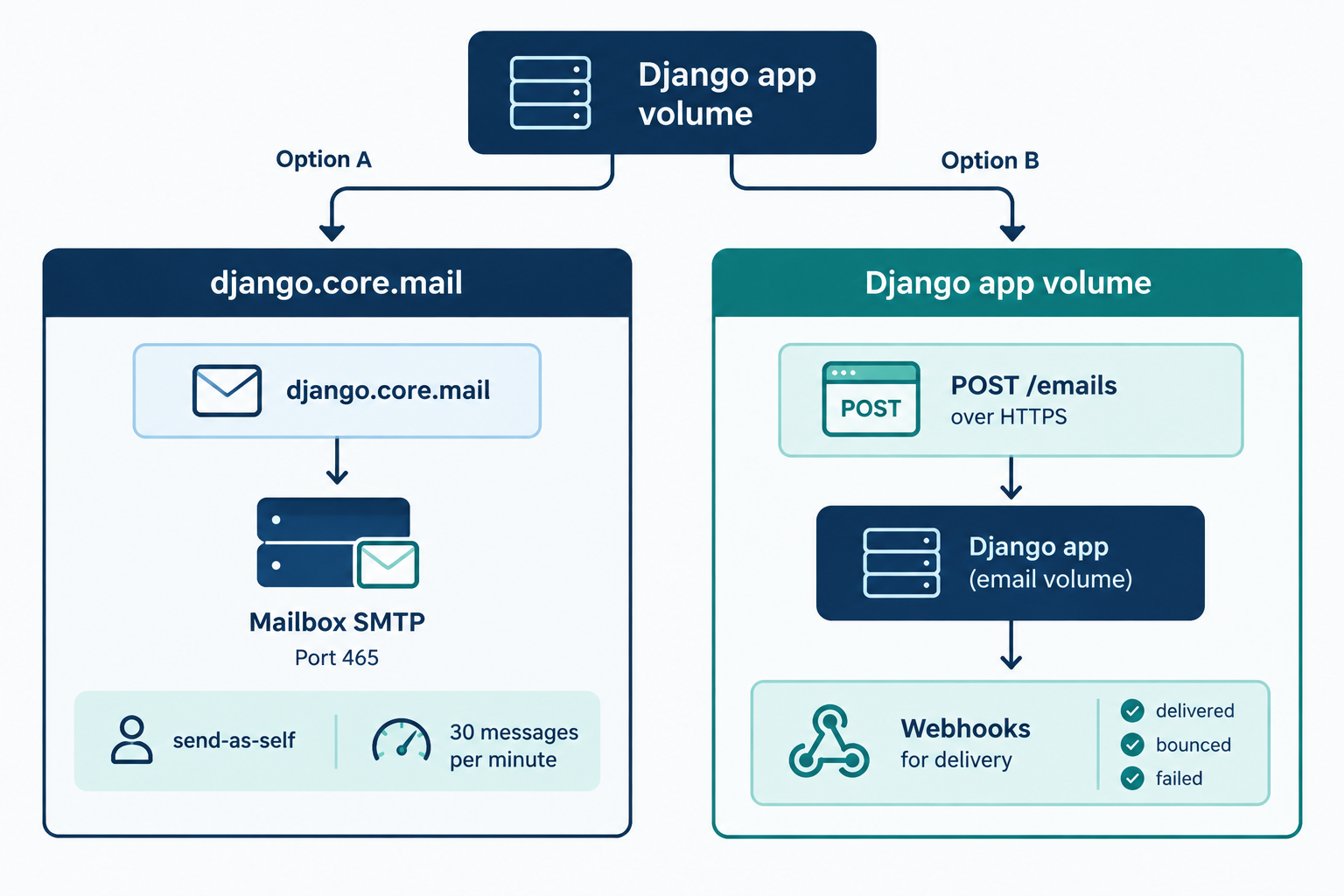
Delivery is asynchronous — do not poll from the request path
A 200 from POST /emails is not a delivery receipt. Confirm later:
- The Emails view in the dashboard.
GET /emails/:idandGET /emails/:id/eventswith afull_accesskey. You are looking foremail.sentfollowed byemail.delivered, oremail.bouncedif the receiving server rejected it (Email delivery status API).- A webhook for anything in production. Verify the HMAC-SHA256 signature (webhook security). Event types include sent, delivered, delayed, bounced, complained, opened, and clicked.
Do not turn a Django view into a polling loop against /emails/:id/events. The docs are explicit: the events endpoint is useful for debugging a single message; systematic handling belongs on a webhook.
POST /emails/batch accepts up to 100 messages, each with the same schema, processed independently. template and topic_id are rejected on the batch endpoint rather than ignored — send those through POST /emails. If you schedule with scheduled_at, reading, rescheduling, and cancelling need full_access or a dashboard session; a sending_access key can only send. The dedicated scheduled email and batch transactional email guides cover those flows in full; this article will not redo them.
Templates are available if you would rather store HTML in Rovela and send { id, variables } (Templates API, templates guide). template is mutually exclusive with html and text. You can also render a Django template on the server and pass the resulting strings as html and text — that is ordinary Django, not a Rovela SDK.
What not to do in a Django codebase
Do not point EMAIL_HOST at mx.rovela.dev and send application volume through django.core.mail. That path is for mailboxes and mail apps. A mailbox can send only as its own address, and the documented client limit is 30 messages a minute. You also lose the HTTP API’s tracking, logs, and webhooks (SMTP, Email API vs SMTP relay).
Do not create a “Rovela SDK” wrapper that invents endpoints, official clients, numeric HTTP rate (req/s) figures, a sandbox flag, or a dedicated IP. Call the documented HTTP API.
Do not put the key in query parameters, in frontend code, or in a committed .env that ships to git. Create a sending_access key for the Django service. If you send for several customers from one organization, a key can be restricted to a single domain (Authentication, Email API for multi-tenant SaaS).
Do not treat a fire-and-forget threading.Thread as a substitute for idempotency. A background call that retries after a timeout still needs an Idempotency-Key. A background call also does not confirm delivery; only the events API or a webhook does.
A compact Django checklist
- Verify the sending domain before any production
from. - Store a
sending_accesskey in the environment; constructAuthorization: Bearer …in server-side settings. - Send both
htmlandtext. Setreply_towhen a human should be able to answer. - Put an
Idempotency-Keyon any send a queue, payment webhook, or double submit might repeat. - Handle 400, 401, and 429 from the documented error envelope. Remember that 200 means queued.
- Store the returned message
idon the order or invoice. - Subscribe to webhooks for delivery, bounces, and complaints; use
GET /emails/:id/eventsonly to debug a single message. - Leave mailbox SMTP to people and mail apps.
Once that helper is in place, every other Django view can call it the same way — receipts, security alerts, “your export is ready” notes — without growing a second email stack. That is the point of a transactional email API: one authenticated HTTP call from the application you already run.