Quote Ready Email API (2026): Tell a Buyer Their Quote Is Ready with POST /emails
Send a “your quote is ready, here is the quote permalink you already have” notice from your own quoting or sales worker with Rovela’s HTTP API: language-agnostic HTTP using Node fetch plus curl, a Bearer key from the process environment, and an Idempotency-Key keyed to the quote. Distinct from an invoice-ready or pay-now notice.

A quote-ready notice is not an invoice, a payment request, or a shipping confirmation
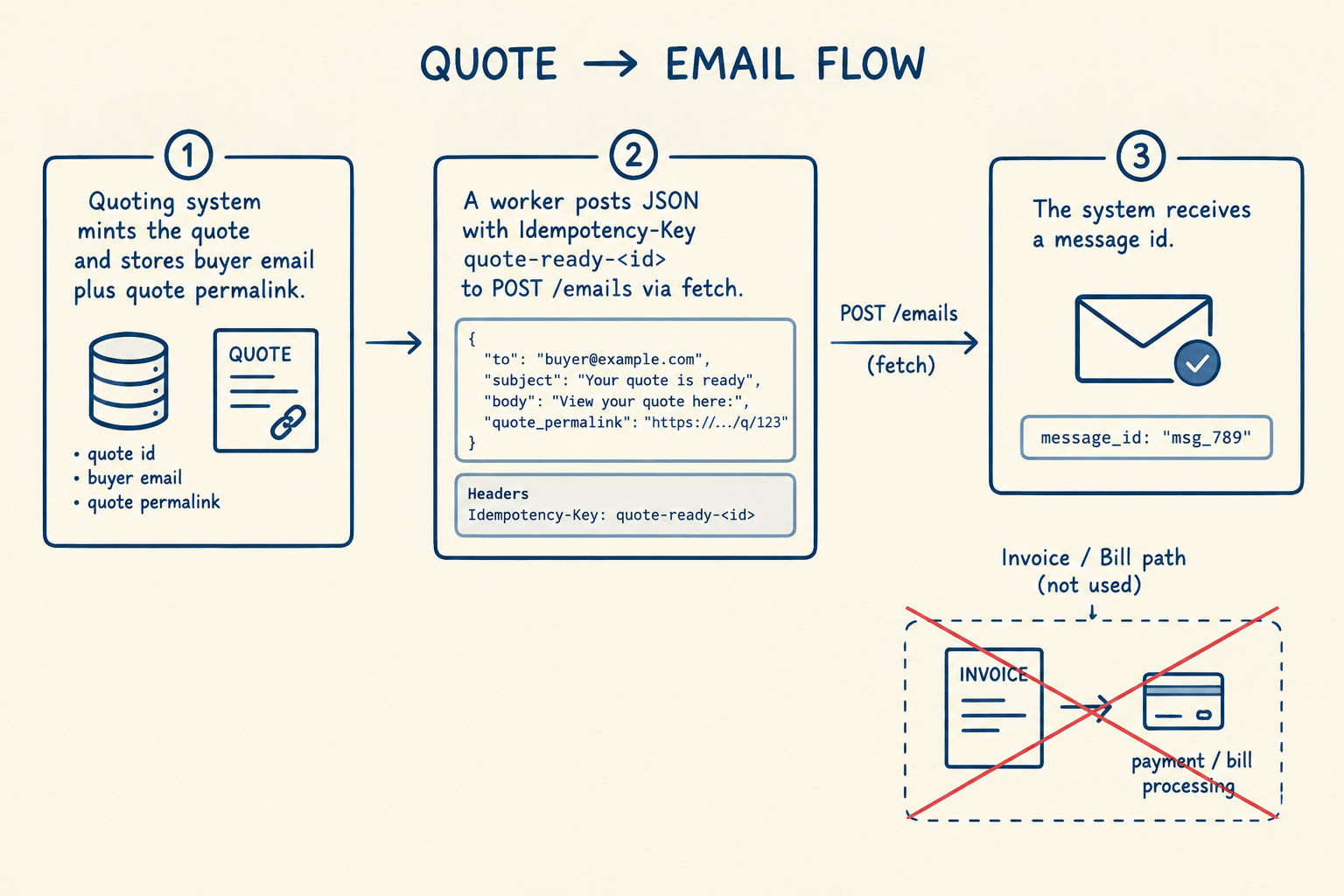
When a sales quote in your product is already minted and ready for the buyer — a services proposal the prospect asked for on Tuesday, a volume price a customer can accept or decline, a renewal quote that is not yet a bill — your own worker still has to tell the buyer: “Your quote is ready,” plus the quote permalink you already have. That send is transactional email. It is not a newsletter, not a marketing drip, and it is not a rewrite of the invoice ready email, send an invoice email with a PDF attachment, payment failed email, payment method updated email, plan upgraded email, trial ending email, refund confirmation email, shipping confirmation email, or e-commerce order email guides. Those tutorials already exist. An invoice-ready notice tells a customer a bill is ready to view, often with an amount due. The invoice-attachment guide sends that bill as a PDF. Payment-failed and payment-method-updated mail concern a charge or a card that already exists. Plan-upgraded and trial-ending mail concern a plan or a trial clock. A refund confirmation tells a customer money was returned. Shipping and order mail concern an order that already exists. This guide is your own quoting or sales worker after you have already minted the quote and stored the quote permalink. The recipient is consistently the buyer or prospect (the address you already store on the quote). The call to action is “open this quote and review or accept it,” not “pay this invoice,” not “your payment failed,” and not “your order has shipped.” Rovela does not generate quotes, store line items, or collect acceptance.
This guide does not invent a Rovela billing product, a quoting product, or a commerce product. There is no client library to install. The public docs describe an HTTP Email API, not a quotes API, and this article will not invent one. Triggers are described generically: your worker runs after you already know the quote is ready. The JSON body and headers are the product.
Rovela’s Email API is a single HTTPS call. The base URL is https://api.rovela.dev. You authenticate with Authorization: Bearer re_… (Authentication) and queue a message with POST /emails. The response is {"object":"email","id":"..."}. HTTP 200 means the message was accepted and queued, not that it has already arrived (Quick Start).
If you are still choosing between HTTP and SMTP, read Email API vs SMTP. Rovela’s SMTP is mailbox SMTP for mail apps (mx.rovela.dev:465, a device credential, send-as-self, 30 messages a minute from one client address). Programmatic volume from a quoting worker belongs on POST /emails, which is also the distinction drawn in Email API vs SMTP relay.
What you need before the first quote-ready notice
The first-email guide and the Quick Start are the same five steps, whether the caller is curl or fetch inside your worker:
- Create an account. You start on the free plan, which sends real mail. There is no separate sandbox, and no test key that behaves differently from production.
- Add and verify a sending domain (a subdomain such as
mail.example.comis a common choice). You cannot send from a domain you have not verified; an unverified or foreignfromis refused with a 400 that names the domain. The dashboard asks for four DNS records — SPF, DKIM, DMARC, and return-path. See the domain setup guide and what domain email is. - Create an API key. A
sending_accesskey can send and nothing else — the right default for a production quote-ready notifier. Afull_accesskey can also read messages and events, and manage domains, templates, and webhooks. The full key is shown once. - Send with
POST /emails. - Confirm delivery in the dashboard, with
GET /emails/:idorGET /emails/:id/events(those reads needfull_accessor a dashboard session), or with a webhook.
from is a string in the documented form "Quotes <quotes@yourdomain.com>". The address must sit on a verified sending domain. That is the same rule that makes domain email trustworthy: you prove you control the domain before you speak as it. How the display name and the address work is covered in the From name guide.
At least one of html, text, or template is required. Send both html and text where you can — many clients preview the text part, which is often where the buyer first sees the quote permalink (HTML email API). If you also want to attach a PDF of the quote, the documented attachments field is { filename, content (base64), content_type }. That is optional here. The invoice-attachment guide covers a bill PDF; this notice can stand on the permalink alone so the buyer reviews the live quote, not a stale file.
A worker that sends after the quote is already minted
Keep the Rovela key out of the browser, out of a public repository, and out of a container image. A leaked sending_access key can send mail as your domain. The server-side worker that already minted the quote should read ROVELA_API_KEY from its process environment and call Rovela only on the server (email API authentication). Your sales tool or quoting service already wrote the quote row; only then do you send.
Store the event first: the quote id you already have, the buyer’s address, a short quote number or title you already store if you show one, and the quote permalink. The send is just the notice. The recipient is consistently the buyer or prospect on that quote — not a public marketing list, and not every salesperson on the account unless you intend each address to receive a copy and to count against quota. Key the Idempotency-Key to that quote so a retried worker does not mail the same “your quote is ready” notice twice. A later, revised quote is a different event and should be a different key, for example by including a revision id you already store.
// rovela.js — quoting-worker helper, plain fetch, no official SDK
const API = "https://api.rovela.dev";
function requireEnv(name) {
const value = process.env[name];
if (!value) throw new Error(`missing ${name}`);
return value;
}
export async function sendEmail({ to, subject, html, text, replyTo, tags, idempotencyKey }) {
const apiKey = requireEnv("ROVELA_API_KEY");
const from = requireEnv("ROVELA_FROM");
const body = { from, to, subject, html, text, tags };
if (replyTo) body.reply_to = replyTo;
const res = await fetch(`${API}/emails`, {
method: "POST",
headers: {
Authorization: `Bearer ${apiKey}`,
"Content-Type": "application/json",
"Idempotency-Key": idempotencyKey,
},
body: JSON.stringify(body),
});
const payload = await res.json().catch(() => ({}));
if (!res.ok) {
const err = new Error(payload.message || `rovela ${res.status}`);
err.statusCode = res.status;
err.name = payload.name;
throw err;
}
return payload.id;
}
export async function notifyQuoteReady({ buyerEmail, quoteNumber, quotePermalink, quoteId }) {
const subject = `Your quote is ready: ${quoteNumber}`;
const text = [
`Your quote ${quoteNumber} is ready to review.`,
`Open the quote: ${quotePermalink}`,
].join("\n\n");
const html = `<p>Your quote ${escapeHtml(quoteNumber)} is ready to review.</p>
<p><a href="${escapeAttr(quotePermalink)}">Open the quote</a></p>`;
return sendEmail({
to: buyerEmail,
subject,
html,
text,
replyTo: process.env.ROVELA_REPLY_TO || undefined,
tags: { type: "quote_ready" },
idempotencyKey: `quote-ready-${quoteId}`,
});
}
function escapeHtml(value) {
return String(value)
.replaceAll("&", "&")
.replaceAll("<", "<")
.replaceAll(">", ">")
.replaceAll('"', """);
}
function escapeAttr(value) {
return escapeHtml(value);
}
reply_to is optional and documented (email API reply-to). A quote-ready notice can point replies at a sales mailbox you already staff, so questions about the proposal do not land on a no-reply address. tags can be an object or an array of labels; they are yours to attach and later filter (email API tags). The helper above uses { type: "quote_ready" }.
The same JSON works from curl, which is useful when you are wiring the worker and want to prove the payload before the job is running:
curl -X POST https://api.rovela.dev/emails \
  -H "Authorization: Bearer $ROVELA_API_KEY" \
  -H "Content-Type: application/json" \
  -H "Idempotency-Key: quote-ready-quo_01JK9P" \
  -d '{
    "from": "Quotes <quotes@yourdomain.com>",
    "to": "buyer@example.com",
    "subject": "Your quote is ready: Q-1842",
    "html": "<p>Your quote Q-1842 is ready to review.</p><p><a href=\"https://app.example.com/quotes/quo_01JK9P\">Open the quote</a></p>",
    "text": "Your quote Q-1842 is ready to review.\n\nOpen the quote: https://app.example.com/quotes/quo_01JK9P",
    "reply_to": "quotes@yourdomain.com",
    "tags": {"type": "quote_ready"}
  }'
The from address must already be on the verified domain. The permalink in the body is yours — a URL you already mint for that quote in your own app. Rovela does not invent, store, or host quotes, and it does not collect the buyer’s acceptance. Your product owns the quote; this mail only carries the permalink. Do not turn the subject into a “pay now” line. A quote is a proposal, not a bill.
Idempotency, recipients, and what a 200 actually means
Workers retry, and a “quote just became ready” path can run more than once for the same quote. Send an Idempotency-Key header (up to 256 characters). A retry of the same request within 24 hours returns the original response instead of sending again (idempotency). Key the header to the quote id (quote-ready-<quoteId>), not to the buyer’s email alone — the same buyer may receive several quotes, and a revised quote should not silently collapse into the first notice.
A message may address at most 50 recipients across to, cc, and bcc combined. That is the transport’s limit, not a plan limit, and it is checked before the request is accepted. Quota is charged per recipient, not per message — cc and bcc count the same as to. A quote-ready notice almost always has one to (the buyer who should open the quote). Do not cc a shared sales mailbox by default unless you intend that mailbox to count against quota and to receive a copy of every quote. If an account owner and a billing contact must both review the proposal, send each person their own message with its own idempotency key such as quote-ready-quo_01JK9P-billing.
If you ever need to notify many independent quotes in one go (a rare catch-up, not the usual path), POST /emails/batch accepts up to 100 messages, each with the same schema. Two fields are rejected rather than ignored: template and topic_id. Send those through POST /emails. See the batch example and the batch transactional email guide. Each item should still carry its own business key if you send them as individual POST /emails calls; if you use the batch endpoint, keep the rest of the payload identical to a single send, without template or topic_id.
template is documented as { id, variables } and is mutually exclusive with html and text. This tutorial sends both html and text so the quote permalink is visible in the notification preview. If you later switch to a stored template, use POST /emails (not batch), follow the Templates API and the templates guide, and still pass only the quote id and the permalink as variables.
You can also set scheduled_at to an ISO 8601 future timestamp, but a quote-ready notice is usually sent immediately after you mint the quote — the buyer is waiting to review it. If you do schedule one and then the quote is withdrawn before the mail goes out, POST /emails/:id/cancel can cancel a message that has not been sent yet. Reading, rescheduling, and cancelling need full_access or a dashboard session. This guide does not invent a reschedule request body.
Errors you should handle in the quoting worker
Documented send errors use an envelope of { statusCode, name, message }:
- 400 — a missing required field, a
fromdomain that does not belong to your organization, atemplatethat does not exist, or more than 50 recipients on one message. Fix the payload; retrying the same body will fail the same way. - 401 — a missing or invalid credential, or a
sending_accesskey used to read, reschedule, or cancel a message. Check the secret the process is actually reading. - 429 — rate limit exceeded. Each message in a batch counts individually. Back off and retry with the same
Idempotency-Key(email API retries, rate limits).
Map 400 and 401 to a non-retryable failure, and 429 to a retry with the same key, so a typo in from does not spin the queue. Broader patterns are in Email API error handling. Domain management endpoints such as GET /domains return 403 for a sending_access key — that is expected; leave domain work to the dashboard or a full_access key (Domains API, sending domains API).
Do not conflate this send with an invoice-ready notice, an invoice PDF attachment, a payment-failed mail, or a shipping confirmation. Those articles cover a bill, a failed charge, or an order in motion. This article covers your own worker after a quote is already minted, and the call to action is “open this quote.”
Delivery is asynchronous — do not poll from the worker
A 200 from POST /emails means accepted for delivery, not delivered. Reading GET /emails/:id or GET /emails/:id/events needs a full_access key or a dashboard session; a sending_access key cannot do it, and you should not add a polling loop inside the quoting worker. Subscribe to a webhook instead, and verify the signature header x-resend-signature as documented in webhook security and signature verification. Event names include accepted, delivered, opened, clicked, bounced, or failed. For a single message you can also use the email delivery status API or the dashboard from a support session.

What not to do in this quote-ready notice
- Do not put the Rovela key in a browser client, a public repository, or a container image.
- Do not invent a Rovela quoting, billing, or commerce product. Your worker already minted the quote; Rovela delivers the mail. There is no official client library.
- Do not reuse an invoice-ready or invoice PDF story. Those are bills to pay. This article is a proposal the buyer can review.
- Do not turn the subject into a payment request, and do not copy a payment-failed, plan-upgraded, trial-ending, refund, or shipping template.
- Do not send from mailbox SMTP for this. SMTP is for mail apps and mailboxes. A quoting worker should use the HTTP API. Inbound mail into a hosted mailbox is a different path, described in the webmail manual; this guide is an outbound quote notice.
- Do not skip domain verification. An unverified
fromis refused. If you send on behalf of several brands or tenants, a key restricted to a single domain limits the blast radius of a leak (Email API for multi-tenant SaaS). - Do not ask Rovela to collect acceptance or to store line items. Your product owns the quote. This mail only carries the permalink you already minted.
A compact quote-ready checklist
- Verify the sending domain and create a
sending_accesskey (Quick Start). - Put
ROVELA_API_KEYandROVELA_FROMin the quoting worker’s process environment, not in the browser. - After your worker has already minted the quote and stored the quote permalink,
POST https://api.rovela.dev/emailswithfetch(or the same JSON from curl). - Send both
htmlandtext, include the quote permalink, and setIdempotency-Keytoquote-ready-<quoteId>. - Optionally set
reply_toandtagssuch astype=quote_ready. - Handle 400, 401, and 429 from the error envelope. Confirm delivery with a webhook, not by polling inside the worker.
- If you are comparing providers, the existing pages are Rovela vs Mailgun, vs Amazon SES, vs Postmark, vs SendGrid, vs Resend, and vs Brevo. For the HTTP shape itself, see the transactional email API, the curl sending guide, and the HTTP email API overview. For other notification patterns, see the email notification API guide.