Laravel Transactional Email API (2026): Replace the SMTP Mailer with Rovela’s HTTP API
Laravel apps often send through the SMTP mailer. Rovela’s SMTP is mailbox SMTP — send-as-self, 30 messages a minute — not an app relay. This guide moves Laravel to POST /emails with Http::, queued jobs, and Idempotency-Key.
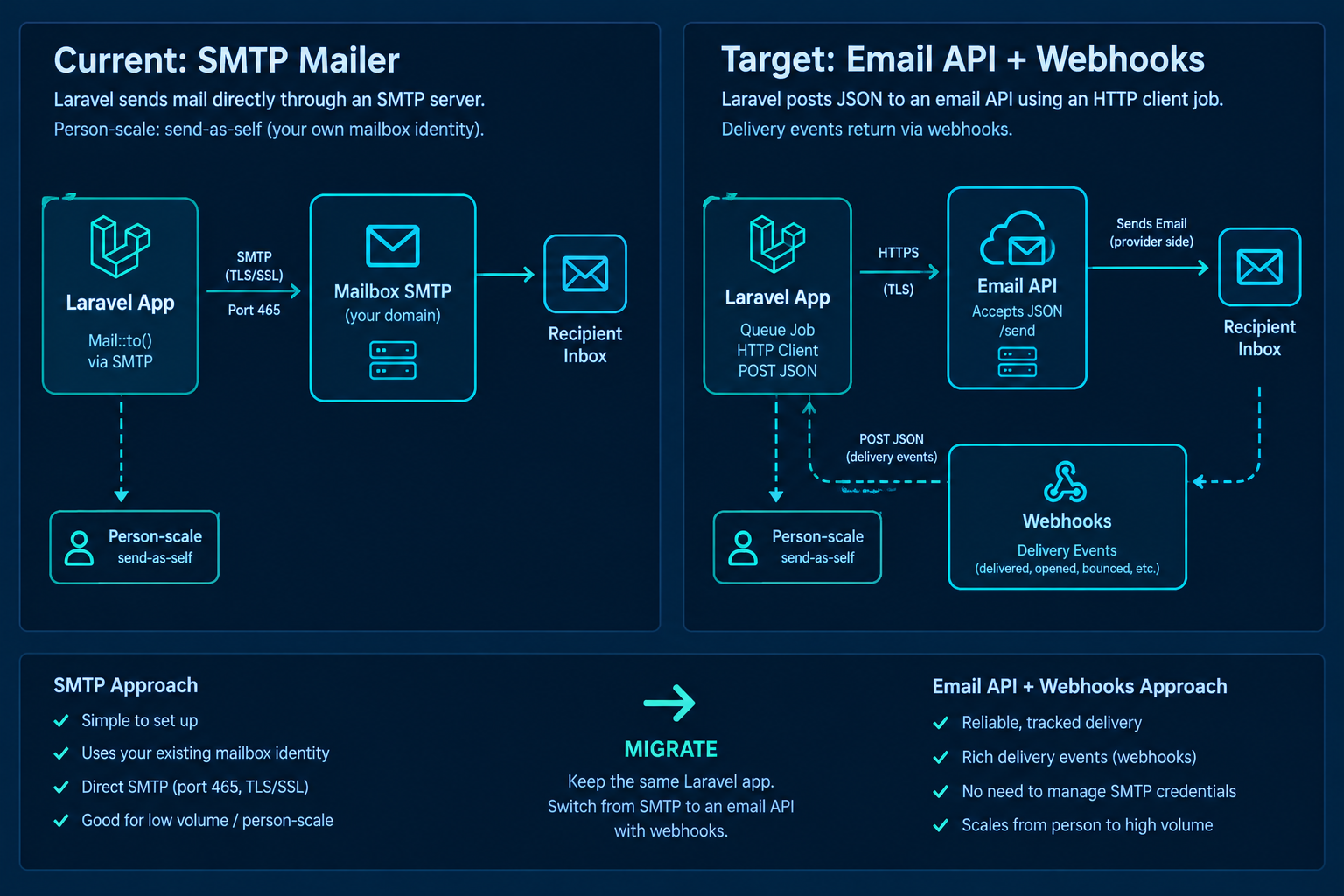
Laravel already has a mailer. For app volume, use an HTTP email API instead.
Most Laravel applications start with config/mail.php and the Mail facade. That is a good fit when the transport really is a mailbox: a person-scale message, one From address, a credential that belongs to that mailbox. It is a poor default once the application itself is sending transactional email — receipts, “your invoice is ready” notes, security alerts, “your export is ready” messages — at product volume.
Rovela’s SMTP is mailbox SMTP, not a high-volume application relay. You point a mail app at mx.rovela.dev on port 465 with SSL/TLS, sign in with the mailbox’s full address and a device credential, and the mailbox can send only as itself. The documented client limit is 30 messages a minute from one client address, and 50 recipients per message. That covers a person or a small app; it is not how a Laravel queue should ship customer mail.
Programmatic volume uses the Email API: POST https://api.rovela.dev/emails with Authorization: Bearer re_…. There is no official SDK and no Composer package you must install. Laravel’s HTTP client (Http::) is enough. This guide is that migration — not an OTP tutorial, and not a walkthrough of Laravel’s task scheduler. Those already have their own posts.
If you want the product-level comparison first, start with Email API vs SMTP and Email API vs SMTP relay.
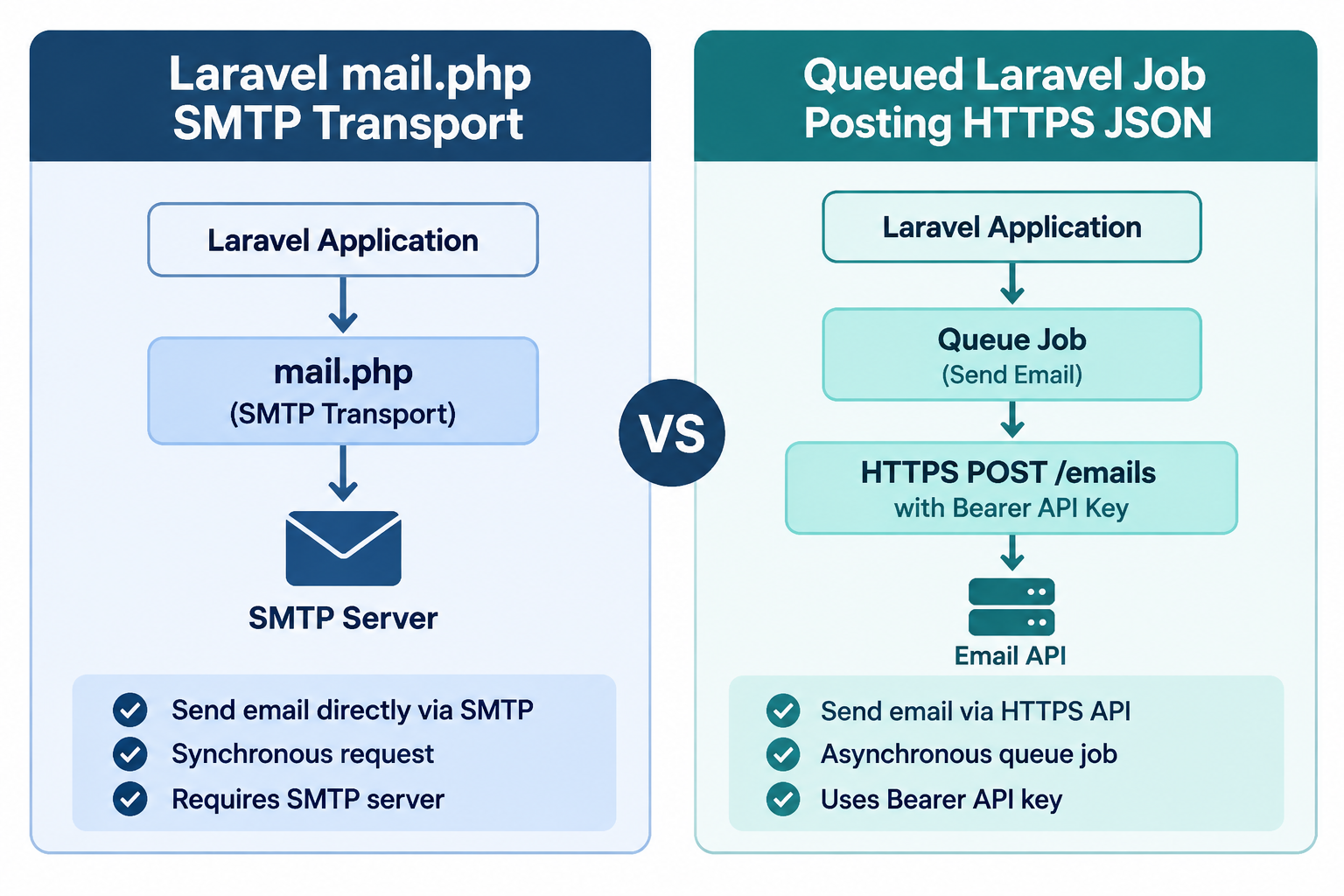
What has to be true before Laravel can send
The Quick Start and Send your first email do not change because the caller is PHP:
- Create an account. The free plan sends real mail. There is no sandbox and no test key that behaves differently.
- Add and verify a sending domain. A subdomain such as
mail.example.comis a common way to keep transactional reputation separate from the root domain. An unverified or foreignfromis refused with a 400 that names the domain. - Create an API key. Use
sending_accessfor the Laravel worker that only sends. Usefull_accessonly for tooling that must read message events or manage domains, templates, and webhooks. The full key is shown once; store it in the environment, never in source control or a frontend asset. - Send
POST /emails. - Confirm delivery in the dashboard, with
GET /emails/:idorGET /emails/:id/events(full_accessor a session), or with a webhook. HTTP 200 means accepted and queued, not delivered.
from is documented as a string like "Acme <hello@yourdomain.com>" and must be on a verified sending domain. That is the same ownership proof behind domain email. At least one of html, text, or template is required; send both html and text when you can (HTML email API).
Replace the SMTP mailer with a small HTTP action
Add the key to .env and config/services.php. Do not point MAIL_MAILER=smtp at mx.rovela.dev for this traffic.
// config/services.php
'rovela' => [
    'key'  => env('ROVELA_API_KEY'),
    'from' => env('ROVELA_FROM', 'Acme <hello@mail.acme.com>'),
    'base' => 'https://api.rovela.dev',
],
A focused service class keeps every send on the documented fields:
<?php

namespace App\Services;

use Illuminate\Support\Facades\Http;
use Illuminate\Http\Client\RequestException;

class RovelaEmails
{
    public function send(
        string $to,
        string $subject,
        string $html,
        string $text,
        ?string $idempotencyKey = null,
        ?string $replyTo = null,
    ): array {
        $request = Http::withToken(config('services.rovela.key'))
            ->acceptJson()
            ->asJson();

        if ($idempotencyKey) {
            $request = $request->withHeaders(['Idempotency-Key' => $idempotencyKey]);
        }

        $payload = [
            'from'    => config('services.rovela.from'),
            'to'      => $to,
            'subject' => $subject,
            'html'    => $html,
            'text'    => $text,
        ];
        if ($replyTo) {
            $payload['reply_to'] = $replyTo;
        }

        $response = $request->post(config('services.rovela.base').'/emails', $payload);

        if ($response->status() === 200) {
            return $response->json(); // ["object" => "email", "id" => "..."]
        }

        $response->throw();
        throw new RequestException($response);
    }
}
Http::withToken() sends Authorization: Bearer …, which is exactly what Authentication asks for. The curl form of the same call is:
curl -X POST https://api.rovela.dev/emails \
  -H "Authorization: Bearer $ROVELA_API_KEY" \
  -H "Content-Type: application/json" \
  -H "Idempotency-Key: invoice-10043-ready" \
  -d '{
    "from": "Acme <hello@mail.acme.com>",
    "to": "alice@example.com",
    "subject": "Your invoice is ready",
    "html": "<p>Invoice 10043 is ready to view.</p>",
    "text": "Invoice 10043 is ready to view."
  }'
A successful body is {"object": "email", "id": "9f1c2e40-..."}. Persist that id on the invoice, order, or user event you just emailed.
Put the send on a queued job, and make retries safe
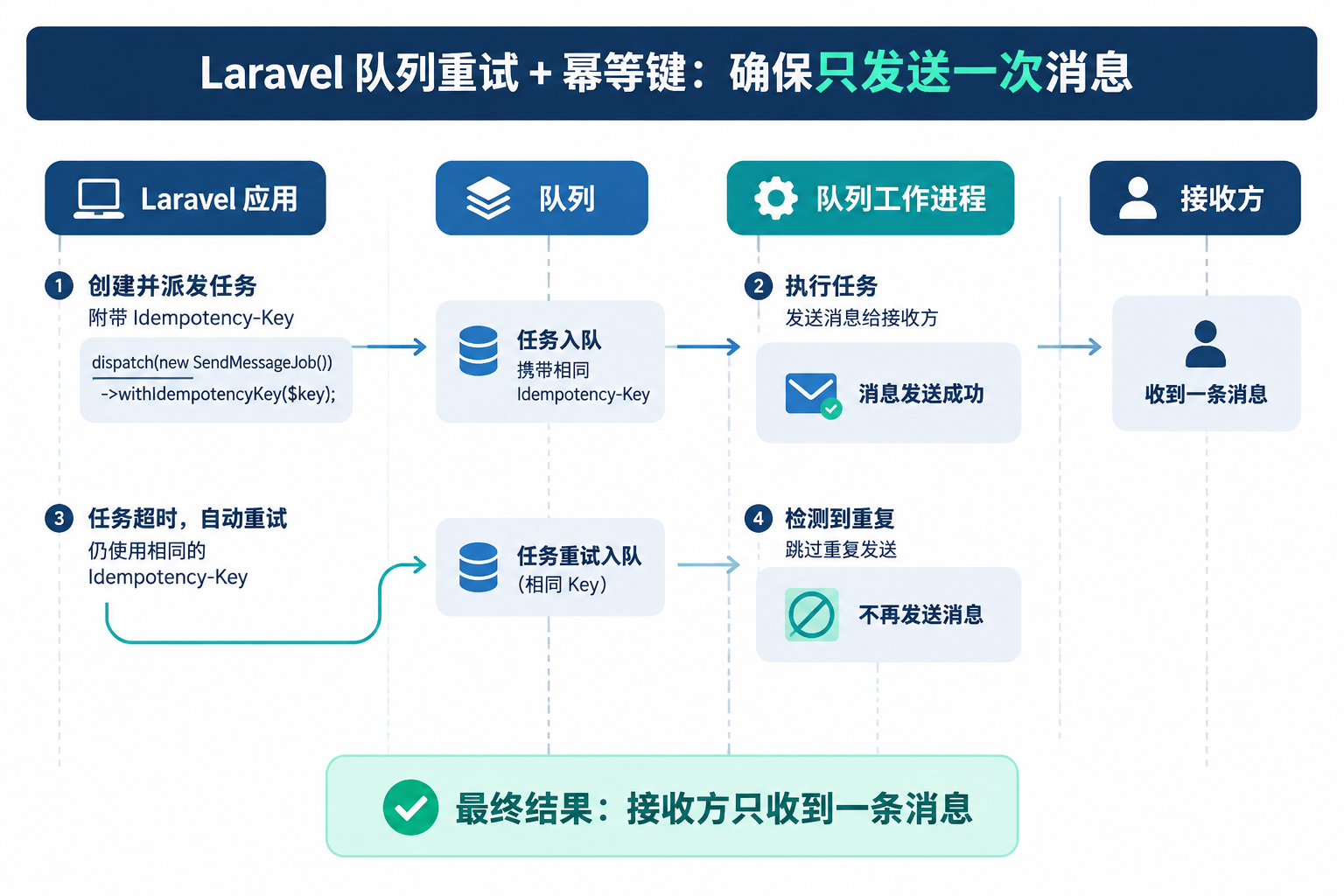
Laravel’s queue is the usual reason people keep a mailer: the HTTP request should not wait on a mailbox. The same instinct applies here, with one extra header. An Idempotency-Key may be up to 256 characters. A retry of the same request within 24 hours returns the original response instead of sending again. That is the difference between “the job ran twice” and “the customer received two invoices.”
<?php

namespace App\Jobs;

use App\Services\RovelaEmails;
use Illuminate\Bus\Queueable;
use Illuminate\Contracts\Queue\ShouldQueue;
use Illuminate\Foundation\Bus\Dispatchable;
use Illuminate\Queue\InteractsWithQueue;
use Illuminate\Queue\SerializesModels;

class SendInvoiceReadyEmail implements ShouldQueue
{
    use Dispatchable, InteractsWithQueue, Queueable, SerializesModels;

    public function __construct(public int $invoiceId) {}

    public function handle(RovelaEmails $emails): void
    {
        $invoice = \App\Models\Invoice::findOrFail($this->invoiceId);

        $result = $emails->send(
            to: $invoice->customer_email,
            subject: "Your invoice {$invoice->number} is ready",
            html: "<p>Invoice {$invoice->number} is ready to view.</p>",
            text: "Invoice {$invoice->number} is ready to view.",
            idempotencyKey: "invoice-{$invoice->id}-ready",
            replyTo: "Acme Billing <billing@acme.com>",
        );

        $invoice->forceFill(['last_email_id' => $result['id']])->save();
    }
}
reply_to is optional and does not replace a verified from. It is where a human reply should go (Email API Reply-To). If you need a teammate to see the outbound copy, that is cc, and cc/bcc count toward the 50-recipient cap and toward monthly quota (Email API CC and BCC). Quota is charged per recipient, not per message.
You can still render Blade (or a stored template) to produce $html and $text. What you should not do is implement a custom Laravel “Rovela transport” that pretends Rovela SMTP is an app relay, or invent a package that wraps undocumented endpoints.
Handle the documented error envelope
Errors use one shape (Quick Start, Email API error handling):
{
  "statusCode": 400,
  "name": "Bad Request",
  "message": "html or text body is required"
}
In the service, read those fields from the response body and log message as-is:
- 400 — missing required field, unverified or foreign
fromdomain, missing template, attachment base64 that does not decode, or more than 50 recipients acrossto,cc, andbcc. - 401 — missing or invalid key, or a
sending_accesskey used to read, reschedule, or cancel. Event reads needfull_accessor a dashboard session. - 429 — rate limit or monthly allowance. Official examples mention
Retry-After. Each message inPOST /emails/batchcounts individually. If you use up the monthly allowance, sending stops until the next calendar month unless you upgrade; unused emails do not carry over (Pricing).
A valid key used on a management endpoint it is not allowed to call can return 403 (for example GET /domains with sending_access). That is not “the key is wrong”; it is “the key is not allowed to do this.”
Do not invent a /logs endpoint. Look at the Emails view in the dashboard, or GET /emails/:id and GET /emails/:id/events.
Confirm delivery outside the job
The job’s job is to get a 200 and an id. Delivery happens afterwards:
- Dashboard Emails, for a single message you are staring at.
GET /emails/:id/eventswith afull_accesskey, looking foremail.sentthenemail.delivered, oremail.bounced(Email delivery status API).- A webhook for production. Verify the HMAC-SHA256 signature over
"<timestamp>.<raw body>"(webhook security).
Do not poll events inside the queued job, and do not substitute Laravel’s scheduler for webhooks. Recurring or scheduled sends are a different topic (scheduled_at, cancel, reschedule — already covered in scheduled email sending and Laravel’s task scheduler). sending_access cannot cancel or reschedule; that needs full_access or a session.
POST /emails/batch sends up to 100 messages, each processed independently. template and topic_id are rejected on the batch endpoint; send those through POST /emails.
What to do with existing Mailables
You do not have to delete every Mailable on day one. A practical sequence that stays inside documented behavior:
- Keep mailbox SMTP for the few messages a person actually sends from a Rovela business mailbox — Outlook, Apple Mail, or a support agent composing in webmail. Those clients should use the device credential and
mx.rovela.dev:465. That path is still the right one for human mail, and every plan includes mailboxes. - For application mail that today lives in a Mailable, keep the Blade (or Markdown) view as the source of
html, produce a matchingtextbody, and call the HTTP service above instead ofMail::to(...)->send(...). The view is yours; the transport isPOST /emails. - If a notification channel is the only caller, swap the channel’s send method so it calls
RovelaEmailsrather than the SMTP mailer. Do not invent a third-party “Rovela notification package” as a requirement — a small class in your app is enough, because the API is plain HTTP and JSON. - When you still want Rovela to store the body, use a template and send
{ "id": "...", "variables": { ... } }throughPOST /emails.templateis mutually exclusive withhtmlandtext. Templates are not accepted onPOST /emails/batch.
Two failure modes are worth calling out during a migration. First, developers sometimes copy the mailbox username and device password into MAIL_USERNAME / MAIL_PASSWORD and assume they can set MAIL_FROM_ADDRESS to any address on the domain. Mailbox SMTP will not do that: a mailbox can send only as itself. The HTTP API is what lets from be any address on a verified domain, in the documented "Acme <hello@mail.acme.com>" form. Second, a staging app that “just sends to a real inbox” is expected — there is no sandbox — so restrict recipients and use a verified staging subdomain, as in the test transactional email API guide.
Once those two points are clear, the rest of Laravel (queues, Horizon, failed-job retries, invoice numbers in the idempotency key) is ordinary application structure around a documented HTTP call.
A Laravel checklist that stays inside the docs
- Verify the sending domain (or a sending subdomain) used in
from. - Put a
sending_accesskey in.env. Never commit it, and never send it to the browser. - Call
POST /emailswith Laravel’s HTTP client, not mailbox SMTP, for application volume. - Send
htmlandtext. Setreply_towhen someone should be able to answer. - Dispatch a queued job, and give every retried send a stable
Idempotency-Key. - Handle 400, 401, and 429 from the documented envelope. Treat 200 as queued.
- Confirm delivery with webhooks (or the events API when debugging one message).
- Leave
mx.rovela.dev:465to people and mail apps — send-as-self, 30 messages a minute, no HTTP tracking.
Laravel’s mailer is not the enemy. It is simply the wrong transport once the sender is your application rather than a person’s mailbox. Moving that traffic onto POST /emails gives you message ids, idempotent retries, and delivery webhooks without inventing an official PHP SDK that does not exist.