Flask Transactional Email API (2026): Send App Mail from Flask with Rovela’s HTTP API
A first-principles Flask guide to transactional email: a requests helper in your app factory, a Bearer key in config, documented POST /emails fields, and why mailbox SMTP is the wrong default for Flask app volume. No official SDK.
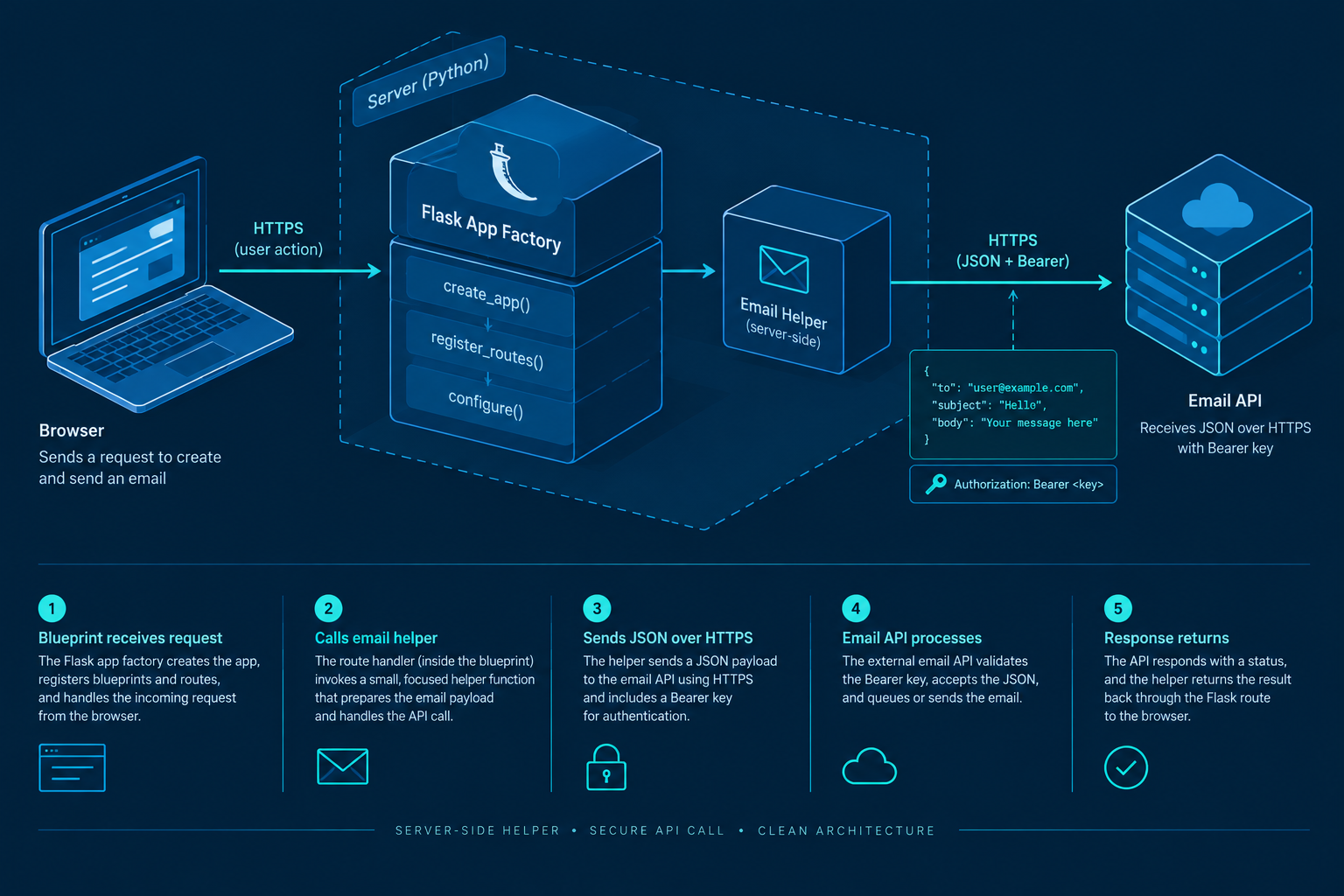
Flask does not need a mail extension to send transactional email
A Flask application is a Python HTTP service. Sending transactional email — a receipt, an “invoice is ready” note, a security alert, a “your export is ready” message — can be the same kind of call: JSON over HTTPS, with a Bearer key, from the server.
Rovela’s Email API is that call. There is no official SDK and no Flask extension you have to install. The base URL is https://api.rovela.dev. You authenticate with Authorization: Bearer re_… (Authentication) and queue a message with POST /emails. A 200 response is {"object": "email", "id": "..."} and means the message was accepted and queued, not that it has arrived (Quick Start).
Flask coverage is otherwise missing from this blog, and this guide is deliberately not a generic “send email with Python” tour, not an OTP walkthrough, and not a FastAPI article with the framework name swapped. FastAPI’s async client and dependency injection are a different shape. Flask’s default is synchronous WSGI, an app factory, blueprints, and current_app.config. The helper below follows that shape.
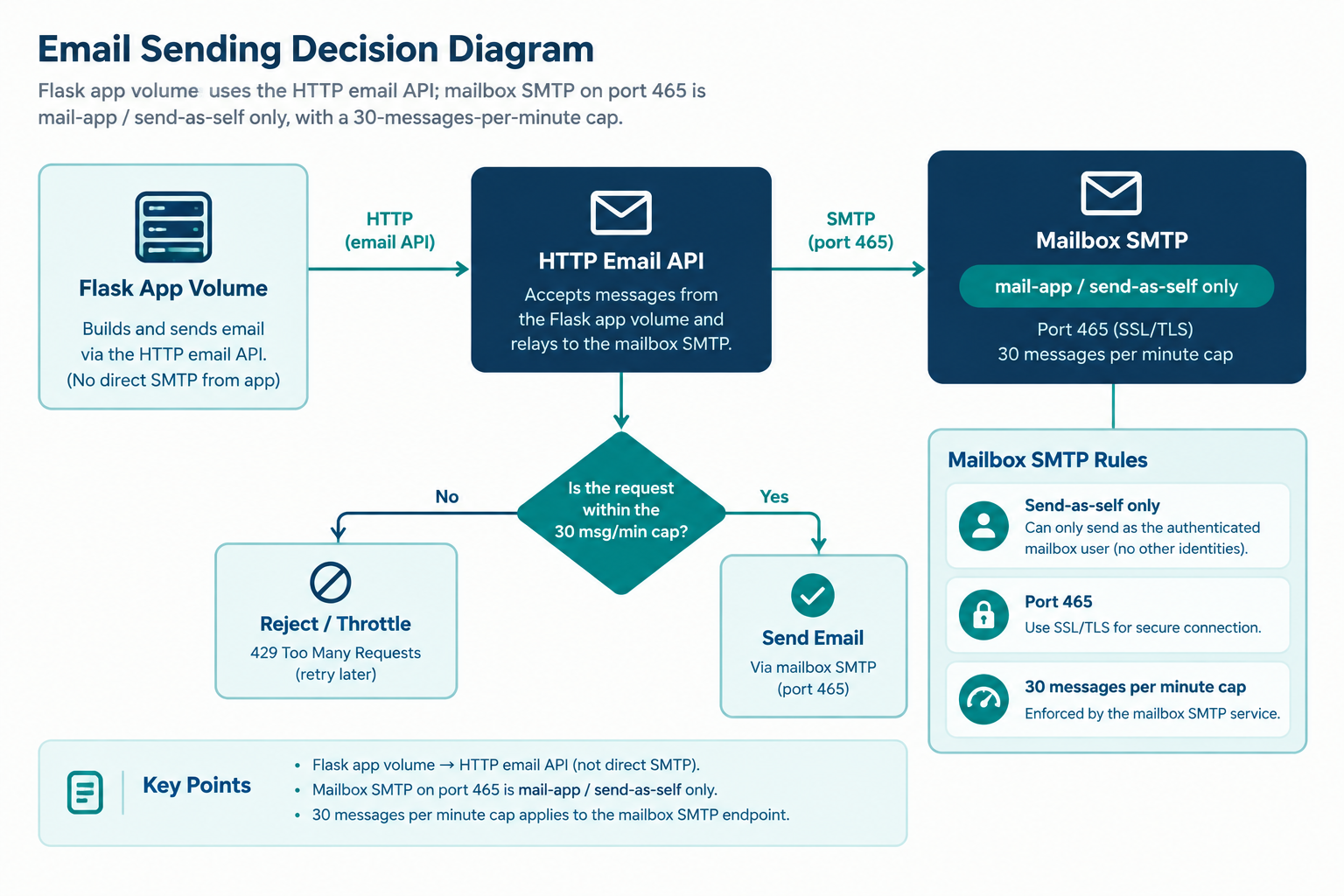
If you are choosing a transport, read Email API vs SMTP. Rovela’s SMTP is mailbox SMTP for mail apps: mx.rovela.dev on port 465, a device credential, send-as-self, 30 messages a minute from one client address. Programmatic volume from a Flask process belongs on POST /emails.
Before you add a helper, verify a domain and create a key
The first-email guide is the same five steps:
- Create an account. The free plan sends real mail. There is no sandbox and no test key.
- Add and verify a sending domain. A subdomain such as
mail.example.comis a common choice. An unverified or foreignfromis refused with a 400 that names the domain. - Create an API key.
sending_accesscan send and nothing else — the right default for a Flask app.full_accesscan also read messages and events and manage domains, templates, and webhooks. The full key is shown once. - Send with
POST /emails. - Confirm delivery in the dashboard, with
GET /emails/:idorGET /emails/:id/events(full_accessor a session), or with a webhook.
from is documented as "Acme <hello@yourdomain.com>" and must be on a verified sending domain. That is the ownership proof behind domain email. At least one of html, text, or template is required; send both html and text when you can (HTML email API).
Keep the key in the environment, not in a committed config file, a template, or any JavaScript you ship to a browser. A leaked sending_access key can send mail as your domain.
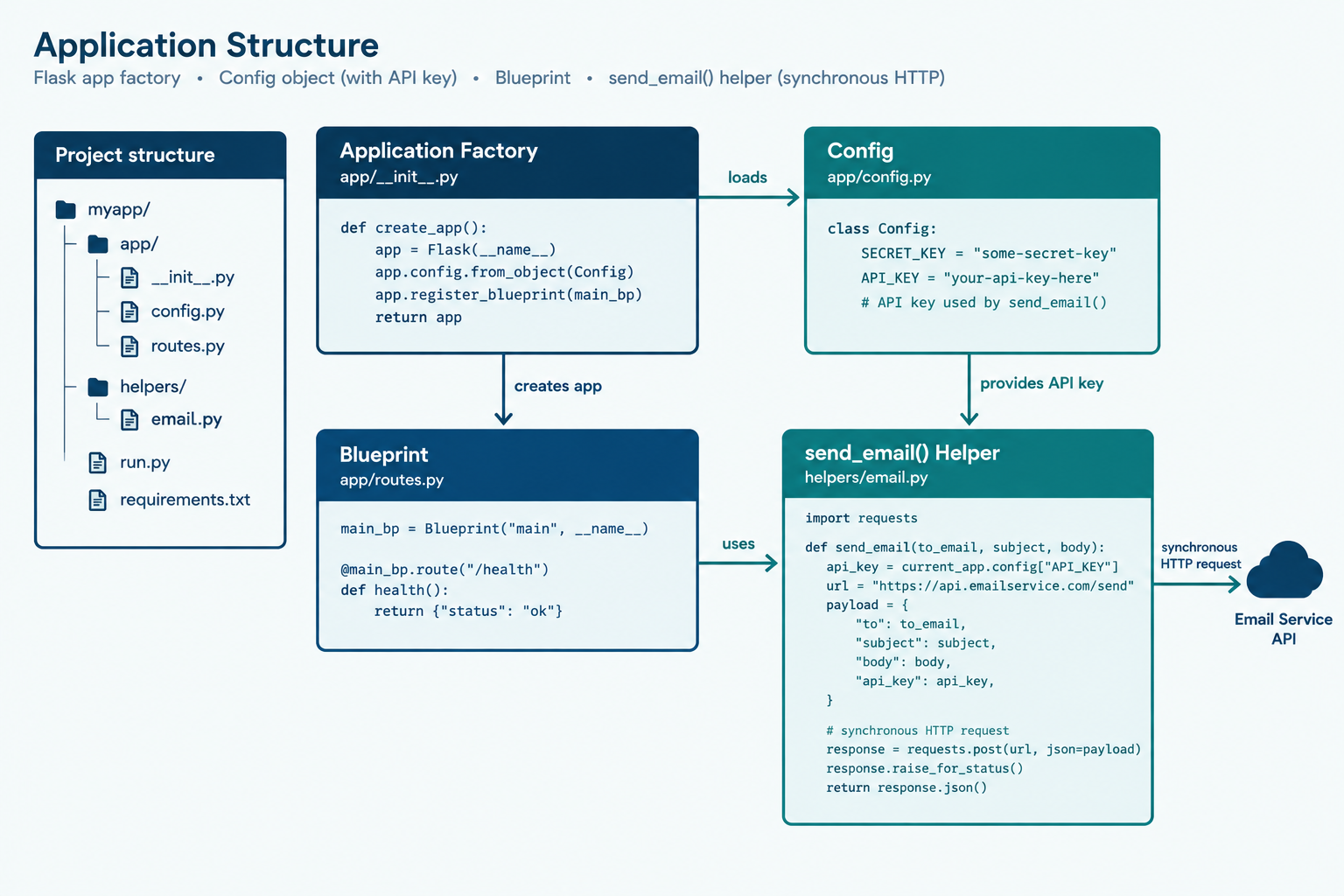
An app-factory helper with the documented fields
# emails.py
import requests
from flask import current_app

class EmailSendError(Exception):
    def __init__(self, status_code, payload):
        self.status_code = status_code
        self.payload = payload
        super().__init__(payload.get("message") or str(payload))

def send_email(*, to, subject, html, text, idempotency_key=None, reply_to=None):
    headers = {
        "Authorization": f"Bearer {current_app.config['ROVELA_API_KEY']}",
        "Content-Type": "application/json",
    }
    if idempotency_key:
        headers["Idempotency-Key"] = idempotency_key
    payload = {
        "from": current_app.config["ROVELA_FROM"],
        "to": to,
        "subject": subject,
        "html": html,
        "text": text,
    }
    if reply_to:
        payload["reply_to"] = reply_to
    resp = requests.post(
        "https://api.rovela.dev/emails",
        headers=headers,
        json=payload,
        timeout=30,
    )
    data = resp.json() if resp.content else {}
    if resp.status_code == 200:
        return data  # {"object": "email", "id": "..."}
    raise EmailSendError(resp.status_code, data)
# app.py
import os
from flask import Flask, request, jsonify
from emails import send_email, EmailSendError

def create_app():
    app = Flask(__name__)
    app.config["ROVELA_API_KEY"] = os.environ["ROVELA_API_KEY"]
    app.config["ROVELA_FROM"] = os.environ.get(
        "ROVELA_FROM", "Acme <hello@mail.acme.com>"
    )

    @app.post("/invoices/<invoice_id>/email")
    def email_invoice(invoice_id):
        invoice = load_invoice(invoice_id)  # your code
        try:
            result = send_email(
                to=invoice["customer_email"],
                subject=f"Your invoice {invoice['number']} is ready",
                html=f"<p>Invoice {invoice['number']} is ready to view.</p>",
                text=f"Invoice {invoice['number']} is ready to view.",
                idempotency_key=f"invoice-{invoice['id']}-ready",
                reply_to="Acme Billing <billing@acme.com>",
            )
        except EmailSendError as exc:
            current = exc.payload
            return jsonify(current), exc.status_code
        return jsonify({"email_id": result["id"]})

    return app
The curl equivalent, using the same path, fields, and header, is:
curl -X POST https://api.rovela.dev/emails \
  -H "Authorization: Bearer $ROVELA_API_KEY" \
  -H "Content-Type: application/json" \
  -H "Idempotency-Key: invoice-10043-ready" \
  -d '{
    "from": "Acme <hello@mail.acme.com>",
    "to": "alice@example.com",
    "subject": "Your invoice is ready",
    "html": "<p>Invoice 10043 is ready to view.</p>",
    "text": "Invoice 10043 is ready to view."
  }'
An Idempotency-Key may be up to 256 characters. A retry of the same request within 24 hours returns the original response instead of sending again. That matters in Flask as soon as a user double-submits, a WSGI worker times out and retries, or a Celery task runs twice. reply_to is optional and is not a substitute for a verified from (Email API Reply-To). cc and bcc count toward the 50-recipient cap and toward monthly quota, which is charged per recipient, not per message (Email API CC and BCC).
requests is used here because it is the usual synchronous client in Flask apps. urllib works equally well. Neither is an official Rovela library.
Errors, blocking calls, and how to test without a sandbox
Every error uses the same shape (Quick Start, Email API error handling):
{
  "statusCode": 400,
  "name": "Bad Request",
  "message": "html or text body is required"
}
Return or log that message as-is:
- 400 — missing required field, unverified or foreign
fromdomain, missing template, attachment base64 that does not decode, or more than 50 recipients acrossto,cc, andbcc. - 401 — missing or invalid key, or a
sending_accesskey used to read, reschedule, or cancel a message. - 429 — rate limit or monthly allowance. Official examples mention
Retry-After. Each entry in a batch counts individually. If you exhaust the monthly allowance, sending stops until the next calendar month unless you upgrade (Pricing).
A 403 on a management endpoint such as GET /domains means the key is valid but not allowed to do that. A production Flask app should usually hold only sending_access. Use a separate full_access key when you need GET /emails/:id/events.
Flask’s request thread is synchronous. A 30-second HTTP timeout is a long time to block a worker. For a low-traffic admin action, calling send_email in the view is acceptable. For anything a user can trigger often, push the send onto a task queue (Celery, RQ, and similar) and pass a stable Idempotency-Key. This article is not a redo of those schedulers; the point is that the worker still calls POST /emails, not mailbox SMTP.
There is no test mode. Free-plan keys send real mail. Rehearse with a verified staging subdomain and recipients you control (test a transactional email API). In unit tests, stub send_email. In a live rehearsal, confirm with the dashboard or with the events API.
Delivery is asynchronous, same as every other integration
A 200 is not a delivery receipt. Confirm later:
- The Emails view in the dashboard.
GET /emails/:idandGET /emails/:id/eventswith afull_accesskey, looking foremail.sentthenemail.delivered, oremail.bounced(Email delivery status API).- A webhook for production. Verify the HMAC-SHA256 signature over
"<timestamp>.<raw body>"(webhook security).
Do not poll the events endpoint from the Flask view that just sent the message. The docs recommend webhooks for anything systematic.
POST /emails/batch accepts up to 100 messages, processed independently. template and topic_id are rejected on the batch endpoint; send those through POST /emails. scheduled_at queues a future send; cancel and reschedule need full_access or a session. See the batch and scheduled email guides rather than repeating them here. Stored bodies go through the Templates API; template is mutually exclusive with html and text.
SMTP, Flask-Mail, and other traps
It is tempting to configure Flask-Mail, or any SMTP library, against mx.rovela.dev:465 with a mailbox address and a device credential. That works for a mail app, and it is documented for that use. It is the wrong default for a Flask product:
- A mailbox can send only as itself. You cannot pick an arbitrary
fromon the domain the way the HTTP API allows on a verified domain. - The documented client limit is 30 messages a minute from one client address, plus 50 recipients per message.
- You do not get the HTTP API’s open and click tracking, logs, or webhooks (SMTP, Email API vs SMTP relay).
Human mail still belongs on business mailboxes and webmail at rovela.email. Application mail belongs on POST /emails.
Do not invent an official Python client, a sandbox flag, dedicated IPs, numeric HTTP rate (req/s) figures, or a /logs endpoint. If you send for several customers from one organization, restrict a key to a single domain (Authentication, Email API for multi-tenant SaaS).
One more practical note on HTML rendering: Flask’s templates (Jinja) are a fine way to produce the html string, and a second, simpler template can produce text. Render them on the server, then pass the strings into send_email. Do not try to “stream a template id” through some unofficial field — the documented way to reuse a stored body is the templates guide, via the template object on POST /emails. And do not put user-controlled HTML into a message without the same escaping you already use on any page you render. The Emails API will send the body you give it; it will not invent a sanitizer on your behalf.
A Flask checklist
- Verify the sending domain used in
from. - Load a
sending_accesskey in the app factory from the environment. - Put a small
send_emailhelper next to your blueprints; keep the key on the server. - Send both
htmlandtext. Setreply_towhen a human should be able to answer. - Add an
Idempotency-Keyfor any send a retry, queue, or double submit might repeat. - Handle 400, 401, and 429 from the documented envelope. Treat 200 as queued.
- Confirm delivery with a signature-verified webhook, or with the events API when debugging one message.
- Leave mailbox SMTP to people and mail apps.
Flask does not need a special email stack. It needs one documented HTTP call, made from the server, with a verified from and an idempotency key you can trust when the worker runs twice. That is a complete transactional email API integration for a Flask app.