Replit Agents Transactional Email API (2026): Send an In-App Notification Email from an Agent-Built App with POST /emails
After an app built by Replit Agents already records a new in-app activity, email the recipient a short notice and a deep link with Rovela POST /emails. No official Replit plugin. Rovela does not render the in-app inbox.
A Replit Agent in-app notice is not a coding-assistant primer, a comment mention, or a generic notification API tour
When a Replit Agent has already built a working app — a users table, an in-app activity or inbox, and a deep link you minted after recording a new event — that backend still has to tell the recipient: “You have a new notification,” plus the deep link you already have. That send is transactional email. It is not a product newsletter, and it is not a rewrite of send email from an AI coding agent, the generic email notification API tour, or the comment mention guide. Those tutorials already exist. The coding-agent article is about Cursor or Claude placing an HTTP send while scaffolding code. This article is about the product Replit Agents just built: an activity already exists in your app (a new assignment, a new message, a status change), and the user should be able to open it from their inbox. Rovela does not run Replit, render your in-app inbox, or talk to the Agent — this is your app’s own activity-notice event, sent through POST /emails. The recipient is the user who should see the activity. The call to action is “open in the app,” not “you were mentioned in a comment,” and not “here is today’s digest.”
This guide does not invent an official Replit plugin or a Rovela Agent tool. There is no client library to install. If the Agent offers to “just add SMTP,” point it at the HTTP email API instead of mailbox SMTP, and never let it paste the key into client code or the Replit chat. Send from a domain you verified, with DKIM and an Idempotency-Key.
Keep the message specific: one activity, one deep link, one recipient. A nightly digest is a different job (and a good fit for documented POST /emails/batch or scheduled_at later). The deep link is yours. Rovela only delivers the notice.
What you need before the first in-app activity notification
The first-email guide and the Quick Start are the same five steps, whether you call curl or a server-side fetch from the backend the Replit Agent generated for your app:
- Create an account. The free plan sends real mail. There is no separate sandbox, and no test key that behaves differently from production.
- Add and verify a sending domain (often a subdomain such as
mail.example.com). An unverified or foreignfromis refused with a 400 that names the domain. The dashboard asks for four DNS records — SPF, DKIM, DMARC, and return-path. See the domain setup guide, the Domains API, and what an email domain is. - Create an API key. A
sending_accesskey can send and nothing else — the right default for a production in-app activity notification sender. Afull_accesskey can also read messages and events, and manage domains, templates, and webhooks. The full key is shown once. Keys look likere_…and go out as a bearer token (authentication, email API authentication). - Send with
POST /emails. - Confirm delivery in the dashboard, with
GET /emails/:idorGET /emails/:id/events(those reads needfull_accessor a dashboard session), or with a webhook.
from is a string in the documented form "Acme <notify@mail.example.com>". The address must sit on a verified sending domain. You prove you control the domain — that is what makes domain email trustworthy — before you speak as it. See the From name guide, the sending domains API, how email authentication works, how to set up domain email, and sending subdomain setup.
At least one of html, text, or template is required. template is a documented { id, variables } object and is mutually exclusive with html and text. Send both html and text where you can (HTML email API). Reusable copy can move to a template later; follow the templates guide. Examples here keep the copy inline.
Programmatic volume belongs on the HTTP email API, not on mailbox SMTP. Rovela SMTP is mailbox mail for Outlook, Apple Mail, or a phone: host mx.rovela.dev, port 465 with SSL/TLS, the mailbox’s full address, and a device credential (the same one that device uses for IMAP). A mailbox can send only as itself. For this in-app activity notification, start with email API vs SMTP.
An agent-built backend that sends only after the activity and deep link already exist
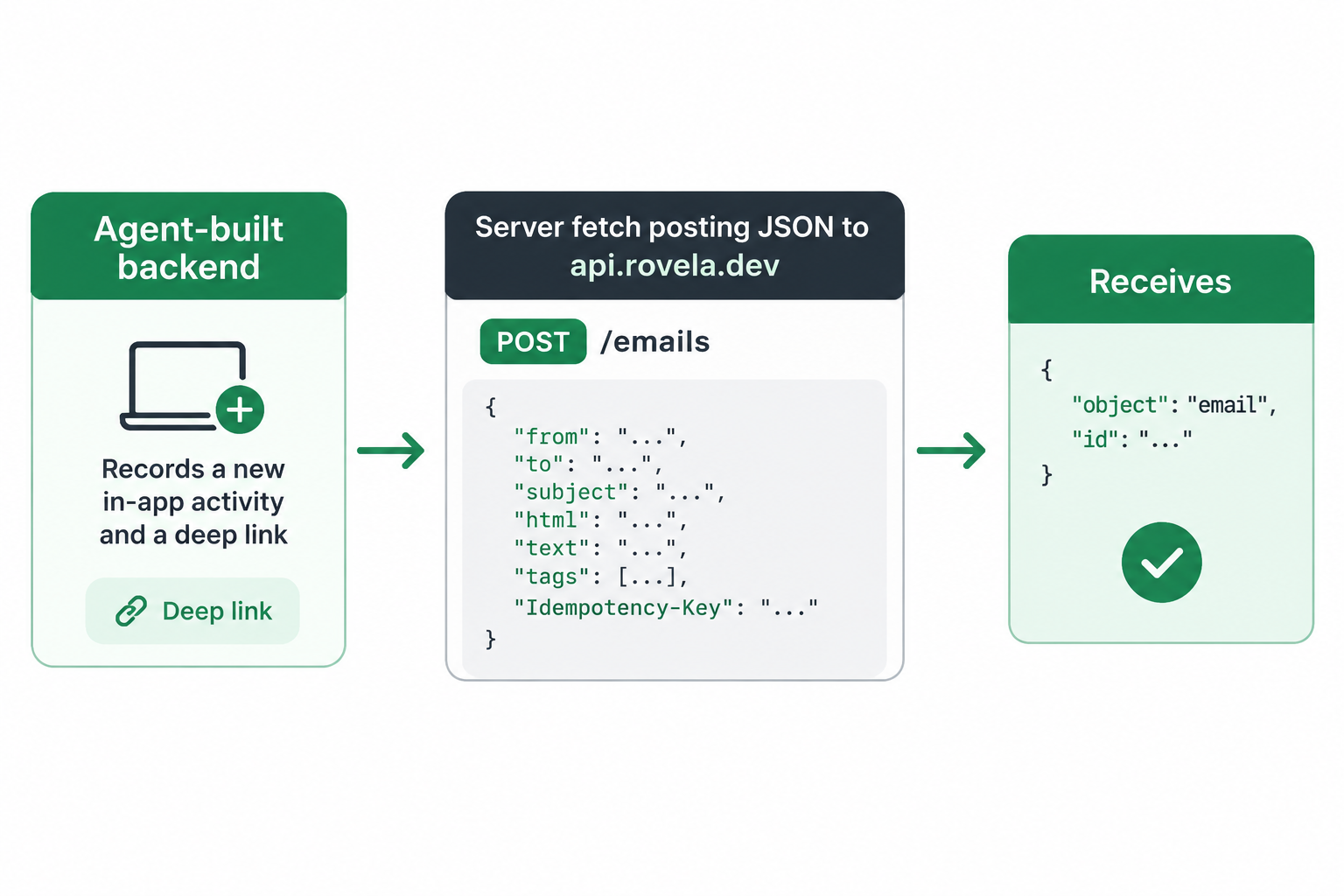
Replit Agents usually generate a backend you can host on Replit or elsewhere: a Node or Python server, a route, or a background worker. The notification email belongs there, after you have already written the activity row. The Agent may also generate a front end; that front end can show a bell icon, but it must never hold ROVELA_API_KEY.
Do the product work first, then the send. Insert the activity (actor, recipient, type, object id), mint a deep link on your domain such as https://app.example.com/inbox/evt_88, and only then call the Send Email API. Honor the recipient’s own notification preferences — if they muted email, skip the send and still keep the in-app item. If the insert fails, do not send.
There is no official Replit SDK for Rovela. A server-side fetch (or httpx) is enough:
// Agent-built server or worker — never the browser.
const openUrl = `https://app.example.com/inbox/${activityId}`;

const res = await fetch("https://api.rovela.dev/emails", {
  method: "POST",
  headers: {
    Authorization: `Bearer ${process.env.ROVELA_API_KEY}`,
    "Content-Type": "application/json",
    "Idempotency-Key": `replit-activity-notice-${activityId}-${userId}`,
  },
  body: JSON.stringify({
    from: "Acme <notify@mail.example.com>",
    to: user.email,
    subject: "You have a new notification",
    html:
      `<p>${summary}</p>` +
      `<p><a href="${openUrl}">Open in app</a></p>`,
    text: `${summary}\nOpen in app: ${openUrl}`,
    tags: { type: "activity-notice", source: "replit-agent-app" },
  }),
});

if (!res.ok) {
  const err = await res.json().catch(() => ({}));
  throw new Error(`rovela ${res.status}: ${err.message || res.statusText}`);
}

const { id } = await res.json();
Use a sending_access key. Keep summary short and specific (“Jordan assigned you ‘Q3 outline’”) rather than a vague “you have a notification.” The deep link should open the exact item. If many users need a personal copy of the same broadcast, use documented POST /emails/batch with one body per recipient, not a single to array of fifty teammates on a private notice.
Idempotency, recipients, and what a 200 actually means
Retries are normal. A server action, edge function, workflow, or queued job can time out after Rovela has already accepted the message. Send the documented Idempotency-Key header so a retry does not create a second in-app activity notification. A stable key such as replit-activity-notice-evt_88-user_02 is unique to this event, this recipient, and this token or invite version, and it stays the same when the HTTP call is repeated.
to accepts a string or an array. cc and bcc count toward billing and toward the documented cap of 50 recipients on one message. For a in-app activity notification, use a single to: the user who should see the new activity. If you need an owner copy, send a second, separately idempotent message instead of BCC-ing a shared inbox.
A 200 from POST /emails means accepted for delivery, not arrived. The body looks like {"object": "email", "id": "9f1c2e40-..."}. Delivery is asynchronous. Read state with GET /emails/:id or GET /emails/:id/events (those need full_access or a dashboard session). In production, subscribe to a webhook for email.sent, email.delivered, email.bounced, and related events instead of polling from the request that minted the in-app activity notification.
If the address is on the suppression list, the send can still return an id, but the message is not delivered and its status becomes suppressed. Check Suppressions in the dashboard before assuming the API failed. Rate limits are per key; a 429 means retry with backoff. Each message in a POST /emails/batch request counts individually.
Optional documented fields include reply_to, scheduled_at (an ISO 8601 timestamp in the future), tags, headers, and attachments as { filename, content (base64), content_type }. This in-app activity notification does not need an attachment. To queue a later follow-up, use scheduled_at — not a sleep in the request path. A batch is appropriate only when you truly have many different messages, up to 100 per request.
Errors you should handle in the agent-built app backend
Documented errors share one shape: statusCode, name, and message. Handle them once in the agent-built app backend.
- 400 — a missing required field, a
fromdomain that is not in your organization or is still unverified, a template that does not exist, a base64 attachment that does not decode, or more than 50 recipients on one message. Readmessage; it often names the domain or the missing field. Do not retry a 400 in a tight loop. - 401 — missing or invalid credential, or a missing
Bearerprefix. A revoked key looks the same from the client’s point of view. - 403 — a valid
sending_accesskey used on a management or read endpoint such asGET /emails/:idorGET /domains. The message says which permission is required. Keep the send path onsending_access; usefull_accessor the dashboard for status reads. - 429 — the per-key rate limit. Retry with backoff. Do not fan out a burst of in-app activity notification sends from an unqueued loop.
A leaked sending_access key can send mail as your domain. Keep ROVELA_API_KEY in the server or edge-function environment, never in the browser, a mobile client, a public page, or a chat transcript (email API authentication). There is no official client SDK to install; a standard HTTPS call is enough.
Delivery is asynchronous — do not poll from the agent-built app backend
After in-app activity notification is accepted, delivery continues in the background. The agent-built app backend should store the returned message id next to your own event record and return to the user. Watching the message from that same request with a tight GET /emails/:id loop will slow the sign-up, invite, or form path and still needs full_access.
For production, configure a webhook and follow the webhook overview. Typical events include email.sent, email.delivered, email.opened, email.clicked, and email.bounced (event reference). Use bounces to keep your own list clean; do not invent a /logs API — the documented reads are GET /emails/:id, GET /emails/:id/events, the dashboard Emails view, and webhooks.
If a in-app activity notification landed in spam, start with DNS rather than the HTTP call: confirm the DKIM record is published at the selector the dashboard gave you, that you have exactly one SPF record, and that DMARC is not p=reject on a brand-new domain with no sending history. Reputation takes weeks, not minutes (how email authentication works).
What not to do in this Replit Agent activity notice
Do not let the Agent hard-code a key in the repo, the front end, or the Replit Secrets screenshot you paste back into chat. Do not point the generated app at mailbox SMTP for volume notifications. Use the HTTP API.
Do not turn this notice into a comment mention tutorial or a marketing digest (transactional vs marketing). Do not invent a /logs endpoint or a dedicated IP. Do not poll GET /emails/:id from the activity request. Do not email users who opted out.
Rovela will not mark the in-app item read. Your app does that when the user opens the deep link.
A compact Replit Agent notification checklist
- Verify a sending domain and create a
sending_accesskey (Quick Start). - Write the activity and mint the deep link first; honor email preferences.
- Call
POST /emailsfrom the agent-built backend withIdempotency-Key,html, andtext. - Keep the key in Replit Secrets or your host’s env, never in client code.
- Use webhooks for bounces; a 200 only means accepted.
- Keep one activity and one deep link per message.