Payload CMS Transactional Email API (2026): Acknowledge a Support Ticket from an afterChange Hook with POST /emails
Send transactional email from Payload CMS with Rovela’s HTTP API: a collection afterChange hook, environment variables for the Bearer key, a ticket-received notice, and Idempotency-Key. Plain HTTP — not an invented Rovela-Payload plugin.
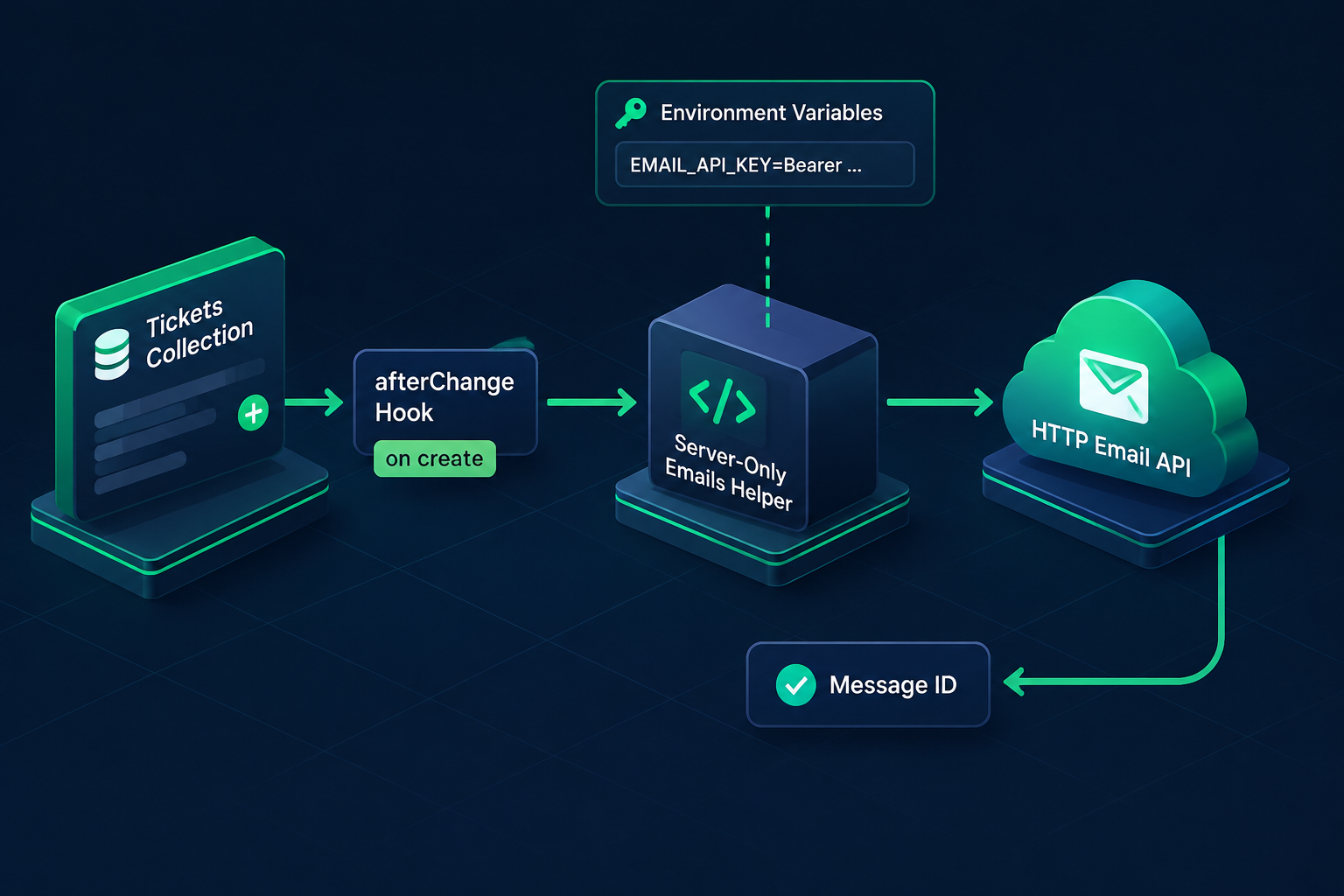
Payload already runs hooks on the server; transactional email belongs in afterChange, not in a plugin listing
A Payload CMS app already has a server: collection hooks, access functions, and custom endpoints all run in Node, where a secret can stay secret. Transactional email — “we received your support ticket,” a case that just landed in the queue, a note with the ticket number — is that kind of work. The natural way to send it is one HTTPS POST with a Bearer key from your own helper, not an SMTP session, and not a marketplace plugin this article would have to invent.
Rovela’s Email API is built for that. There is no client library to install and no official Rovela-Payload plugin in the public docs. Do not look for one in this guide. The base URL is https://api.rovela.dev. You authenticate with Authorization: Bearer re_… (Authentication) and queue a message with POST /emails. The response is a message id. HTTP 200 means the message was accepted and queued, not that it has already arrived (Quick Start).
This is not a redo of a one-time passcode tutorial, and it is not a contacts, topics, or broadcasts product tour. It is everyday app mail from Payload server code: a dedicated helper, environment variables for the key, a collection afterChange hook that sends after a support ticket is created, an Idempotency-Key on anything a retry or a double submit might repeat, and documented error handling around the {statusCode, name, message} envelope. The just-published Strapi guide covers a content-type lifecycle after an article is published; this article covers Payload’s hook model and a different story. Nearby language walkthroughs such as sending email in Node.js cover the runtime; this article covers the Payload shape.
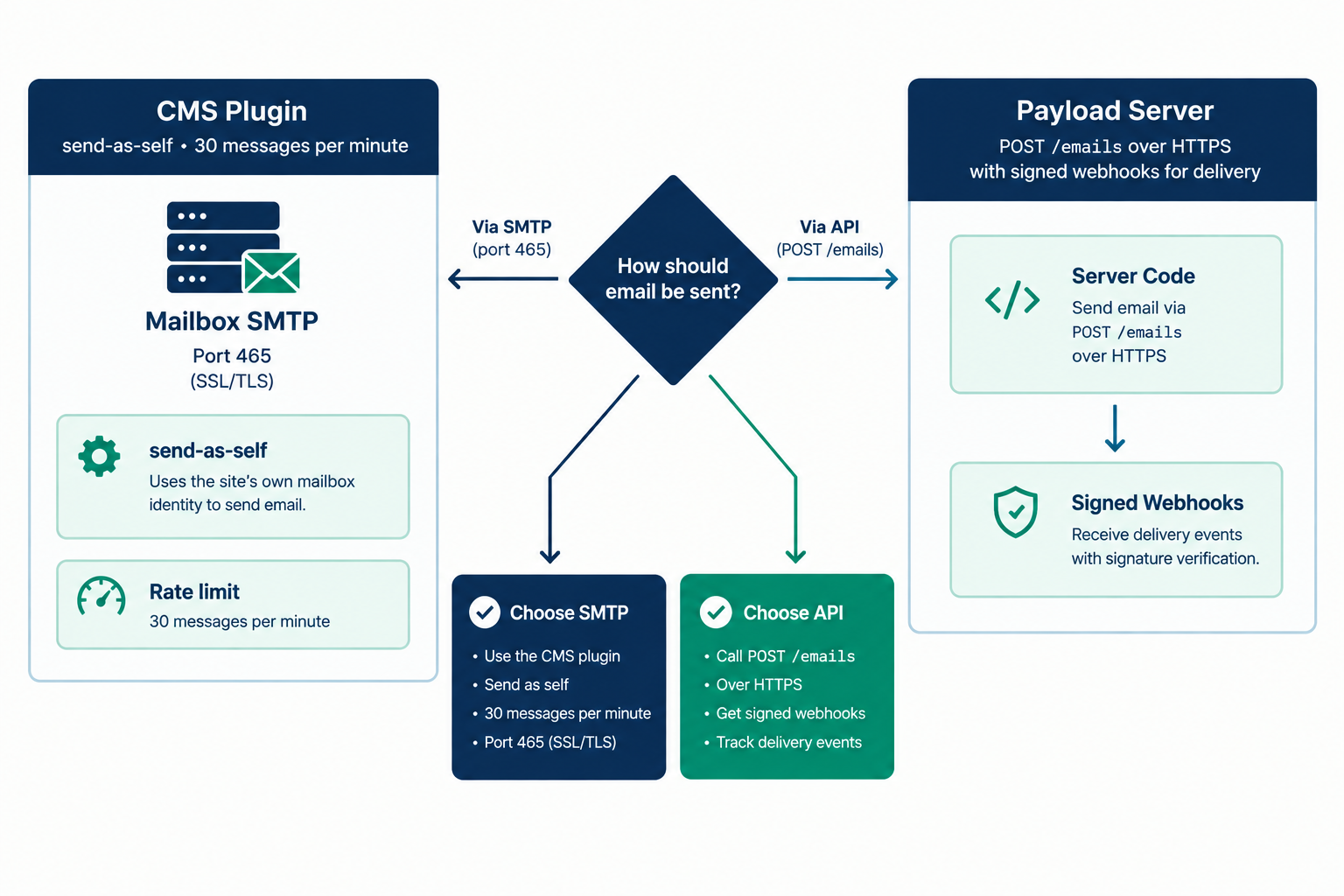
If you are still choosing between HTTP and SMTP, read Email API vs SMTP. Rovela’s SMTP is mailbox SMTP for mail apps (mx.rovela.dev:465, a device credential, send-as-self, 30 messages a minute from one client address). Programmatic volume from a Payload process belongs on POST /emails.
What you need before the first Payload send
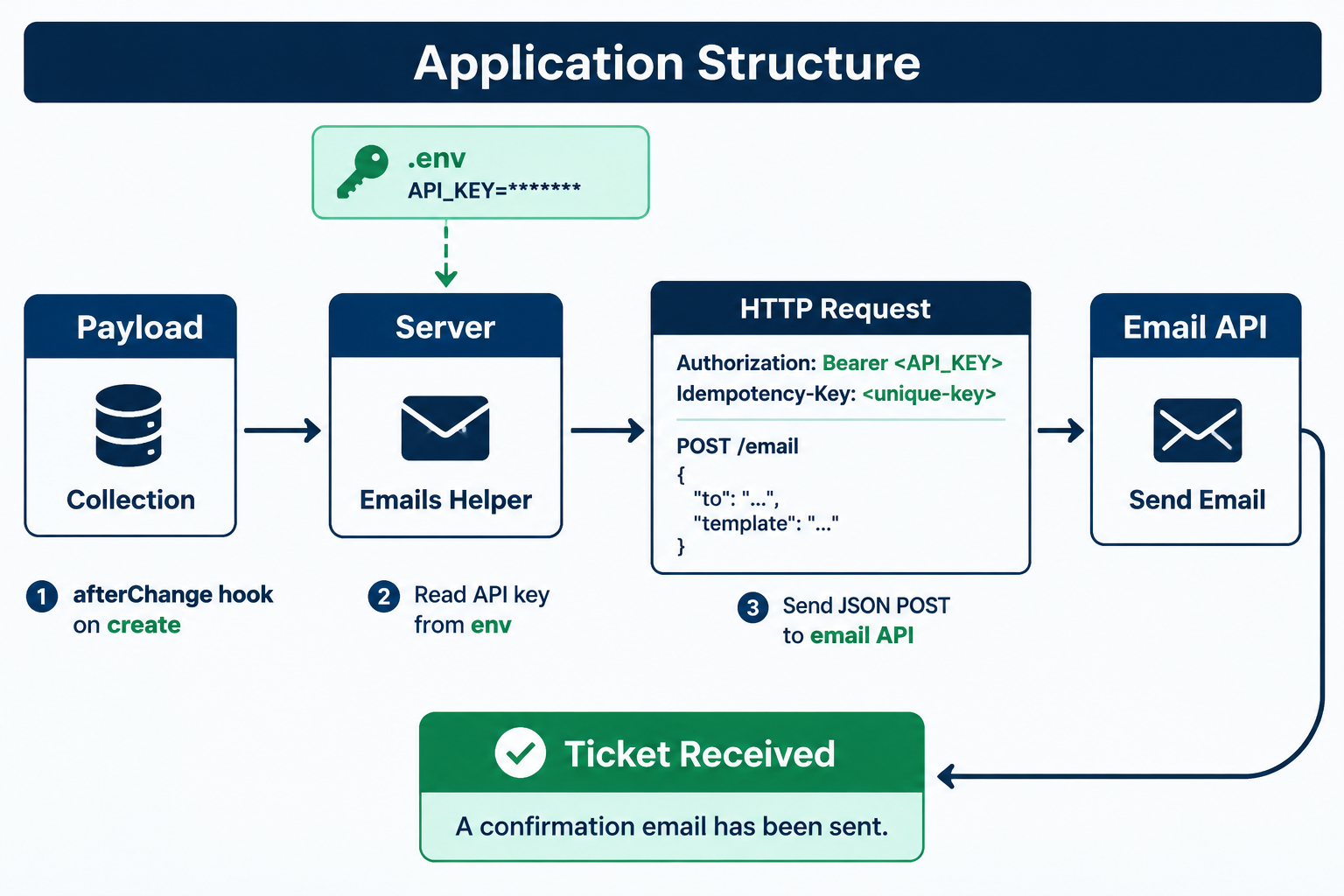
The first-email guide and the Quick Start are the same five steps, whether your caller is curl or fetch inside a Payload hook:
- Create an account. You start on the free plan, which sends real mail. There is no separate sandbox or test key.
- Add and verify a sending domain (a subdomain such as
mail.example.comis a common choice). You cannot send from a domain you have not verified; an unverified or foreignfromis refused with a 400 that names the domain. See the domain setup guide and what domain email is. - Create an API key. A
sending_accesskey can send and nothing else — the right default for production. Afull_accesskey can also read messages and events, and manage domains, templates, and webhooks. The full key is shown once. - Send with
POST /emails. - Confirm delivery in the dashboard, with
GET /emails/:idorGET /emails/:id/events(those reads needfull_accessor a dashboard session), or with a webhook.
from is a string in the documented form "Support <tickets@yourdomain.com>". The address must sit on a verified sending domain. That is the same rule that makes domain email trustworthy: you prove you control the domain before you speak as it. How the display name and the address work is covered in the From name guide.
At least one of html, text, or template is required. Send both html and text where you can — many clients preview the text part (HTML email API).
A server helper and environment variables
Keep the key on the server. Never put it in a public frontend folder, never return it from a custom Payload endpoint the browser can call for no reason, and never paste it into a rich-text or JSON field that is then returned as content. A leaked sending_access key can send mail as your domain.
Private values belong in .env and are read through process.env. A missing key should fail when the helper is first used, not halfway through creating a ticket. Payload 3 often sits on Next.js; that does not change the rule. Hooks still run on the server. The helper must not be imported into a client component.
# .env (server only; never commit the live key)
ROVELA_API_KEY=re_your_sending_key
ROVELA_FROM=Support <tickets@mail.example.com>
// src/lib/emails.ts
export class ApiError extends Error {
  statusCode: number
  constructor({ statusCode, name, message }: { statusCode: number; name?: string; message?: string }) {
    super(message || `Rovela: HTTP ${statusCode}`)
    this.statusCode = statusCode
    this.name = name || 'ApiError'
  }
}

function requireEnv(name: string): string {
  const value = process.env[name]
  if (!value) {
    throw new Error(`Missing required environment variable: ${name}`)
  }
  return value
}

export async function sendEmail(opts: {
  to: string | string[]
  subject: string
  html?: string
  text?: string
  replyTo?: string | string[]
  tags?: Record<string, string>
  idempotencyKey?: string
}) {
  const apiKey = requireEnv('ROVELA_API_KEY')
  const from = requireEnv('ROVELA_FROM')
  const headers: Record<string, string> = {
    Authorization: `Bearer ${apiKey}`,
    'Content-Type': 'application/json',
  }
  if (opts.idempotencyKey) {
    headers['Idempotency-Key'] = opts.idempotencyKey
  }

  const body: Record<string, unknown> = { from, to: opts.to, subject: opts.subject }
  if (opts.html) body.html = opts.html
  if (opts.text) body.text = opts.text
  if (opts.replyTo) body.reply_to = opts.replyTo
  if (opts.tags) body.tags = opts.tags

  const res = await fetch('https://api.rovela.dev/emails', {
    method: 'POST',
    headers,
    body: JSON.stringify(body),
  })

  const payload = await res.json().catch(() => ({})) as { statusCode?: number; name?: string; message?: string; id?: string; object?: string }
  if (!res.ok) {
    throw new ApiError({
      statusCode: Number(payload.statusCode || res.status),
      name: payload.name,
      message: payload.message,
    })
  }
  return payload as { object: string; id: string }
}
The helper uses the platform fetch already available in a current Node runtime, so the module does not need a second HTTP client just to send mail. The JSON body and headers are the same ones the Emails API documents. Only server code should import this file — a collection hook, a custom endpoint, or a job.
An afterChange hook that sends after a ticket is created
A received support ticket is a good everyday example because it is not a login code and it is easy to double-send: the visitor submits twice, an admin later edits the same document, or a seed script re-imports the collection. Put the send behind the official collection afterChange hook, guard so you send only on create (not on every later update), and give every ticket a stable Idempotency-Key that includes the document id. An Idempotency-Key may be up to 256 characters; a retry of the same request within 24 hours returns the original response instead of sending again (idempotency).
The sketch below is for a typical tickets collection. This is still your code calling POST /emails. It is not a Rovela plugin, and it is not a Payload official email adapter this article would have to invent.
// src/collections/Tickets.ts
import type { CollectionConfig } from 'payload'
import { ApiError, sendEmail } from '../lib/emails'

export const Tickets: CollectionConfig = {
  slug: 'tickets',
  fields: [
    { name: 'requesterEmail', type: 'email', required: true },
    { name: 'subject', type: 'text', required: true },
    { name: 'body', type: 'textarea', required: true },
    { name: 'ticketNumber', type: 'text' },
  ],
  hooks: {
    afterChange: [
      async ({ doc, operation, req }) => {
        if (operation !== 'create') return doc

        const to = doc.requesterEmail
        const ticketId = String(doc.id)
        const ticketNumber = String(doc.ticketNumber || ticketId)
        if (!to) {
          req.payload.logger.warn('ticket created without requesterEmail; skipping mail')
          return doc
        }

        try {
          const result = await sendEmail({
            to,
            subject: 'We received your support ticket',
            html: `<p>We received your ticket <b>${ticketNumber}</b>.</p><p>${doc.subject}</p>`,
            text: `We received your ticket ${ticketNumber}. ${doc.subject}`,
            tags: { purpose: 'ticket-received', ticket_id: ticketId },
            idempotencyKey: `ticket-received:${ticketId}`,
          })
          req.payload.logger.info(`ticket received mail queued: ${result.id}`)
        } catch (err) {
          if (err instanceof ApiError) {
            req.payload.logger.error(`ticket received mail failed: ${err.message}`)
            return doc
          }
          throw err
        }

        return doc
      },
    ],
  },
}
If you would rather not send from a hook — hooks can surprise you during imports and migrations — call the same sendEmail helper from a custom Payload endpoint after you create the document yourself. The HTTP call stays in the helper either way. Do not send from the admin UI via a browser request; the Emails API is called from your Payload server.
requesterEmail and ticketNumber are your domain fields. This article does not invent a Rovela CMS endpoint, and it does not invent a Payload field you must add under a special name — store the requester address however your collection already does, then pass it to POST /emails.
If you later need many personalized messages in one go — a status update to a batch of open tickets — use batch (POST /emails/batch, up to 100 messages, each processed independently). template and topic_id are rejected on batch rather than ignored; send those through POST /emails.
Errors you should handle in the helper
Every documented error uses the same envelope, so one ApiError covers them (Quick Start, Email API error handling):
{ "statusCode": 400, "name": "Bad Request", "message": "html or text body is required" }
The message says what was wrong. Surface it in your Payload logs as-is.
400— a missing required field, a base64 attachment that does not decode, afromdomain that does not belong to your organization, atemplatethat does not exist, or more than 50 recipients on one message.401— missing or invalid credential, or asending_accesskey used to read, reschedule, or cancel a message.429— rate limit exceeded. The first-email guide notes that the rate limit is per key, and that each message in a batch counts individually. The official batch example waits onRetry-Afterwhen that header is present (and falls back to one second if it is not). This article will not invent a requests-per-second number, because the public docs do not publish one.
HTTP 200 on send is not delivery. If you need to look a message up later, GET /emails/:id and GET /emails/:id/events require a full_access key or a dashboard session — do not put that key in the same helper you call from every create hook. Managing sending domains is a different API and a different key scope (Domains API, Email API authentication, sending domains API). A sending_access key used on a management endpoint such as GET /domains is documented as 403; that is not the same as a failed send.
A hook should not fail the create just because mail queued slowly. Log the error, keep the ticket, and let your webhook or a later retry (with the same idempotency key) finish the notice.
Delivery is asynchronous — do not poll from the hook
The hook should record the message id and return the document. Confirm delivery in the dashboard, with the Email delivery status API, or with a webhook. For production, prefer a webhook over polling GET /emails/:id from afterChange. A create request should not wait on inbox arrival.
A webhook endpoint in Payload is a custom POST route that reads the raw body, verifies x-resend-signature, and returns 2xx quickly. Verification is byte-exact HMAC-SHA256 over "<timestamp>.<raw body>" (webhook security). A 400 you return because a payload surprised you is a permanent loss; store anything you do not yet understand rather than rejecting it. Deduplicate on the event id. Managing webhook endpoints themselves is covered in the Email Webhooks API guide and the signature verification walkthrough.
When you need a message to go out later — a follow-up the next business day — use scheduled_at (scheduled email). POST /emails/:id/cancel can cancel a message that has not been sent yet; reading, rescheduling, and cancelling need a full_access key or a dashboard session. Public docs do not describe a reschedule request body, so this article will not invent one. When you need many sends in one request, use batch transactional email. Reusable layouts belong in the Templates API and the templates guide.
What not to do in a Payload codebase
Do not invent a Rovela-Payload plugin, a dashboard click path that is not in the docs, or a special collection Rovela would have to provide. This integration is plain HTTP from your server code.
Do not point Nodemailer, a generic SMTP transport, or Payload’s own email adapter at Rovela mailbox SMTP and call that your application mailer. Mailbox SMTP is for mail apps: a mailbox can send only as itself, and a single client address is limited to 30 messages a minute. That is the wrong default for app volume, which is the point of Email API vs SMTP relay as well.
Do not put a Rovela key in a public asset, a collection field, or a repository. Call the API from a hook, a custom endpoint, or a job that only runs on the server. Authentication is explicit: a browser bundle is readable by anyone who has it.
Do not treat this guide as a replacement for an OTP article, and do not treat it as a broadcast or contacts tour. Public docs for contacts, topics, segments, and broadcasts are not used as a product walkthrough here. This helper is for the mail your CMS sends after a support event — a ticket received, a status change you already decided to notify, a notice that a reply was posted.
Hosted mailboxes are a different product surface. People can read and send from them in a mail app. Your Payload process should not share a device credential with someone else’s Thunderbird profile.
If you send on behalf of several help desks from one organization, restrict a key to a single domain so a leak cannot send as somebody else (Email API for multi-tenant SaaS). Retries of a failed HTTP call should reuse the same idempotency key (Email API retries).
If you later compare providers, the documented pages include Rovela vs Resend, vs SendGrid, vs Postmark, vs Mailgun, vs Brevo, and vs Amazon SES.
A compact Payload checklist
- Verify the sending domain before you set
from. An unverified domain is a 400, not a silent drop. - Keep
ROVELAcredentials in server environment variables and import them only from hooks, endpoints, or jobs. - Prefer a
sending_accesskey in production create hooks; keepfull_accessfor tooling that reads events or manages webhooks. - Send both
htmlandtextwhen you can, and set anIdempotency-Keyon any path a retry or a double create can hit twice. GuardafterChangeso updates do not send a second “we received your ticket.” - Record the message
idand return from the hook. Do not fail the create because mail is still queueing. Watch delivery with a webhook, not a loop in the hook. - If you need a first request in curl, use the transactional email API overview, the curl sending guide, or the HTTP email API explainer — then come back to this helper for the Payload shape.