Email Webhooks API (2026): Register, List, and Delete Endpoints over HTTP
How to manage Rovela webhook endpoints programmatically: POST /webhooks with endpoint and events, the signing secret shown once, GET /webhooks, and DELETE /webhooks/:id. A full_access key or dashboard session is required; there is no rotate-in-place.
A webhooks API is how you register an endpoint, not how you interpret events
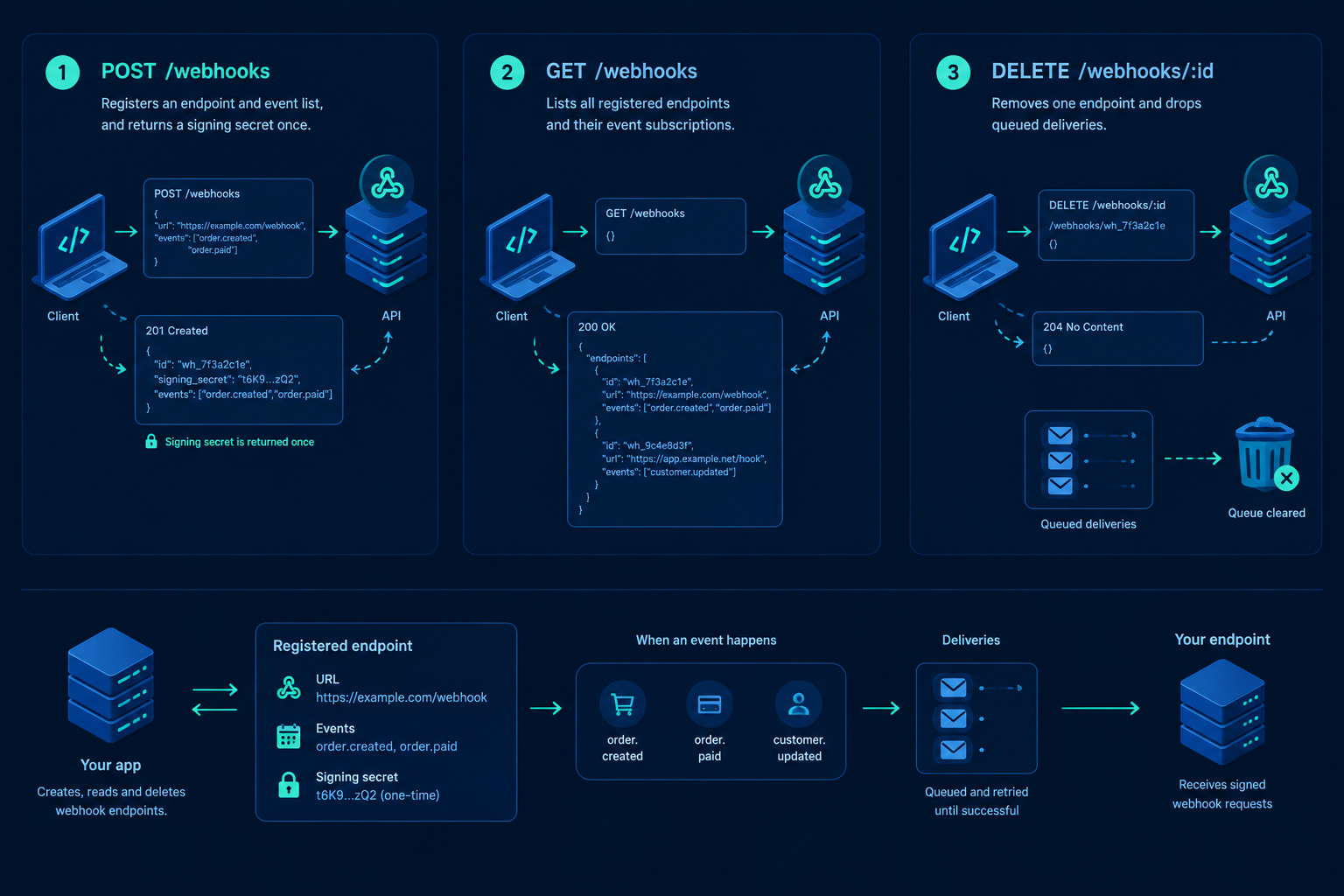
Sending returns an id, not an outcome. Whether a message was delivered, opened, or bounced is decided later, and a webhook is how you find out without polling (Webhooks overview). The dashboard can create that subscription. This article is the other path: the documented HTTP surface for managing endpoints, used from a program with a full_access key or a dashboard session.
That is a different job from the explainers already on the blog. Transactional email webhooks covers delivery-event semantics — which types to subscribe to, and why email.bounced and email.complained should change something on your side. Verifying webhook signatures is the HMAC walkthrough: raw body, replay window, constant-time comparison. Webhook-driven email automation is an architecture essay. Inbound email API webhooks is the email.received path. This guide stays on registration and lifecycle: POST /webhooks, the signing secret in the create response, GET /webhooks, and DELETE /webhooks/:id.
There is no official SDK. The base URL is https://api.rovela.dev. Endpoint management accepts a dashboard session or a full_access API key (Authentication, overview). A sending_access key can send mail and nothing else; it is the wrong credential for this API. This article will not invent an HTTP status for that refusal — the overview names the required credential, and the general authentication rules distinguish a 401 (missing, invalid, or the wrong kind of key) from a 403 (a valid credential whose role does not permit the action).
If you came here looking for how to send, start at the Email API and POST /emails. If you came here looking for how to poll one message, that is the Email delivery status API (GET /emails/:id and GET /emails/:id/events). For anything systematic, register an endpoint instead of polling.
What you need before the first registration
Create a full_access key in the dashboard, or use a dashboard session. The full key is shown once. Keep it on the server; never put a full_access key in a browser bundle, a mobile app, or a public repository. A leaked full-access key can manage webhooks, domains, and templates, not only send mail. If you send on behalf of several customers from one organization, a key can also be restricted to a single domain so a leak cannot send as somebody else (Email API for multi-tenant SaaS).
The URL you register must be an http or https address, and it may not point at a private or loopback host. That is a documented constraint, not a style preference. An endpoint on localhost or a link-local address will not work as a place for Rovela to call you. Expose a public HTTPS URL, then verify signatures on every request (webhook security).
You do not need a new sending domain to register a webhook. You do need a verified domain email address before POST /emails will accept your from. Domain provisioning is a different API (sending domains API, Domains API, domain setup guide). Engagement events (email.opened, email.clicked) only fire when tracking is enabled for the sending domain (webhook events); a domain with tracking off produces no engagement events at all.
Register an endpoint and store the secret immediately
POST /webhooks accepts an API key or a session. The documented fields are endpoint — the URL to call — and events, the list of event types you want.
curl -X POST https://api.rovela.dev/webhooks \
  -H "Authorization: Bearer re_your_full_access_key" \
  -H "Content-Type: application/json" \
  -d '{
    "endpoint": "https://example.com/hooks/rovela",
    "events": ["email.delivered", "email.bounced", "email.complained"]
  }'
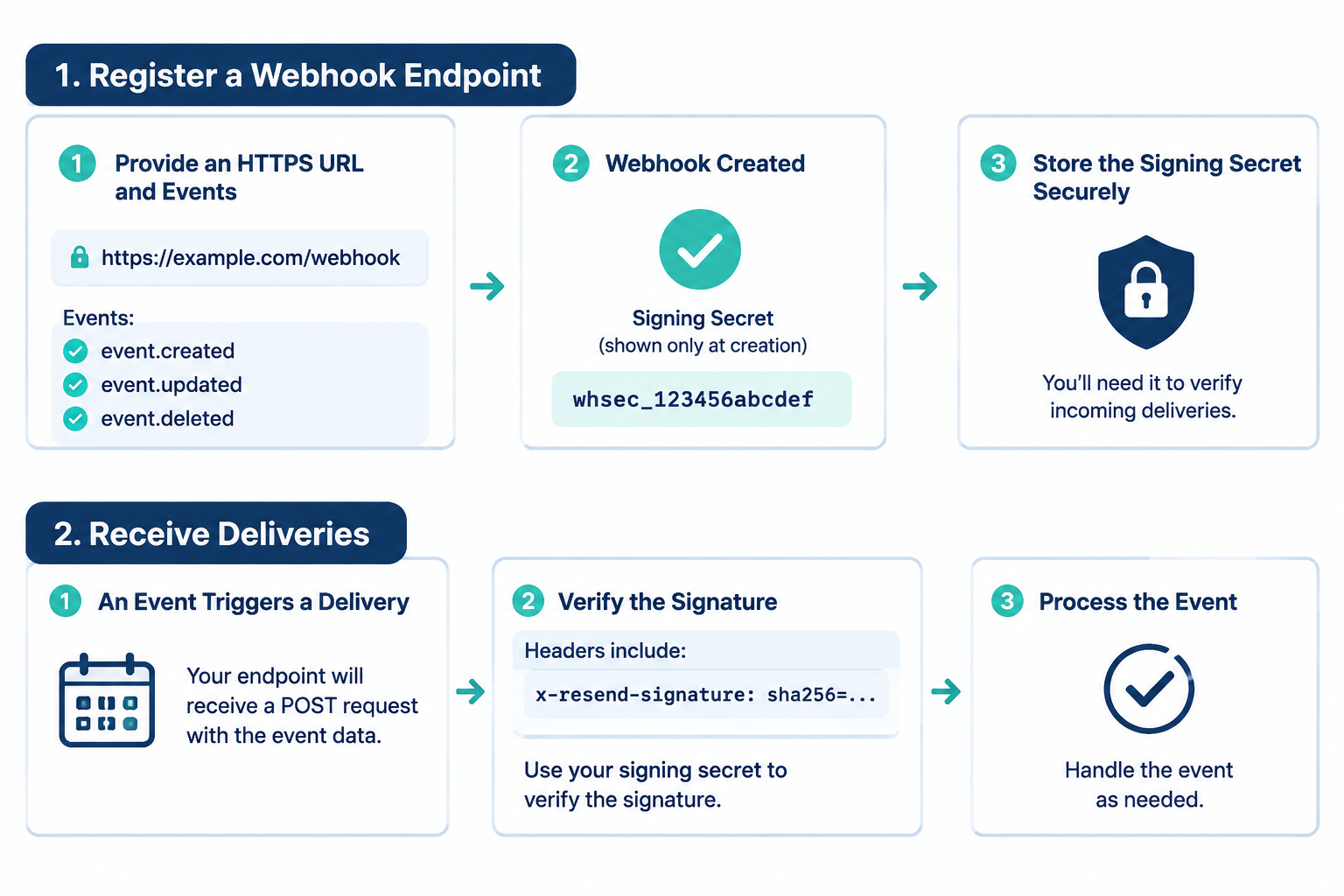
The response includes a signing secret. It is shown when the endpoint is created, and it is what you verify deliveries with. Treat it as a credential: put it in environment variables, never in the repository, and never in client-side code. If you do not store it at creation time, you will not be able to read it back later — there is no rotate-in-place and no “show secret again” documented on this API.
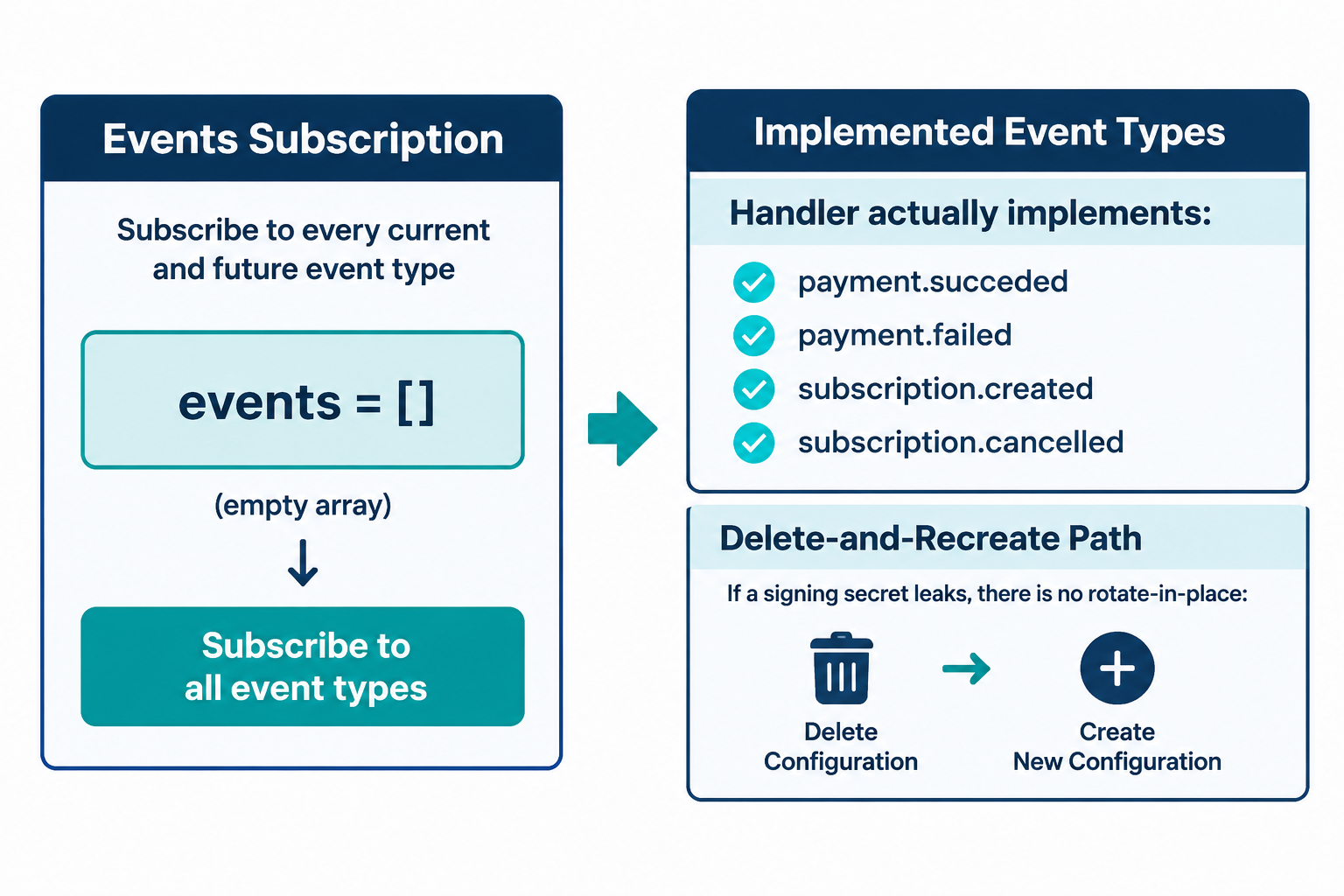
Registering an endpoint with a name that is not on the events catalog is rejected rather than accepted and quietly never fired, so a typo surfaces at registration instead of at three in the morning. List only types that exist, and list only types your handler implements.
Choose events explicitly — an empty list is not a shortcut
An empty events array subscribes to everything, including event types added after you registered. That is usually not what you want in production: a handler written for three event types will start receiving twenty-five. List the ones you handle.
For transactional sending, the events that should change something on your side are typically email.bounced, email.complained, and — if you keep an audience — contact.unsubscribed. Transactional email webhooks explains why ignoring bounces and complaints is how a domain loses sending reputation. email.delivered is the one people subscribe to first, and it is the least actionable. email.opened and email.clicked only fire where tracking is enabled. Inbound mail is email.received and is covered separately.
The catalog also includes delivery delay and failure (email.delivery_delayed, email.failed, email.suppressed, email.scheduled, email.sent), domain lifecycle (domain.created, domain.updated, domain.deleted), suppressions, contacts, broadcasts, automations, and mailbox quota alerts. Subscribe to a type because you have a handler for it, not because the name looks complete. The events page is the source of truth for the payload shape; treat the exact field set of data as additive.
What a delivery looks like, briefly
This article will not redo the signature walkthrough. You still need to know what arrives, because the management API is how that traffic starts.
For each event, Rovela sends an HTTP POST with a JSON body and three headers: x-resend-signature (t=<unix_timestamp>,v1=<hmac_sha256_hex>), x-resend-event-type, and x-resend-delivery-id. The event type appears twice — in the header and in the body. The body id is unique per event; deduplicate on it rather than on created_at. x-resend-delivery-id identifies this attempt, not the event, and differs between retries of the same event.
The signature is HMAC-SHA256 over "<timestamp>.<raw body>", keyed with the endpoint’s signing secret. Verify on the raw bytes, before JSON parsing, and reject when verification fails (webhook security, verify webhook signatures). Return 2xx once you have accepted the event, then do the work in your own queue. A slow handler is a handler that gets retried.
Retries are documented precisely: a delivery that is not answered 2xx is retried, to a maximum of five attempts in total, with the delay doubling each time (immediate, then 1, 2, 4, and 8 seconds). Only transport-level failures are retried: 5xx, 408, and 429. Every other response — including all other 4xx — marks the delivery failed and it is not tried again. A 400 you return because a payload surprised you is a permanent loss. Events are not guaranteed to arrive in the order they happened; order on created_at if the sequence matters, and treat any single event as a fact about the past rather than as the current state.
List endpoints, and delete when you mean to
These endpoints accept a dashboard session or a full_access key.
# List your endpoints.
curl https://api.rovela.dev/webhooks \
  -H "Authorization: Bearer re_your_full_access_key"

# Remove one. Deliveries already queued for it are dropped.
curl -X DELETE https://api.rovela.dev/webhooks/:id \
  -H "Authorization: Bearer re_your_full_access_key"
GET /webhooks is how tooling lists what you have registered. The official overview documents that this lists your endpoints; it does not sample a response body, and this article will not invent field names for the list. Use the GET to confirm that the URL and the event list you think are live actually are, especially after a deploy that changed your public path.
DELETE /webhooks/:id is the cleanup call, and it is also the leak response. If a signing secret leaks, delete the endpoint and create a new one. There is no rotate-in-place: the secret is issued at creation, and a new endpoint gets a new one. Deleting drops any deliveries already queued for the old endpoint, so do it at a quiet moment and expect to miss whatever was in flight. Change your environment to the new secret before you start accepting traffic on the replacement URL, or verification will fail and a careless 400 will drop those events permanently.
Do not invent a /logs endpoint for webhook deliveries. Delivery attempts are visible in the dashboard logs view discussed in Email API logs; the management API here is registration, listing, and deletion.
How this API sits next to sending
Registering an endpoint does not send mail, and sending mail does not create an endpoint. A production setup usually has both: a sending_access key used by the application to call POST /emails, and a full_access key (or a dashboard session) used by provisioning tooling to manage webhooks and, when needed, sending domains.
HTTP 200 on send still means accepted and queued, not delivered (Quick Start). After that, either you poll with a full-access key, or you let the webhook tell you. For a single debug session, GET /emails/:id/events is enough. For production, subscribe.
Errors on the Emails API — 400, 401, 429, and the {statusCode, name, message} envelope — are covered in Email API error handling. They are about the send request, not about a webhook delivery your endpoint refused. A send can succeed and the later delivery event can still bounce. Keep those two failure domains separate in your logs.
If you also send from mail apps, that path is mailbox SMTP (mx.rovela.dev:465, send-as-self, 30 messages a minute). Programmatic volume, open and click tracking, and webhooks belong on the Email API. The comparison is in Email API vs SMTP and Email API vs SMTP relay.
Reusable layouts still go through the Templates API and the templates guide. Scheduled and batch sends are documented on the Emails API and in scheduled email and batch transactional email. None of those features registers a webhook for you.
What not to do with the Webhooks API
Do not register http://127.0.0.1 or another private host and assume a tunnel you have not set up will make it reachable. The endpoint must be a public http or https address.
Do not pass an empty events array “to be safe.” You will receive types your handler does not understand, and if that handler returns 400, those events are gone.
Do not skip signature verification, and do not verify a re-serialized JSON body. The security guide is explicit: signing is byte-exact. Do not echo the body in your response; it contains recipient addresses, and your endpoint is public.
Do not return 400 for a transient problem on your side. Use 5xx (or 429 if you are asking for a slower retry) when you want another attempt, and only reject when the signature is wrong.
Do not expect a leaked secret to be rotatable in place. Delete, create, and accept that in-flight deliveries on the old endpoint are dropped.
Do not use this guide as a substitute for the event catalog or the signature article. Link them from your runbook: this page for creating and deleting endpoints, the events page for payloads, and webhook security for verification.
A compact webhooks-API checklist
- Use a
full_accesskey or a dashboard session to manage endpoints. Keep asending_accesskey forPOST /emails. - Register a public
httporhttpsURL. Store the signing secret from the create response immediately; it is shown once. - List the event types you handle. Do not rely on an empty
eventsarray in production. - Verify
x-resend-signatureon the raw body, return2xxquickly, and deduplicate on the eventid. - If a secret leaks, delete the endpoint and create a new one at a quiet moment. There is no rotate-in-place.
- Confirm what is registered with
GET /webhooks. Remove unused endpoints withDELETE /webhooks/:id, knowing queued deliveries will be dropped. - If you need a first send first, start at the Quick Start, the first-email guide, or the curl sending guide, then come back to this API to subscribe to the outcome.