A Nodemailer Alternative (2026): Replace SMTP in Node Apps with Rovela’s HTTP Email API
Rovela’s SMTP is mailbox SMTP for mail apps, including Nodemailer with a device credential. For programmatic volume, migrate to POST /emails over HTTPS — with message ids, Idempotency-Key, and webhooks, and no official SDK.
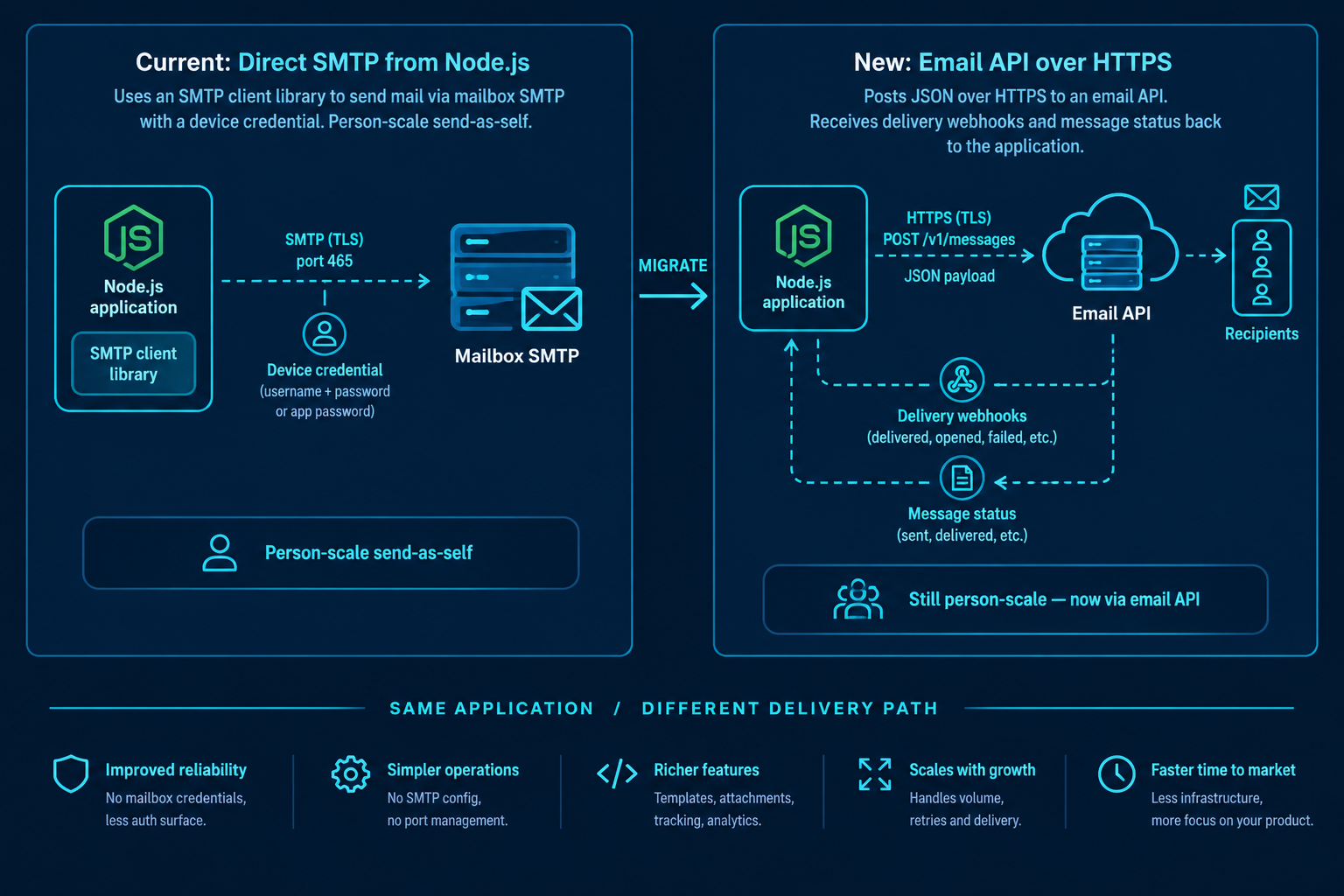
Why Node apps look for a Nodemailer alternative
If you build APIs in Node.js, there is a good chance the first outbound mail you shipped went through Nodemailer. The library talks SMTP: it opens a session, authenticates, and writes a MIME message. That is a reasonable way to drive a mailbox. It is a poor fit for transactional email at application volume, where you want a message id, an idempotent retry, delivery events, and no SMTP state machine in your request path.
Rovela’s own SMTP page is explicit about the split. Every business mailbox can send over standard SMTP, and the page lists “software such as Nodemailer or PHPMailer configured with a mailbox credential” as a supported client. In the same breath it says: for programmatic sending at volume, use the HTTP Email API, which adds open and click tracking, logs, and webhooks.
This guide is that migration, at the library level. It is not a generic transport comparison — those already exist as Email API vs SMTP, Email API vs SMTP relay, and Migrate SMTP to an Email API. It is also not a language tour; Send email with Node.js and the Node.js email API posts cover language-level sending. Here the question is narrower: you already have Nodemailer, and you are sending mail from an app. What should replace the SMTP transport?
Start with the Quick Start and Installation: there is no official SDK to install. The base URL is https://api.rovela.dev. If the from domain is still fuzzy, read What is domain email? first.
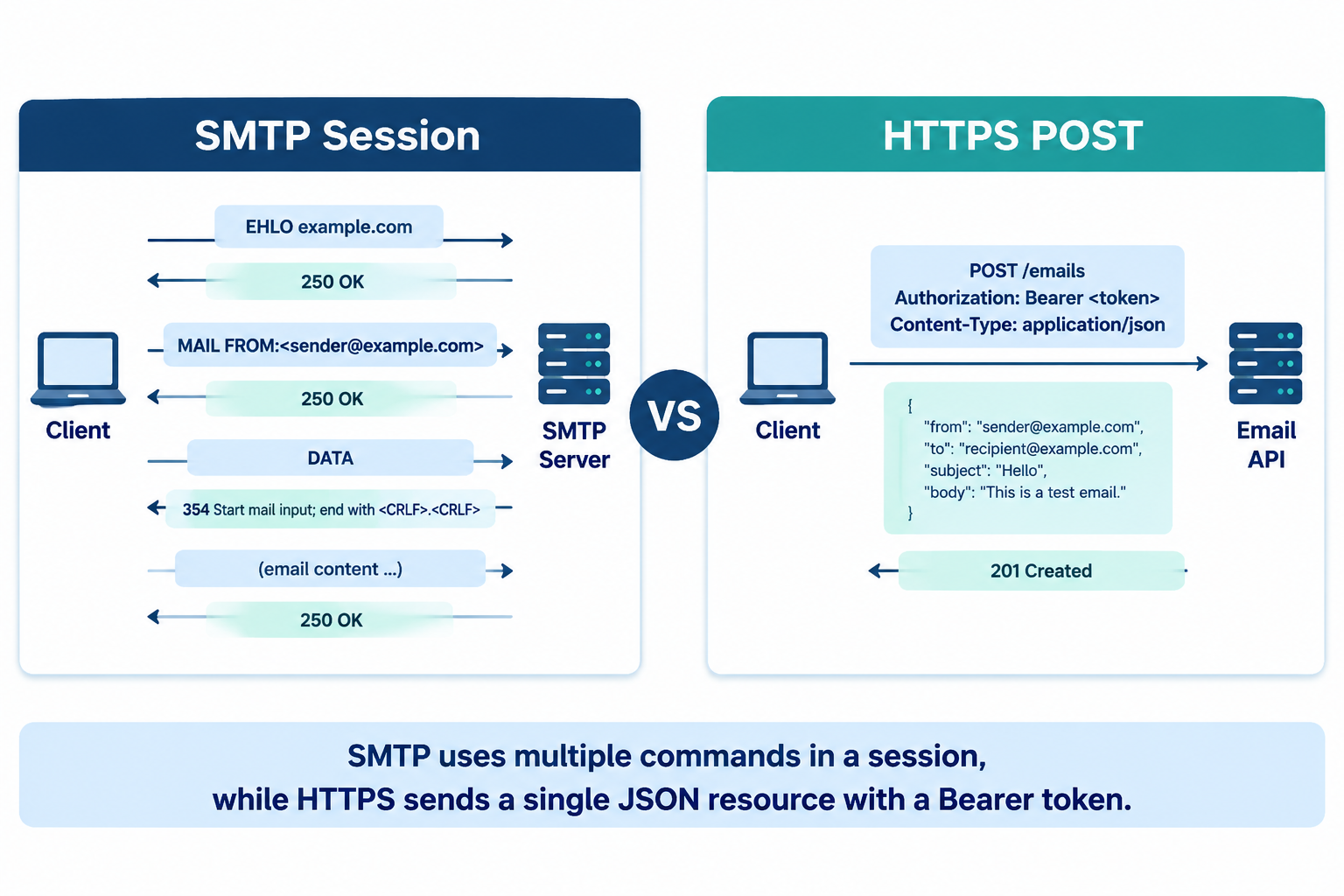
What mailbox SMTP gives you — and what it does not
Pointing Nodemailer at Rovela as if it were a high-volume SMTP relay is the usual leftover design. The documented mailbox settings are:
| Setting | Value |
|---|---|
| Host | mx.rovela.dev |
| Port | 465 |
| Security | Implicit TLS 1.2 or later, from the first byte |
| Username | The mailbox’s full address |
| Password | A device credential created for that mailbox, used for both IMAP and SMTP |
Those settings are correct for Outlook, Apple Mail, Thunderbird, a phone mail app, or a small script acting as that mailbox. They come with safeguards you should not try to bypass:
- A mailbox can send only as itself. A leaked credential cannot impersonate anyone else on the domain.
- Up to 50 recipients per message, and 30 messages a minute from one client address — enough for a person or a small app, and enough to stop a compromised client flooding the domain.
- Messages are still DKIM-signed with your domain key, with SPF and DMARC aligned.
What you do not get on that path is the rest of the Email API: a JSON message id, GET /emails/:id and /events, signed webhooks, Idempotency-Key, scheduled_at, POST /emails/batch, and dashboard sending logs tied to the HTTP request. You also should not expect mailbox SMTP to be a drop-in “relay host” for a SaaS that sends thousands of password resets. That workload is POST /emails.
The replacement is one HTTP call, not another SMTP library
Installation says there is no client library to install. The API is plain HTTP and JSON; every official example is curl or fetch. After you verify a sending domain and create a sending_access key (Authentication), the Node equivalent of a Nodemailer transporter.sendMail(...) is:
async function sendTransactional(payload, idempotencyKey) {
  const res = await fetch("https://api.rovela.dev/emails", {
    method: "POST",
    headers: {
      Authorization: "Bearer " + process.env.ROVELA_SENDING_KEY,
      "Content-Type": "application/json",
      "Idempotency-Key": idempotencyKey,
    },
    body: JSON.stringify(payload),
  });
  const body = await res.json();
  if (!res.ok) {
    throw new Error(body.message || `send failed: ${res.status}`);
  }
  return body; // { object: "email", id: "..." }
}

await sendTransactional(
  {
    from: "Acme <hello@mail.acme.com>",
    to: "alice@example.com",
    subject: "Your invoice is ready",
    html: "<p>Invoice 1842 is attached to your account.</p>",
    text: "Invoice 1842 is attached to your account.",
    reply_to: "Acme Billing <billing@acme.com>",
  },
  "invoice-1842-ready"
);
Map the old Nodemailer fields deliberately:
frommust be on a verified domain, not “whatever SMTP will accept.” Unverified domains are a 400 (Quick Start).to, and optionallycc/bcc/reply_to, are first-class JSON fields (Email API reply-to, Email API CC and BCC).- Prefer both
htmlandtextrather than hoping a transport builds a multipart body for you (HTML email API). - Attachments, when you need them, are
{ filename, content (base64), content_type }on the same request — see the official invoice example, not an SMTPattachmentsfile path. - Put the key in an environment variable on the server. Never in a client bundle (Authentication).
A 200 means the message was accepted and queued, not delivered. Store id. Observe delivery with a webhook in production, or with GET /emails/:id/events and a full_access key when you are debugging (Email delivery status API).
Idempotency replaces “did sendMail actually run?”
Nodemailer plus SMTP leaves you in a familiar hole: the TCP session timed out, and you do not know whether DATA completed. A naive retry sends a second invoice. Rovela’s documented answer is an Idempotency-Key header of up to 256 characters. A retry of the same key within 24 hours returns the original response without dispatching a second message (Emails API, Idempotency keys).
Choose a key that is stable for the business event — invoice-1842-ready, order-10043-shipped, password-reset-user-77-2026-11-11T02 — and pass it from the job that already has that id. If you handle 429s, wait for Retry-After as the official batch example does, then retry with the same key. See Email API retries and Email API error handling.
For many independent messages, POST /emails/batch accepts up to 100 objects with the same schema. Do not put template or topic_id in a batch; those are rejected rather than ignored. Each entry counts individually toward rate limits and toward monthly quota, which is charged per recipient (Pricing, Batch transactional email API).
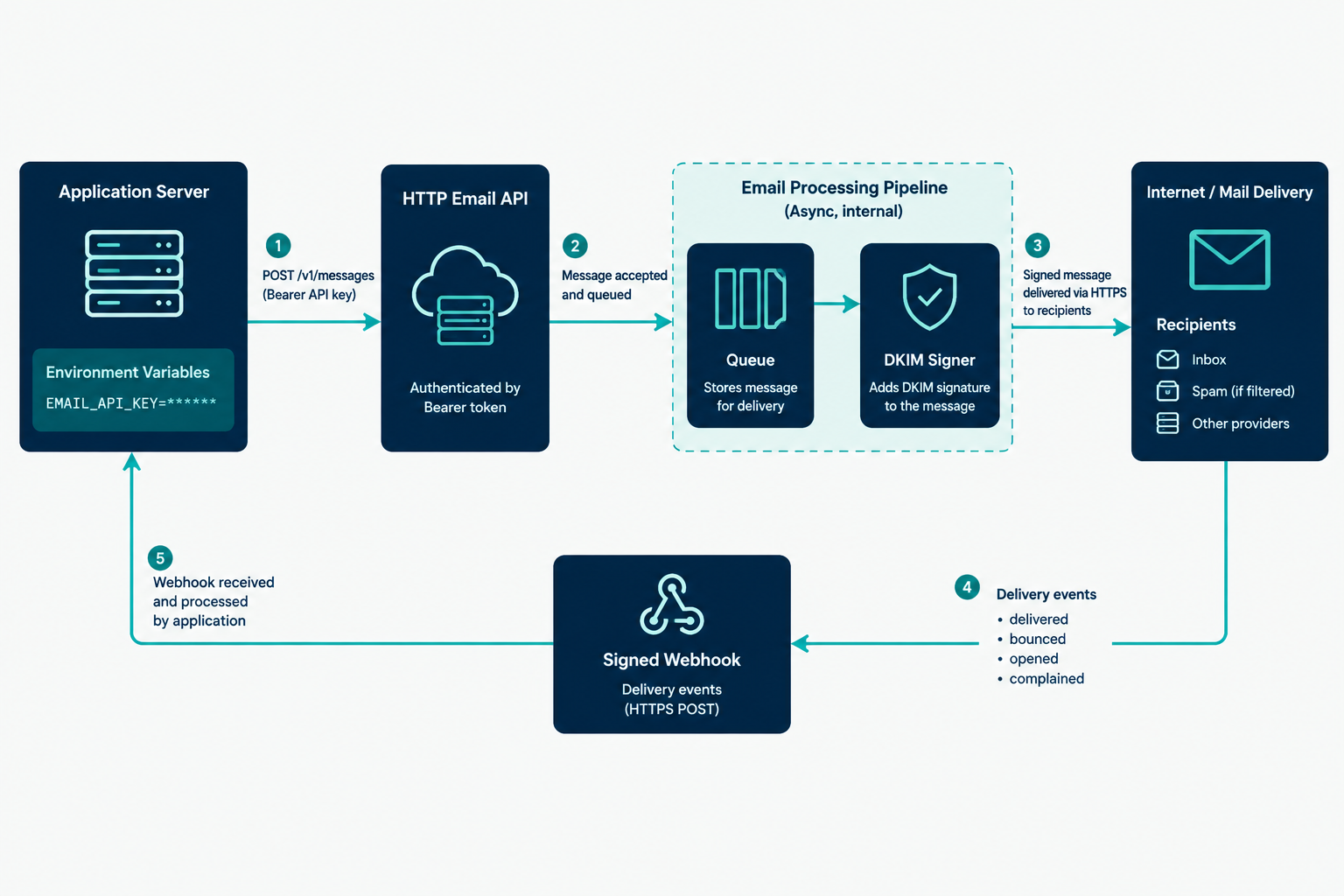
A migration sequence that does not surprise users
- Add and verify the sending domain you want
fromto use. A subdomain such asmail.acme.comis the pattern in Send your first email. Publish the DNS records the dashboard shows; do not copy them from a blog post. - Create a
sending_accesskey for the application, and afull_accesskey only for tooling that reads status or manages domains. The full secret is shown once. - Replace the Nodemailer transport in the job or request handler with
fetchtoPOST /emails. Keep the HTML templates you already have; they become thehtml(andtext) fields, or a stored template sent as{ id, variables }onPOST /emails— not on batch (Templates API). - Add
Idempotency-Keyat the same time, derived from the event you already persist. - Subscribe a webhook for delivered, bounced, and complained events and verify the signature. Stop treating “no exception from sendMail” as proof of delivery.
- Leave mailbox SMTP in place for humans. Support agents can keep Outlook or webmail. You are changing the application path, not taking the inbox away.
Teams sometimes keep a Nodemailer wrapper and swap only the transport config, hoping the HTTP API will speak SMTP. It will not. The API is JSON over HTTPS. If you want a thin helper, write the dozen-line sendTransactional function above — that is the intended integration style, the same one Send email programmatically describes.
When you should still use Nodemailer
Keep Nodemailer (or any SMTP client) when the sender really is a mailbox: a person, a shared support inbox composing from a desktop client, or a tiny internal tool that must send as that one address and will stay under 30 messages a minute. The send-as-self rule is a safety feature, not an inconvenience.
Do not keep Nodemailer as the production transport for sign-ups, receipts, password resets, or dunning just because “we already had a transporter.” Those messages want a verified from, per-message tracking, and retries that do not double-send. They also want you to handle HTTP 400/401/429 correctly, which is a different discipline than an SMTP response code.
If you are comparing providers rather than libraries, Rovela publishes product pages for Resend, SendGrid, Postmark, Mailgun, Brevo, and Amazon SES. This article does not relitigate those comparisons; the move that usually matters first is SMTP-library to HTTP API, on whichever provider you pick — and on Rovela, that API is the documented default for app mail.
Checklist
- Treat Rovela SMTP as mailbox SMTP, not as an app relay.
- Send application mail with
POST https://api.rovela.dev/emailsand a Bearerre_…key. - Verify the
fromdomain; store the message id; send anIdempotency-Key. - Confirm delivery with webhooks or the events API, not with “the promise resolved.”
- Leave Nodemailer connected only where a mailbox credential and send-as-self are the right model.
Once that split is in place, you can delete the SMTP transport from the app’s production path and still give every human on the domain a real mailbox. That is the Nodemailer alternative the docs actually describe.
A concrete before-and-after
A typical leftover transport looks like this — and it is valid mailbox SMTP, which is why it can stay for mail apps:
// Mailbox path only. Do not use this for application volume.
import nodemailer from "nodemailer";

const transporter = nodemailer.createTransport({
  host: "mx.rovela.dev",
  port: 465,
  secure: true, // implicit TLS, as the SMTP page requires
  auth: {
    user: "support@acme.com",
    pass: process.env.ROVELA_MAILBOX_DEVICE_CREDENTIAL,
  },
});
Implicit TLS on 465 is required from the first byte; there is no “start unencrypted, then STARTTLS” setup in the documented mailbox settings. The username is the full mailbox address, and the password is a device credential you can revoke without rotating every other device.
The application path should not share that credential, that port, or that library. After the switch, the same invoice job calls sendTransactional with a sending_access key, a verified from on mail.acme.com, and an idempotency key derived from the invoice number. Support can still answer from support@acme.com in a mail client. The two credentials do different jobs, and mixing them is how an app either hits the 30-message-per-minute mailbox cap or starts sending as a person instead of as the product.
If you want a first successful HTTP send on the command line before you touch production code, the curl Quick Start and Send email with curl are the shortest rehearsal. Then delete the transporter from the job, not from the support inbox.